
TableViewDelegate QML Type
| Import Statement: | import QtQuick.Controls |
| Since: | Qt 6.9 |
| Inherits: | |
| Inherited By: |
プロパティ
詳細な説明
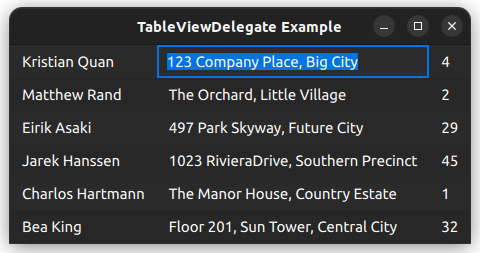
TableViewDelegateは、TableView のdelegate property に割り当てることができるデリゲートです。これは、アプリケーションのスタイルを使用して、ビュー内のテーブルの各セルを描画します。
TableView {
    anchors.fill: parent
    delegate: TableViewDelegate {}
    // model: yourModel
}TableViewDelegateはItemDelegate を継承しており、これはbackground とcontentItem の2つの要素で構成されていることを意味します。
contentItemの位置は、padding によって制御されます。
ポインタとの連携
TableViewDelegateはItemDelegate を継承しています。つまり、ユーザーがデリゲートをクリックすると、clicked などのシグナルが発信されます。このシグナルに接続することで、アプリケーション固有の機能を実装できます。
ただし、ItemDelegate のAPIでは、クリック位置や押されている修飾キーに関する情報は得られません。これが必要な場合は、ポインタハンドラを使用する方が適切です。例:
TableView {
    id: tableView
    delegate: TableViewDelegate {
        TapHandler {
            acceptedButtons: Qt.RightButton
            onTapped: someContextMenu.open()
        }

        TapHandler {
            acceptedModifiers: Qt.ControlModifier
            onTapped: tableView.doSomethingToCell(row, column)
        }
    }
}
注: ユーザーがデリゲートをクリックした際に発生するデフォルトの動作(現在のインデックスの変更など)を無効にしたい場合は 、pointerNavigationEnabled をfalse に設定できます。
テーブル内のセルの編集
TableViewDelegateには、デフォルトのedit delegate が割り当てられています。TableView にedit triggers が設定されており、かつmodel がediting model items をサポートしている場合、ユーザーは任意の編集トリガーをアクティブにすることで、current のテーブルセルのテキストを編集できます。
デフォルトの編集デリゲートは、Qt.EditRole を使用して、model へのデータの読み書きを行います。別のロールを使用する必要がある場合や、デフォルトの編集デリゲートが提供する機能以外の要件がある場合は、いつでも独自のデリゲートをTableView.editDelegate に割り当てることができます。
「TableViewDelegateのカスタマイズ」および「TableView 」も参照してください 。
プロパティのドキュメント
current : bool
このプロパティは、そのデリゲートがselection model 内のcurrent index を表しているかどうかにかかわらず、成立します。
editing : bool
このプロパティは、デリゲートがedited されているかどうかに関係なく保持されます。
selected : bool
このプロパティは、そのデリゲートがselection model 内のselected index を表しているかどうかにかかわらず、有効です。
tableView : TableView
このプロパティは、デリゲート項目を含むTableView を指します。
© 2026 The Qt Company Ltd. Documentation contributions included herein are the copyrights of their respective owners. The documentation provided herein is licensed under the terms of the GNU Free Documentation License version 1.3 as published by the Free Software Foundation. Qt and respective logos are trademarks of The Qt Company Ltd. in Finland and/or other countries worldwide. All other trademarks are property of their respective owners.
