
QPainterPath Class
QPainterPath クラスは、描画操作のためのコンテナを提供し、グラフィカルな図形の作成や再利用を可能にします。詳細...
| ヘッダー: | #include <QPainterPath> |
| CMake: | find_package(Qt6 REQUIRED COMPONENTS Gui) target_link_libraries(mytarget PRIVATE Qt6::Gui) |
| qmake: | QT += gui |
- 継承されたメンバーを含む、すべてのメンバーの一覧
- QPainterPath は、ペイントクラスの一部です。
注:このクラスのすべての関数は再入可能である。
パブリック型
| class | Element |
| enum | ElementType { MoveToElement, LineToElement, CurveToElement, CurveToDataElement } |
パブリック関数
| QPainterPath() | |
| QPainterPath(const QPointF &startPoint) | |
| QPainterPath(const QPainterPath &path) | |
(since 6.10) | QPainterPath(QPainterPath &&other) |
| ~QPainterPath() | |
| void | addEllipse(const QRectF &boundingRectangle) |
| void | addEllipse(const QPointF ¢er, qreal rx, qreal ry) |
| void | addEllipse(qreal x, qreal y, qreal width, qreal height) |
| void | addPath(const QPainterPath &path) |
| void | addPolygon(const QPolygonF &polygon) |
| void | addRect(const QRectF &rectangle) |
| void | addRect(qreal x, qreal y, qreal width, qreal height) |
| void | addRegion(const QRegion ®ion) |
| void | addRoundedRect(const QRectF &rect, qreal xRadius, qreal yRadius, Qt::SizeMode mode = Qt::AbsoluteSize) |
| void | addRoundedRect(qreal x, qreal y, qreal w, qreal h, qreal xRadius, qreal yRadius, Qt::SizeMode mode = Qt::AbsoluteSize) |
| void | addText(const QPointF &point, const QFont &font, const QString &text) |
| void | addText(qreal x, qreal y, const QFont &font, const QString &text) |
| qreal | angleAtPercent(qreal t) const |
| void | arcMoveTo(const QRectF &rectangle, qreal angle) |
| void | arcMoveTo(qreal x, qreal y, qreal width, qreal height, qreal angle) |
| void | arcTo(const QRectF &rectangle, qreal startAngle, qreal sweepLength) |
| void | arcTo(qreal x, qreal y, qreal width, qreal height, qreal startAngle, qreal sweepLength) |
| QRectF | boundingRect() const |
| int | capacity() const |
| void | clear() |
| void | closeSubpath() |
| void | connectPath(const QPainterPath &path) |
| bool | contains(const QPainterPath &p) const |
| bool | contains(const QPointF &point) const |
| bool | contains(const QRectF &rectangle) const |
| QRectF | controlPointRect() const |
| void | cubicTo(const QPointF &c1, const QPointF &c2, const QPointF &endPoint) |
| void | cubicTo(qreal c1X, qreal c1Y, qreal c2X, qreal c2Y, qreal endPointX, qreal endPointY) |
| QPointF | currentPosition() const |
| QPainterPath::Element | elementAt(int index) const |
| int | elementCount() const |
| Qt::FillRule | fillRule() const |
| QPainterPath | intersected(const QPainterPath &p) const |
| bool | intersects(const QPainterPath &p) const |
| bool | intersects(const QRectF &rectangle) const |
(since 6.10) bool | isCachingEnabled() const |
| bool | isEmpty() const |
| qreal | length() const |
| void | lineTo(const QPointF &endPoint) |
| void | lineTo(qreal x, qreal y) |
| void | moveTo(const QPointF &point) |
| void | moveTo(qreal x, qreal y) |
| qreal | percentAtLength(qreal len) const |
| QPointF | pointAtPercent(qreal t) const |
| void | quadTo(const QPointF &c, const QPointF &endPoint) |
| void | quadTo(qreal cx, qreal cy, qreal endPointX, qreal endPointY) |
| void | reserve(int size) |
(since 6.10) void | setCachingEnabled(bool enabled) |
| void | setElementPositionAt(int index, qreal x, qreal y) |
| void | setFillRule(Qt::FillRule fillRule) |
| QPainterPath | simplified() const |
| qreal | slopeAtPercent(qreal t) const |
| QPainterPath | subtracted(const QPainterPath &p) const |
| void | swap(QPainterPath &other) |
| QPolygonF | toFillPolygon(const QTransform &matrix = QTransform()) const |
| QList<QPolygonF> | toFillPolygons(const QTransform &matrix = QTransform()) const |
| QPainterPath | toReversed() const |
| QList<QPolygonF> | toSubpathPolygons(const QTransform &matrix = QTransform()) const |
| void | translate(qreal dx, qreal dy) |
| void | translate(const QPointF &offset) |
| QPainterPath | translated(qreal dx, qreal dy) const |
| QPainterPath | translated(const QPointF &offset) const |
(since 6.10) QPainterPath | trimmed(qreal fromFraction, qreal toFraction, qreal offset = 0) const |
| QPainterPath | united(const QPainterPath &p) const |
| bool | operator!=(const QPainterPath &path) const |
| QPainterPath | operator&(const QPainterPath &other) const |
| QPainterPath & | operator&=(const QPainterPath &other) |
| QPainterPath | operator+(const QPainterPath &other) const |
| QPainterPath & | operator+=(const QPainterPath &other) |
| QPainterPath | operator-(const QPainterPath &other) const |
| QPainterPath & | operator-=(const QPainterPath &other) |
| QPainterPath & | operator=(QPainterPath &&other) |
| QPainterPath & | operator=(const QPainterPath &path) |
| bool | operator==(const QPainterPath &path) const |
| QPainterPath | operator|(const QPainterPath &other) const |
| QPainterPath & | operator|=(const QPainterPath &other) |
関連する非メンバー
| QDataStream & | operator<<(QDataStream &stream, const QPainterPath &path) |
| QDataStream & | operator>>(QDataStream &stream, QPainterPath &path) |
詳細な説明
ペインターパスは、矩形、楕円、線、曲線などのグラフィック構成要素で構成されるオブジェクトです。構成要素は、矩形や楕円など、閉じたサブパスとして結合することができます。 閉じたパスとは、始点と終点が一致するパスのことです。あるいは、線や曲線のように、閉じていないサブパスとして独立して存在することもあります。
QPainterPathオブジェクトは、塗りつぶし、アウトライン描画、およびクリッピングに使用できます。指定されたペインターパスに対して塗りつぶし可能なアウトラインを生成するには、QPainterPathStroker クラスを使用します。通常の描画操作に比べてペインターパスの主な利点は、複雑な形状を一度作成するだけで済み、その後はQPainter::drawPath()関数を呼び出すだけで何度でも描画できることです。
QPainterPath は、パスやその要素に関する情報を取得するために使用できる一連の関数を提供しています。さらに、toReversed() 関数を使用して要素の順序を逆順にすることも可能です。また、このペインターパスオブジェクトをポリゴン表現に変換するための関数もいくつか用意されています。
QPainterPathの作成
QPainterPath オブジェクトは、空のパスとして、指定された開始点を持つパスとして、あるいは別の QPainterPath オブジェクトのコピーとして構築できます。作成後は、lineTo()、arcTo()、cubicTo()、およびquadTo() 関数を使用して、パスに直線や曲線を追加できます。 直線や曲線は、currentPosition() から引数として渡された位置まで伸びます。
QPainterPath オブジェクトの `currentPosition()` は、常に最後に追加されたサブパスの終了位置(または初期の開始点)となります。コンポーネントを追加せずに `currentPosition()` を移動するには、`moveTo()` 関数を使用します。`moveTo()` 関数は、暗黙的に新しいサブパスを開始し、前のサブパスを閉じます。 新しいサブパスを開始する別の方法として、closeSubpath() 関数を呼び出す方法があります。この関数は、currentPosition() からパスの開始位置まで線を追加することで、現在のパスを閉じます。新しいパスの初期位置は (0, 0) になることに注意してください:currentPosition()。
QPainterPath クラスは、閉じたサブパスをペインターパスに追加するための便利な関数をいくつか提供しています。addEllipse()、addPath()、addRect()、addRegion()、およびaddText() です。addPolygon() 関数は、閉じられていないサブパスを追加します。実際、これらの関数はすべて、moveTo()、lineTo()、およびcubicTo() の操作を組み合わせたものです。
さらに、connectPath() 関数を使用すると、現在のパスにパスを追加することができます。ただし、この関数は、現在のパスの最後の要素と指定されたパスの最初の要素を線で接続することに注意してください。
以下は、QPainterPath オブジェクトの使用方法を示すコードスニペットです:
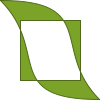 | |
ペインターパスは、生成された時点では空の状態です。まず、閉じたサブパスである矩形を追加します。次に、個々には閉じていないものの、組み合わせることで閉じたサブパスを形成する2つのベジエ曲線を追加します。最後に、パス全体を描画します。パスの塗りつぶしには、デフォルトの塗りつぶしルールである `Qt::OddEvenFill` が使用されます。Qtでは、パスの塗りつぶし用に2つの方法が用意されています:
ルールの定義については、Qt::FillRule のドキュメントを参照してください。ペインターパスの現在設定されている塗りつぶしルールは、fillRule()関数を使用して取得でき、setFillRule()関数を使用して変更できます。
円弧と楕円
arcTo()、arcMoveTo()、QPainter::drawArc()、QPainter::drawPie()、およびQPainter::drawChord() の角度引数は、偏心角です。偏心角は、境界矩形に収まる楕円をパラメータ化します。これは、その矩形の中心から結果となる点への方向を測るものではありません。 一般に、この2つが一致するのは、外接長方形が正方形の場合のみである。例えば、400×100の長方形の場合、45度の角度では、中心から見て水平線よりおよそ14度上にある点が得られる。
代わりに、中心からの特定の方向に点を配置するには、その点を自分で計算し、moveTo() またはlineTo() に渡してください。あるいは、これらの関数を使い続け、方向を変換することもできます。指定されたwidth およびheight のバウンディング矩形において、ラジアン単位の方向theta は、偏心角qRadiansToDegrees(qAtan2(width * qSin(theta), height * qCos(theta))) に対応します。
ペインターパスには線分とベジエ曲線セグメントのみが格納されるため、Qtでは円弧や楕円を三角関数で評価するのではなく、3次ベジエ曲線で近似します。 円の場合、この近似により、各点は半径の 0.1% 未満の誤差で真の位置からずれます。したがって、arcMoveTo() による点と、qSin() およびqCos() で計算された点を比較するコードでは、等価性をテストするのではなく、許容誤差を考慮する必要があります。
QPainterPath の情報
QPainterPath クラスは、パスとその要素に関する情報を返す一連の関数を提供します。
currentPosition() 関数は、最後に追加されたサブパスの終点(または最初の開始点)を返します。elementAt() 関数を使用してさまざまなサブパス要素を取得でき、elementCount() 関数を使用して要素数を取得でき、isEmpty() 関数は、この QPainterPath オブジェクトに要素が含まれているかどうかを判定します。
controlPointRect() 関数は、このパス内のすべての点および制御点を含む矩形を返します。この関数は、浮動小数点精度でこの QPainterPath の境界矩形を返す厳密なboundingRect() 関数に比べ、計算速度が大幅に高速です。
最後に、QPainterPath には、指定された点または矩形がパス内にあるかどうかを判定するための `contains()` 関数と、指定された矩形内の点のいずれかがこのパス内にあるかどうかを判定するための `intersects()` 関数が用意されています。
QPainterPath の変換
互換性の理由から、ペインターパスの表現を簡略化する必要がある場合があります。QPainterPath には、ペインターパスをポリゴンに変換する `toFillPolygon()`、`toFillPolygons()`、および `toSubpathPolygons()` 関数が用意されています。`toFillPolygon()` はペインターパスを単一のポリゴンとして返すのに対し、後者の 2 つの関数はポリゴンのリストを返します。
toFillPolygons() およびtoSubpathPolygons() 関数が提供されているのは、描画される点の総数が同じであっても、通常、1つの大きなポリゴンを描画するよりも、複数の小さなポリゴンを描画する方が高速であるためです。 2つの違いは、返されるポリゴンの数にあります。toSubpathPolygons() は、サブパスが交差している(つまり、バウンディング矩形が重なっている)場合でも、サブパスごとに 1 つのポリゴンを作成しますが、toFillPolygons() は、重なっているサブパスに対して 1 つのポリゴンしか作成しません。
toFillPolygon() およびtoFillPolygons() 関数は、まずすべてのサブパスをポリゴンに変換し、その後、巻き戻し(rewinding)技術を用いて、重なり合うサブパスが正しい塗りつぶしルールに従って塗りつぶされるようにします。なお、巻き戻し処理によりポリゴン内に追加の線が挿入されるため、塗りつぶしポリゴンの輪郭はパスの輪郭と一致しなくなる点に注意してください。
例
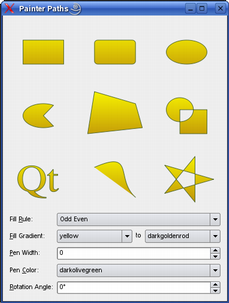
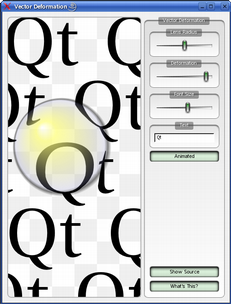
Qt には、Qt のサンプルディレクトリにある「Painter Paths Example」と「Vector Deformation Example」が用意されています。
「Painter Paths Example」では、ペインターパスを用いてレンダリング用の複雑な形状を構築する方法を示しており、ユーザーは塗りつぶしやストロークを自由に試すことができます。「Vector Deformation Example」では、QPainterPath を使用してテキストを描画する方法を示しています。
関連項目: QPainterPathStroker 、QPainter 、QRegion 、および「Painter Paths Example」。
メンバ型のドキュメント
enum QPainterPath::ElementType
この列挙型は、サブパス内の頂点を接続するために使用される要素の種類を表します。
なお、addEllipse()、addPath()、addPolygon()、addRect()、addRegion()、addText() といった便利関数を使用して閉じたサブパスとして追加された要素は、実際にはmoveTo()、lineTo()、cubicTo() といった関数を使用して、個別の要素の集合としてパスに追加されることに注意してください。
| 定数 | 値 | 説明 |
|---|---|---|
QPainterPath::MoveToElement | 0 | 新しいサブパス。moveTo() も参照してください。 |
QPainterPath::LineToElement | 1 | 線分。lineTo() も参照してください。 |
QPainterPath::CurveToElement | 2 | 曲線。cubicTo() およびquadTo() も参照してください。 |
QPainterPath::CurveToDataElement | 3 | CurveToElement 要素内で曲線を記述するために必要な追加データ。 |
elementAt() およびelementCount()も参照してください 。
メンバ関数のドキュメント
[noexcept] QPainterPath::QPainterPath()
空の QPainterPath オブジェクトを作成します。
[explicit] QPainterPath::QPainterPath(const QPointF &startPoint)
指定されたstartPoint を現在の位置として、QPainterPathオブジェクトを作成します。
QPainterPath::QPainterPath(const QPainterPath &path)
指定されたpath のコピーであるQPainterPathオブジェクトを作成します。
operator=()も参照してください 。
[noexcept, since 6.10] QPainterPath::QPainterPath(QPainterPath &&other)
other から新しいペインターパスをムーブコンストラクトします。
移動元のオブジェクト `other ` は、デフォルトコンストラクタで初期化された状態になります。
この関数は Qt 6.10 で導入されました。
[noexcept] QPainterPath::~QPainterPath()
このQPainterPath オブジェクトを破棄します。
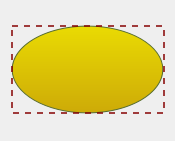
void QPainterPath::addEllipse(const QRectF &boundingRectangle)
指定されたboundingRectangle 内に楕円を作成し、それを閉じたサブパスとしてペインターパスに追加します。
この楕円は、0度(3時の位置)を起点および終点とする時計回りの曲線で構成されています。Arcs and Ellipses で説明されているように、この曲線は楕円の3次ベジェ近似であり、楕円そのものを正確に表現したものではありません。
 | |
arcTo()、QPainter::drawEllipse()、およびComposing a QPainterPathも参照してください 。
void QPainterPath::addEllipse(const QPointF ¢er, qreal rx, qreal ry)
center に位置し、半径がrx およびry の楕円を作成し、閉じたサブパスとしてペインターパスに追加します。
これはオーバーロードされた関数です。
void QPainterPath::addEllipse(qreal x, qreal y, qreal width, qreal height)
左上隅を (x,y)、width 、height で定義される境界矩形内に楕円を作成し、閉じたサブパスとしてペインターパスに追加します。
これはオーバーロードされた関数です。
void QPainterPath::addPath(const QPainterPath &path)
指定されたpath を、このパスに閉じたサブパスとして追加します。
connectPath() およびComposing a QPainterPathも参照してください 。
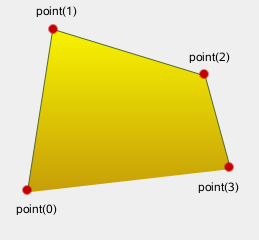
void QPainterPath::addPolygon(const QPolygonF &polygon)
指定されたpolygon を、パスに(閉じられていない)サブパスとして追加します。
ポリゴンが追加された後の現在の位置は、polygon の最後の点になることに注意してください。最初の点まで線を引くには、closeSubpath() 関数を使用してください。
 | |
lineTo() およびComposing a QPainterPathも参照してください 。
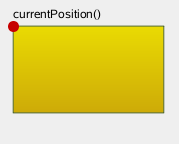
void QPainterPath::addRect(const QRectF &rectangle)
指定されたrectangle を、閉じたサブパスとしてこのパスに追加します。
rectangle は、時計回りに並んだ線の集合として追加されます。rectangle が追加された後のペインターパスの現在の位置は、矩形の左上隅になります。
 | |
addRegion()、lineTo()、およびComposing a QPainterPathも参照してください 。
void QPainterPath::addRect(qreal x, qreal y, qreal width, qreal height)
位置 (x,y) に、指定されたwidth およびheight を持つ長方形を、閉じたサブパスとして追加します。
これはオーバーロードされた関数です。
void QPainterPath::addRegion(const QRegion ®ion)
指定されたregion をパスに追加し、その領域内の各矩形を個別の閉じたサブパスとして追加します。
addRect() およびComposing a QPainterPathも参照してください 。
void QPainterPath::addRoundedRect(const QRectF &rect, qreal xRadius, qreal yRadius, Qt::SizeMode mode = Qt::AbsoluteSize)
指定された角が丸い長方形 `rect ` をパスに追加します。
引数 `xRadius ` および `yRadius ` は、角が丸い矩形の角を定義する楕円の半径を指定します。`mode ` が `Qt::RelativeSize` の場合、`xRadius ` および `yRadius ` は、それぞれ矩形の幅と高さの半分に対するパーセンテージで指定され、0.0 から 100.0 の範囲である必要があります。
addRect()も参照してください 。
void QPainterPath::addRoundedRect(qreal x, qreal y, qreal w, qreal h, qreal xRadius, qreal yRadius, Qt::SizeMode mode = Qt::AbsoluteSize)
指定された矩形(x 、y 、w 、h )を、角を丸くしてパスに追加します。
これはオーバーロードされた関数です。
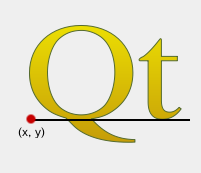
void QPainterPath::addText(const QPointF &point, const QFont &font, const QString &text)
指定されたtext を、このパスに、指定されたfont から作成された閉じたサブパスのセットとして追加します。サブパスは、テキストのベースラインの左端が指定されたpoint に位置するように配置されます。
フォントによってはサブパスが重なる場合があり、正しくレンダリングするには `Qt::WindingFill ` フィルルールを指定する必要があります。
 | |
QPainter::drawText()、Composing a QPainterPath 、およびsetFillRule()も参照してください 。
void QPainterPath::addText(qreal x, qreal y, const QFont &font, const QString &text)
指定されたtext を、指定されたfont から生成された閉じたサブパスのセットとして、このパスに追加します。サブパスは、テキストのベースラインの左端が(x,y)で指定された点にくるように配置されます。
これはオーバーロードされた関数です。
qreal QPainterPath::angleAtPercent(qreal t) const
パーセンテージt におけるパスの接線の角度を返します。引数t は0から1の間の値でなければなりません。
角度の正の値は反時計回り、負の値は時計回りを意味します。0度は3時の位置に相当します。
他のパーセントメソッドと同様に、パスに曲線が含まれている場合、パーセントによる測定値は長さに対して線形ではないことに注意してください。曲線が含まれている場合、パーセント引数はベジェ方程式の t パラメータにマッピングされます。
void QPainterPath::arcMoveTo(const QRectF &rectangle, qreal angle)
angle における指定されたrectangle に位置する円弧上に、移動を作成します。
角度は度単位で指定します。正の角度を指定することで、反時計回りの弧を指定できます。rectangle が正方形でない場合、angle は偏心角となり、Arcs and Ellipses で説明されているように、長方形の中心からの方向を測定するものではありません。
moveTo()、arcTo()、およびArcs and Ellipsesも参照してください 。
void QPainterPath::arcMoveTo(qreal x, qreal y, qreal width, qreal height, qreal angle)
angle において、QRectF (x 、y 、width 、height )を占める弧上に位置する移動を作成します。
これはオーバーロードされた関数です。
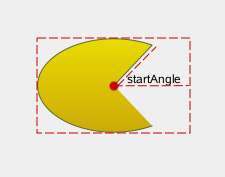
void QPainterPath::arcTo(const QRectF &rectangle, qreal startAngle, qreal sweepLength)
指定されたrectangle の範囲を占める円弧を作成します。この円弧は、指定されたstartAngle を起点とし、反時計回りにsweepLength 度まで伸びます。
角度は度単位で指定します。時計回りの円弧は、負の角度を使用して指定できます。rectangle が正方形でない場合、角度は偏心角となり、Arcs and Ellipses で説明されているように、長方形の中心からの方向を測定するものではありません。
なお、この関数は、円弧の始点と現在の位置がまだ接続されていない場合、それらを接続します。円弧が追加された後、現在の位置は円弧の最後の点になります。最初の点まで線を引くには、closeSubpath() 関数を使用してください。
 | |
関連項目: arcMoveTo()、addEllipse()、QPainter::drawArc()、QPainter::drawPie()、およびComposing a QPainterPath 。
void QPainterPath::arcTo(qreal x, qreal y, qreal width, qreal height, qreal startAngle, qreal sweepLength)
QRectF (x 、y 、width 、height )の矩形を覆う円弧を作成します。この円弧は、指定されたstartAngle を起点とし、sweepLength 度反時計回りに伸びます。
これはオーバーロードされた関数です。
QRectF QPainterPath::boundingRect() const
このペインターパスの外接矩形を、浮動小数点精度の矩形として返します。
controlPointRect()も参照してください 。
int QPainterPath::capacity() const
QPainterPath によって割り当てられた要素の数を返します。
clear() およびreserve()も参照してください 。
void QPainterPath::clear()
保存されているパス要素をクリアします。
これにより、パスは以前のメモリ割り当てを再利用できるようになります。
reserve() およびcapacity()も参照してください 。
void QPainterPath::closeSubpath()
現在のサブパスを、その始点まで線を引いて閉じ、自動的に新しいパスを開始します。新しいパスの現在の点は (0, 0) です。
サブパスに要素が含まれていない場合、この関数は何もしません。
moveTo() およびComposing a QPainterPathも参照してください 。
void QPainterPath::connectPath(const QPainterPath &path)
指定されたpath を、このパスの最後の要素から指定されたパスの最初の要素へと線を引くことで、このパスに接続します。
addPath() およびComposing a QPainterPathも参照してください 。
bool QPainterPath::contains(const QPainterPath &p) const
指定されたパス `p ` が現在のパスに含まれている場合、`true ` を返します。現在のパスと `p ` のいずれかの辺が交差する場合、`false ` を返します。
パスに対する集合演算では、パスは領域として扱われます。閉じていないパスは、暗黙的に閉じたものとして扱われます。
intersects()も参照してください 。
bool QPainterPath::contains(const QPointF &point) const
指定された `point ` がパス内に含まれている場合は `true ` を返し、そうでない場合は `false` を返します。
intersects()も参照してください 。
bool QPainterPath::contains(const QRectF &rectangle) const
指定された `rectangle ` がパス内に含まれている場合は `true ` を返し、そうでない場合は `false` を返します。
QRectF QPainterPath::controlPointRect() const
このパスに含まれるすべての点および制御点を囲む矩形を返します。
この関数は、厳密なboundingRect()よりも計算速度が大幅に速く、返される矩形は常にboundingRect()によって返される矩形の上位集合となります。
boundingRect()も参照してください 。
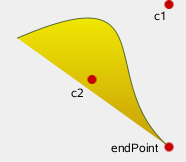
void QPainterPath::cubicTo(const QPointF &c1, const QPointF &c2, const QPointF &endPoint)
c1 で指定された制御点とc2 を使用して、現在の位置と指定されたendPoint の間に3次ベジェ曲線を追加します。
曲線が追加された後、現在の位置は曲線の終点に更新されます。
 | |
quadTo() およびComposing a QPainterPathも参照してください 。
void QPainterPath::cubicTo(qreal c1X, qreal c1Y, qreal c2X, qreal c2Y, qreal endPointX, qreal endPointY)
現在の位置と終点(endPointX 、endPointY )の間に、制御点(c1X 、c1Y )および(c2X 、c2Y )で指定された3次ベジェ曲線を追加します。
これはオーバーロードされた関数です。
QPointF QPainterPath::currentPosition() const
パスの現在の位置を返します。
QPainterPath::Element QPainterPath::elementAt(int index) const
ペインターパス内の指定されたindex にある要素を返します。
ElementType 、elementCount()、およびisEmpty()も参照してください 。
int QPainterPath::elementCount() const
ペインターパスに含まれるパス要素の数を返します。
ElementType 、elementAt()、およびisEmpty()も参照してください 。
Qt::FillRule QPainterPath::fillRule() const
ペインターパスの現在設定されている塗りつぶしルールを返します。
setFillRule()も参照してください 。
QPainterPath QPainterPath::intersected(const QPainterPath &p) const
このパスの塗りつぶし領域とp の塗りつぶし領域の交差部分となるパスを返します。ベジェ曲線の交差計算には数値的な不安定性があるため、ベジェ曲線は線分に変換される場合があります。
bool QPainterPath::intersects(const QPainterPath &p) const
現在のパスが、指定されたパス `p` といずれかの点で交差する場合、true を返します。また、現在のパスが `p` のいずれかの部分を含んでいるか、あるいはその一部に含まれている場合、true を返します。
パスに対する集合演算では、パスは領域として扱われます。閉じていないパスは、暗黙的に閉じたものとして扱われます。
contains()も参照してください 。
bool QPainterPath::intersects(const QRectF &rectangle) const
指定されたrectangle 内のいずれかの点がパスと交差する場合、true を返します。そうでない場合は、false を返します。
交差があるとは、長方形を構成する線のいずれかがパスの一部と交差する場合、または長方形のいずれかの部分がパスに囲まれた領域と重なる場合を指します。この関数は、パスの内部とみなされる範囲を決定する際に、現在のfillRule を参照します。
contains()も参照してください 。
[since 6.10] bool QPainterPath::isCachingEnabled() const
キャッシュが有効になっている場合は true を返し、そうでない場合は false を返します。
この関数は Qt 6.10 で導入されました。
setCachingEnabled()も参照してください 。
bool QPainterPath::isEmpty() const
このパスに要素がない場合、または唯一の要素がMoveToElement である場合は、true を返します。それ以外の場合は、false を返します。
elementCount()も参照してください 。
qreal QPainterPath::length() const
現在のパスの長さを返します。
void QPainterPath::lineTo(const QPointF &endPoint)
現在の位置から指定されたendPoint まで直線を追加します。線の描画後、現在の位置は線の終点に更新されます。
addPolygon()、addRect()、およびComposing a QPainterPathも参照してください 。
void QPainterPath::lineTo(qreal x, qreal y)
現在の位置から点 (x,y) まで線を引きます。
これはオーバーロードされた関数です。
void QPainterPath::moveTo(const QPointF &point)
現在のポイントを指定されたpoint に移動し、暗黙的に新しいサブパスを開始して、前のサブパスを終了します。
closeSubpath() およびComposing a QPainterPathも参照してください 。
void QPainterPath::moveTo(qreal x, qreal y)
現在の位置を (x,y) に移動し、新しいサブパスを開始すると同時に、前のパスを暗黙的に閉じます。
これはオーバーロードされた関数です。
qreal QPainterPath::percentAtLength(qreal len) const
指定された長さlen における、パス全体の長さに対する割合を返します。
他のパーセントメソッドと同様に、パスに曲線が含まれている場合、パーセンテージの測定値は長さに対して線形ではないことに注意してください。曲線が含まれている場合、パーセンテージ引数はベジェ方程式の t パラメータにマッピングされます。
QPointF QPainterPath::pointAtPercent(qreal t) const
現在のパスのt のパーセンテージ位置にある点を返します。引数t は0から1の間でなければなりません。
他のパーセントメソッドと同様に、パスに曲線が含まれている場合、パーセンテージの測定値は長さに対して線形ではないことに注意してください。曲線が含まれている場合、パーセンテージ引数はベジェ方程式の t パラメータにマッピングされます。
void QPainterPath::quadTo(const QPointF &c, const QPointF &endPoint)
現在の位置と指定されたendPoint の間に、c で指定された制御点を持つ2次ベジェ曲線を追加します。
曲線が追加されると、現在のポイントは曲線の終点に更新されます。
cubicTo() およびComposing a QPainterPathも参照してください 。
void QPainterPath::quadTo(qreal cx, qreal cy, qreal endPointX, qreal endPointY)
現在の点と終点 (endPointX,endPointY) の間に、制御点 (cx,cy) で指定された2次ベジェ曲線を追加します。
これはオーバーロードされた関数です。
void QPainterPath::reserve(int size)
QPainterPath の内部メモリに、指定された数の要素を予約します。
少なくともsize 個の要素分のメモリを割り当てようとします。
clear()、capacity()、およびQList::reserve()も参照してください 。
[since 6.10] void QPainterPath::setCachingEnabled(bool enabled)
enabled の値に応じて、長さのキャッシュを有効または無効にします。
キャッシュを有効にすると、length()、percentAtLength()、pointAtPercent() など、経路長やパーセンテージ値を扱うメンバ関数への繰り返し呼び出しが高速化されますが、その代償として、中間計算結果を保存するために若干の追加メモリ使用量が発生します。デフォルトでは無効になっています。
キャッシュを無効にすると、割り当てられていたキャッシュメモリが解放されます。
この機能は Qt 6.10 で導入されました。
isCachingEnabled()、length()、percentAtLength()、pointAtPercent()、およびtrimmed()も参照してください 。
void QPainterPath::setElementPositionAt(int index, qreal x, qreal y)
インデックスindex の要素のx座標とy座標を、それぞれx およびy に設定します。
void QPainterPath::setFillRule(Qt::FillRule fillRule)
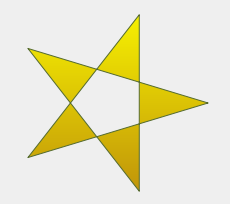
ペインターパスの塗りつぶしルールを、指定されたfillRule に設定します。Qtでは、パスの塗りつぶし方法として以下の2つのメソッドが用意されています:
| Qt::OddEvenFill (デフォルト) | Qt::WindingFill |
|---|---|
 |  |
fillRule()も参照してください 。
QPainterPath QPainterPath::simplified() const
このパスの簡略化されたバージョンを返します。これは、交差するすべてのサブパスを統合し、交差するエッジを含まないパスを返すことを意味します。連続する平行線も統合されます。簡略化されたパスでは、常にデフォルトの塗りつぶしルール(Qt::OddEvenFill )が使用されます。ベジェ曲線の交差処理には数値的な不安定性が生じる可能性があるため、ベジェ曲線は線分に変換される場合があります。
qreal QPainterPath::slopeAtPercent(qreal t) const
t のパーセンテージ位置におけるパスの傾きを返します。引数t は 0 から 1 の間の値でなければなりません。
他のパーセントメソッドと同様に、パスに曲線が含まれている場合、パーセントによる測定値は長さに対して線形ではないことに注意してください。曲線が含まれている場合、パーセント引数はベジェ方程式の t パラメータにマッピングされます。
QPainterPath QPainterPath::subtracted(const QPainterPath &p) const
p の塗りつぶし領域から、このパスの塗りつぶし領域を差し引いたパスを返します。
パスに対する集合演算では、パスは領域として扱われます。閉じていないパスは、暗黙的に閉じたものとみなされます。ベジエ曲線の交差演算には数値的な不安定性があるため、ベジエ曲線は線分へと平坦化される場合があります。
[noexcept] void QPainterPath::swap(QPainterPath &other)
このペインターパスを `other` と入れ替えます。この操作は非常に高速で、失敗することはありません。
QPolygonF QPainterPath::toFillPolygon(const QTransform &matrix = QTransform()) const
QTransform matrix を使用してパスをポリゴンに変換し、そのポリゴンを返します。
ポリゴンの作成は、まずすべてのサブパスをポリゴンに変換し、次に巻き戻し手法を用いて、重なり合うサブパスが正しい塗りつぶしルールに従って塗りつぶされるようにすることで行われます。
リワインディングではポリゴンに追加の線が挿入されるため、塗りつぶしポリゴンの輪郭はパスの輪郭と一致しないことに注意してください。
toSubpathPolygons()、toFillPolygons()、およびQPainterPath Conversionも参照してください 。
QList<QPolygonF> QPainterPath::toFillPolygons(const QTransform &matrix = QTransform()) const
QTransform matrix を使用して、パスをポリゴンのリストに変換し、そのリストを返します。
この関数は、toFillPolygon() 関数とは異なり、複数のポリゴンを作成します。描画される点の総数は同じであっても、通常、1つの大きなポリゴンを描画するよりも、複数の小さなポリゴンを描画する方が高速であるため、この関数が提供されています。
toFillPolygons()関数は、toSubpathPolygons()関数とは異なり、境界矩形が重なり合うサブパスに対してのみポリゴンを作成します。
toFillPolygon() 関数と同様に、この関数も巻き戻し(rewinding)手法を用いて、重なり合うサブパスが正しい塗りつぶしルールに従って塗りつぶされるようにしています。なお、巻き戻しを行うとポリゴン内に追加の線が挿入されるため、塗りつぶしポリゴンの輪郭はパスの輪郭と一致しなくなる点に注意してください。
toSubpathPolygons()、toFillPolygon()、およびQPainterPath Conversionも参照してください 。
QPainterPath QPainterPath::toReversed() const
パスの逆順のコピーを作成して返します。
逆順になるのは要素の順序です。QPainterPath が、moveTo()、lineTo()、cubicTo()の関数を指定された順序で呼び出して構成される場合、その逆順のコピーは、cubicTo()、lineTo()、moveTo()を呼び出して構成されます。
QList<QPolygonF> QPainterPath::toSubpathPolygons(const QTransform &matrix = QTransform()) const
QTransform matrix を使用して、パスをポリゴンのリストに変換し、そのリストを返します。
この関数は、サブパスが交差している場合(つまり、バウンディング矩形が重なっている場合)でも、サブパスごとに 1 つのポリゴンを作成します。このような重なり合うサブパスが正しく塗りつぶされるようにするには、代わりに `toFillPolygons()` 関数を使用してください。
toFillPolygons()、toFillPolygon()、およびQPainterPath Conversionも参照してください 。
void QPainterPath::translate(qreal dx, qreal dy)
パス内のすべての要素を (dx,dy) によって変換します。
translated()も参照してください 。
void QPainterPath::translate(const QPointF &offset)
パス内のすべての要素を、指定されたoffset で変換します。
これはオーバーロードされた関数です。
translated()も参照してください 。
QPainterPath QPainterPath::translated(qreal dx, qreal dy) const
(dx 、dy) によって変換されたパスのコピーを返します。
translate()も参照してください 。
QPainterPath QPainterPath::translated(const QPointF &offset) const
指定されたoffset によって変換されたパスのコピーを返します。
これはオーバーロードされた関数です。
translate()も参照してください 。
[since 6.10] QPainterPath QPainterPath::trimmed(qreal fromFraction, qreal toFraction, qreal offset = 0) const
パス長を構成する区間fromFraction とtoFraction の間の区間を返します。これらの区間の有効範囲は、パスの始点を表す0から、その終点を表す1までです。これらの区間は、パーセンテージ値とは対照的に、パス長に対して線形に変化します。
offset の値は、分数値に加算されます。これにより[0, 1]の範囲を超過または下回った場合、値はラップされ、結果のパスも同様にラップされます。オフセットの有効範囲は-1から1の間です。
この関数の繰り返し呼び出しは、{setCachingEnabled()} を有効にすることで最適化できます。
この関数は Qt 6.10 で導入されました。
length()、percentAtLength()、およびsetCachingEnabled()も参照してください 。
QPainterPath QPainterPath::united(const QPainterPath &p) const
このパスの塗りつぶし領域と、p の塗りつぶし領域の和集合となるパスを返します。
パスに対する集合演算では、パスは領域として扱われます。閉じていないパスは、暗黙的に閉じたものとして扱われます。ベジエ曲線の交差処理には数値的な不安定性が生じる可能性があるため、ベジエ曲線は線分に変換される場合があります。
intersected() およびsubtracted()も参照してください 。
bool QPainterPath::operator!=(const QPainterPath &path) const
このペインターパスが指定されたpath と異なる場合、true を返します。
パスの比較には要素ごとの比較が含まれる場合があり、複雑なパスでは処理に時間がかかる可能性があることに注意してください。
operator==()も参照してください 。
QPainterPath QPainterPath::operator&(const QPainterPath &other) const
このパスとother パスの共通部分を返します。
intersected()、operator&=()、united()、およびoperator|()も参照してください 。
QPainterPath &QPainterPath::operator&=(const QPainterPath &other)
このパスをother と交差させ、このパスへの参照を返します。
intersected()、operator&()、およびoperator|=()も参照してください 。
QPainterPath QPainterPath::operator+(const QPainterPath &other) const
このパスとother のパスの和集合を返します。この関数は演算子|()と同等です。
united()、operator+=()、およびoperator-()も参照してください 。
QPainterPath &QPainterPath::operator+=(const QPainterPath &other)
このパスをother と結合し、このパスへの参照を返します。これは演算子 |=() と同等です。
united()、operator+()、およびoperator-=()も参照してください 。
QPainterPath QPainterPath::operator-(const QPainterPath &other) const
このパスのコピーから「other 」というパスを差し引き、そのコピーを返します。
subtracted()、operator-=()、およびoperator+()も参照してください 。
QPainterPath &QPainterPath::operator-=(const QPainterPath &other)
このパスから `other ` を差し引き、このパスへの参照を返します。
subtracted()、operator-()、およびoperator+=()も参照してください 。
[noexcept] QPainterPath &QPainterPath::operator=(QPainterPath &&other)
other をこのQPainterPath インスタンスに割り当てます。
QPainterPath &QPainterPath::operator=(const QPainterPath &path)
指定されたpath をこのペインターパスに割り当てます。
QPainterPath()も参照してください 。
bool QPainterPath::operator==(const QPainterPath &path) const
このペインターパスが指定されたpath と等しい場合、true を返します。
パスの比較には要素ごとの比較が含まれる場合があり、複雑なパスでは処理に時間がかかる可能性があることに注意してください。
operator!=()も参照してください 。
QPainterPath QPainterPath::operator|(const QPainterPath &other) const
このパスとother のパスの和集合を返します。
united()、operator|=()、intersected()、およびoperator&()も参照してください 。
QPainterPath &QPainterPath::operator|=(const QPainterPath &other)
このパスを `other ` と結合し、このパスへの参照を返します。
united()、operator|()、およびoperator&=()も参照してください 。
関連する非メンバー
QDataStream &operator<<(QDataStream &stream, const QPainterPath &path)
指定されたペインター `path ` を、指定された `stream` に書き込み、`stream` への参照を返します。
「Qt データ型のシリアライズ」も参照してください 。
QDataStream &operator>>(QDataStream &stream, QPainterPath &path)
指定されたstream からペインターパスを指定されたpath に読み込み、stream への参照を返します。
「Qtデータ型のシリアル化」も参照してください 。
© 2026 The Qt Company Ltd. Documentation contributions included herein are the copyrights of their respective owners. The documentation provided herein is licensed under the terms of the GNU Free Documentation License version 1.3 as published by the Free Software Foundation. Qt and respective logos are trademarks of The Qt Company Ltd. in Finland and/or other countries worldwide. All other trademarks are property of their respective owners.
