
Qt Quick 3D - View3D の例
View3D を使用して、複数のカメラからの視点でシーンを表示する方法を示します。
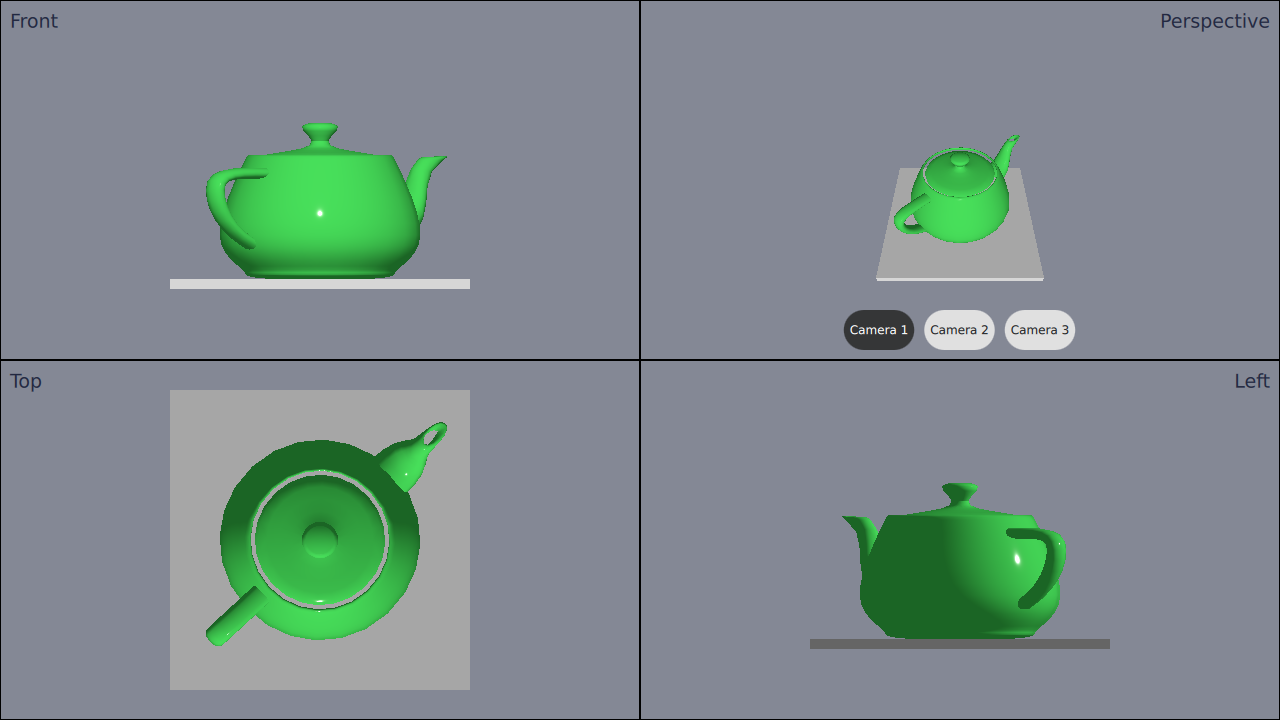
この例では、アプリケーション内で、それぞれ異なるカメラを持つ4つのView3Dを使用する方法を示しています。
カメラの定義
まず、cameras を定義します。ビューは4つしか追加しませんが、いくつかの異なるカメラを定義します。これは、いずれかのビューでカメラを切り替えられるようにするためです。
カメラはルートNode 内で定義する必要があります。カメラの定義方法は以下の通りです:
Node {
    id: standAloneScene
    ...
// The predefined cameras. They have to be part of the scene, i.e. inside the root node.
// Animated perspective camera
Node {
    PerspectiveCamera {
        id: cameraPerspectiveOne
        z: 600
    }

    PropertyAnimation on eulerRotation.x {
        loops: Animation.Infinite
        duration: 5000
        to: -360
        from: 0
    }
}

// Stationary perspective camera
PerspectiveCamera {
    id: cameraPerspectiveTwo
    z: 600
}
    ...
    // Stationary orthographic camera viewing from left
    OrthographicCamera {
        id: cameraOrthographicLeft
        x: -600
        eulerRotation.y: -90
    }
}
ビューの追加
カメラを定義したら、views を追加できます。画面を4つの部分に分け、次のようにビューを1つずつ追加していきます:
// The views
Rectangle {
    id: topLeft
    anchors.top: parent.top
    anchors.left: parent.left
    width: parent.width * 0.5
    height: parent.height * 0.5
    color: "#848895"
    border.color: "black"

    View3D {
        id: topLeftView
        anchors.fill: parent
        importScene: standAloneScene
        camera: cameraOrthographicFront
    }

    Label {
        text: "Front"
        anchors.top: parent.top
        anchors.left: parent.left
        anchors.margins: 10
        color: "#222840"
        font.pointSize: 14
    }
}
    ...
右上のビューには3つのボタンがあります。これらのボタンを使用すると、そのビューで使用されるカメラをその場で切り替えることができます。切り替えは、カメラのプロパティを設定するだけで行えます:
RoundButton {
    text: "Camera 1"
    highlighted: topRightView.camera == cameraPerspectiveOne
    implicitWidth: controlsContainer.buttonWidth
    onClicked: {
        topRightView.camera = cameraPerspectiveOne
    }
}
...© 2026 The Qt Company Ltd. Documentation contributions included herein are the copyrights of their respective owners. The documentation provided herein is licensed under the terms of the GNU Free Documentation License version 1.3 as published by the Free Software Foundation. Qt and respective logos are trademarks of The Qt Company Ltd. in Finland and/or other countries worldwide. All other trademarks are property of their respective owners.
