
Button QML Type
명령을 실행하거나 질문에 답하기 위해 클릭할 수 있는 버튼. 더 보기...
| Import Statement: | import QtQuick.Controls |
| Inherits: | |
| Inherited By: |
속성
- flat : bool
- highlighted : bool
상세 설명
Button은 사용자가 누르거나 클릭할 수 있는 푸시 버튼 컨트롤을 제공합니다. 버튼은 일반적으로 어떤 작업을 수행하거나 질문에 응답하는 데 사용됩니다. 대표적인 버튼으로는 OK, 적용, 취소, 닫기, 예, 아니요, 도움말 등이 있습니다.
Button은 AbstractButton 에서 API를 상속받습니다. 예를 들어, AbstractButton API를 사용하여 text 을 설정하고, 아이콘을 표시하며, clicks 에 반응할 수 있습니다.
버튼은 사용자가 활성화할 때 clicked() 신호를 발생시킵니다. 이 신호에 연결하여 버튼의 동작을 수행할 수 있습니다. 또한 버튼은 canceled(), doubleClicked(), pressed(), released() 및 pressAndHold() 신호를 제공하며, 이 중 () 신호는 길게 누를 때 발생합니다.
버튼의 신호에 연결하는 방법은 아래 코드 예제를 참조하십시오.
RowLayout {
    Button {
        text: "Ok"
        onClicked: model.submit()
    }
    Button {
        text: "Cancel"
        onClicked: model.revert()
    }
}속성 문서
flat : bool
이 속성은 버튼이 평면 형태인지 여부를 나타냅니다.
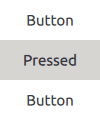
일반적으로 평면 버튼은 눌리거나 선택된 상태가 아닌 한 배경을 그리지 않습니다.
기본값은 ` false`입니다.
highlighted : bool
이 속성은 버튼이 강조 표시되어 있는지 여부와 관계없이 적용됩니다.
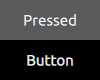
버튼은 사용자의 주의를 끌기 위해 강조 표시될 수 있습니다. 이는 키보드 상호작용에는 영향을 미치지 않습니다.
기본값은 ` false`입니다.
© 2026 The Qt Company Ltd. Documentation contributions included herein are the copyrights of their respective owners. The documentation provided herein is licensed under the terms of the GNU Free Documentation License version 1.3 as published by the Free Software Foundation. Qt and respective logos are trademarks of The Qt Company Ltd. in Finland and/or other countries worldwide. All other trademarks are property of their respective owners.
