
Qt Quick 예제 - 텍스트
이곳은 텍스트와 관련된 QML 예제 모음입니다.
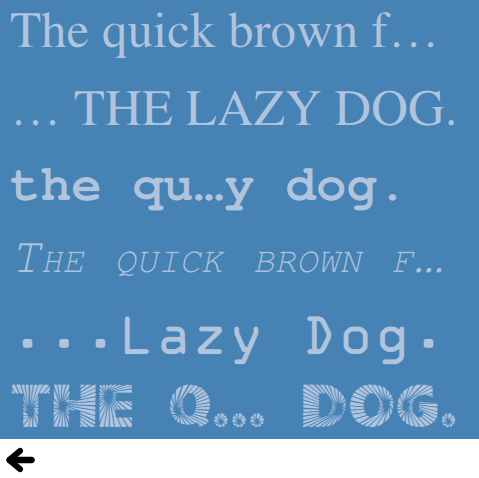
'텍스트'는 텍스트와 관련된 간단한 QML 예제 모음입니다. 각 예제는 작은 QML 파일로, 대개 특정 유형이나 기능을 포함하거나 강조하고 있습니다. 각 예제를 실행하여 동작을 확인해 볼 수 있습니다.
Hello
'Hello' 예제는 ` Text ` 유형의 글자 간격을 변경하고 애니메이션을 적용하는 방법을 보여줍니다. 이 예제는 순차 애니메이션을 사용하여 먼저 `font.letterSpacing` 속성을 3초에 걸쳐 ` 0 `에서 ` 50 `로 변경한 다음, 텍스트를 화면상의 임의의 위치로 이동시킵니다:
            SequentialAnimation on font.letterSpacing {
                loops: Animation.Infinite
                NumberAnimation {
                    from: 0
                    to: 50
                    easing.type: Easing.InQuad
                    duration: 3000
                }
                ScriptAction {
                    script: {
                        container.y = (screen.height / 4) + (Math.random() * screen.height / 2)
                        container.x = (screen.width / 4) + (Math.random() * screen.width / 2)
                    }
                }
            }
글꼴
'글꼴'은 ` Text ` 타입과 함께 글꼴을 사용하는 다양한 방법을 보여줍니다. 단순히 이름을 지정하여 `font.family` 속성을 직접 사용하는 방법:
font.family: "Times"또는 ` FontLoader `를 사용하여 로컬 글꼴 파일을 지정하는 방법:
    FontLoader {
        id: localFont
        source: "content/fonts/tarzeau_ocr_a.ttf"
    }
또는 마지막으로 ` FontLoader `를 사용하여 원격 글꼴 파일을 지정하는 방법:
    FontLoader {
        id: webFont
        source: "https://www.princexml.com/fonts/steffmann/Starburst.ttf"
    }
사용 가능한 글꼴
'사용 가능한 글꼴'은 ` Qt ` 전역 객체와 목록 뷰를 사용하여 시스템에서 사용 가능한 모든 글꼴을 표시하는 방법을 보여줍니다. ` ListView ` 타입은 사용 가능한 글꼴 목록을 모델로 사용합니다:
model: Qt.fontFamilies()델리게이트 내부에서는 modelData를 통해 글꼴 패밀리가 설정됩니다:
font.family: parent.modelData배너
'배너'는 텍스트 유형의 행과 NumberAnimation 을 사용하여 배너를 만드는 방법을 보여주는 간단한 예제입니다.
Img 태그
Img 태그는 <img> 태그를 사용하여 텍스트 객체 내에서 이미지를 표시하는 다양한 방법을 보여줍니다.
텍스트 레이아웃
텍스트 레이아웃은 텍스트 항목에 대해 보다 복잡한 레이아웃을 만드는 방법을 보여줍니다. 이 예제는 각 줄의 위치와 크기를 조정할 수 있는 onLineLaidOut 핸들러를 사용하여 텍스트를 두 열로 배치합니다:
        onLineLaidOut: (line) => {
            line.width = width / 2  - main.margin

            if (line.y + line.height >= height) {
                line.y -= height - main.margin
                line.x = width / 2 + main.margin
            }

            if (line.isLast) {
                lastLineMarker.x = line.x + line.implicitWidth
                lastLineMarker.y = line.y + (line.height - lastLineMarker.height) / 2
            }
}© 2026 The Qt Company Ltd. Documentation contributions included herein are the copyrights of their respective owners. The documentation provided herein is licensed under the terms of the GNU Free Documentation License version 1.3 as published by the Free Software Foundation. Qt and respective logos are trademarks of The Qt Company Ltd. in Finland and/or other countries worldwide. All other trademarks are property of their respective owners.
