
Qt Quick 3D - 사용자 정의 효과 예시
사용자 정의 후처리 효과 구현 방법을 보여줍니다.
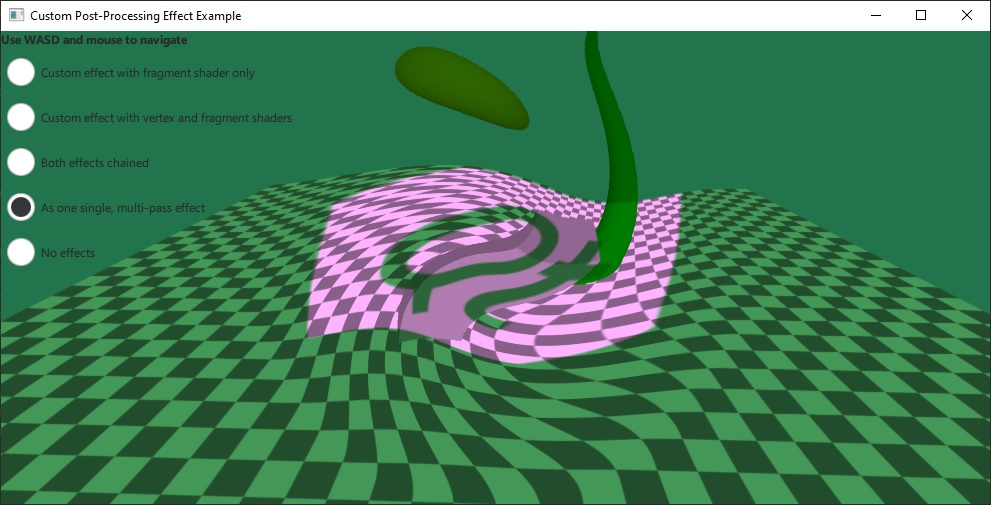
이 예제에서는 자체적인 사용자 정의 후처리 효과를 구현하고, 이를 ` SceneEnvironment::effects`을 통해 씬에 적용합니다. 이 예제는 프래그먼트 셰이더만 사용하는 가장 간단한 유형의 효과와, 버텍스 셰이더와 프래그먼트 셰이더가 모두 존재하며 두 셰이더 간에 데이터가 전달되는 더 고급 사례를 모두 보여줍니다.
간단한 이펙트는 단일 프래그먼트 셰이더만 사용하며, 이미지 파일에서 텍스처 입력을 추가합니다:
Effect {
    id: eff1
    property TextureInput tex: TextureInput {
        id: qtLogo
        texture: Texture { source: "qt_logo_rect.png" }
    }
    passes: Pass {
        shaders: Shader {
            id: fs1
            stage: Shader.Fragment
            shader: "effect.frag"
        }
    }
}
이 효과는 매우 간단한 프래그먼트 셰이더를 사용하며, 장면을 포함하는 입력 텍스처를 받아 이미지 텍스처와 곱하기만 합니다:
void MAIN()
{
    vec4 c = texture(tex, TEXTURE_UV);
    FRAGCOLOR = c * texture(INPUT, INPUT_UV);
}
.vert 및 .frag 파일에 포함된 셰이더 코드 조각은 Effect 문서에 설명된 대로 내장 키워드를 사용하여 작성되었습니다. 기본 유형의 사용자 정의 속성은 물론, TextureInput 유형의 속성도 셰이더에 유니폼(uniform) 및 샘플러(sampler)로 자동으로 노출됩니다.
두 번째 이펙트는 더 복잡합니다. 이 이펙트는 버텍스 셰이더와 프래그먼트 셰이더는 물론, uRed 및 uGreen 라는 두 가지 속성을 지정하며, uRed 에 애니메이션이 적용되어 있습니다:
Effect {
    id: eff2
    property real uRed: 0.0
    SequentialAnimation {
        running: radioEff2.checked || radioEff3.checked
        loops: Animation.Infinite
        NumberAnimation { target: eff2; property: "uRed"; from: 0; to: 1; duration: 2000 }
        NumberAnimation { target: eff2; property: "uRed"; from: 1; to: 0; duration: 2000 }
    }
    property real uGreen: 1.0
    Shader {
        id: vs2
        stage: Shader.Vertex
        shader: "effect2.vert"
    }
    Shader {
        id: fs2
        stage: Shader.Fragment
        shader: "effect2.frag"
    }
    passes: Pass {
        shaders: [ vs2, fs2 ]
    }
}
이 효과의 프래그먼트 셰이더는 샘플링 좌표를 수정하여 왜곡 효과를 생성합니다. 이 계산에는 center_vec 이 사용되는데, 이는 버텍스 셰이더에서 설정된 VARYING으로, 화면 중심에서 현재 프래그먼트까지의 종횡비 보정 벡터를 저장합니다. 마지막으로, 셰이더는 uRed 및 uGreen 유니폼을 사용하여 색상을 조정합니다. 이 유니폼들은 셰이더 내에서 선언할 필요가 없다는 점에 유의하십시오:
VARYING vec2 center_vec;

void MAIN()
{
    float radius = 0.25;
    float dist_to_center = length(center_vec) / radius;
    vec2 texcoord = INPUT_UV;
    if (dist_to_center <= 1.0) {
        float rotation_amount = (1.0 - dist_to_center) * (1.0 - dist_to_center);
        float r = radians(360.0) * rotation_amount / 4.0 * FRAMEBUFFER_Y_UP;
        float cos_r = cos(r);
        float sin_r = sin(r);
        mat2 rotation = mat2(cos_r, sin_r, -sin_r, cos_r);
        texcoord = vec2(0.5, 0.5) + rotation * (INPUT_UV - vec2(0.5, 0.5));
    }
    vec4 c = texture(INPUT, texcoord);
    c.r *= uRed;
    c.g *= uGreen;
    FRAGCOLOR = c;
}© 2026 The Qt Company Ltd. Documentation contributions included herein are the copyrights of their respective owners. The documentation provided herein is licensed under the terms of the GNU Free Documentation License version 1.3 as published by the Free Software Foundation. Qt and respective logos are trademarks of The Qt Company Ltd. in Finland and/or other countries worldwide. All other trademarks are property of their respective owners.
