
创建极坐标图
注意:这是 “带小部件的图表图库”示例的一部分。
它还展示了如何实现极坐标图的滚动和缩放功能,并直观地演示了极坐标图与笛卡尔坐标图之间的关系。
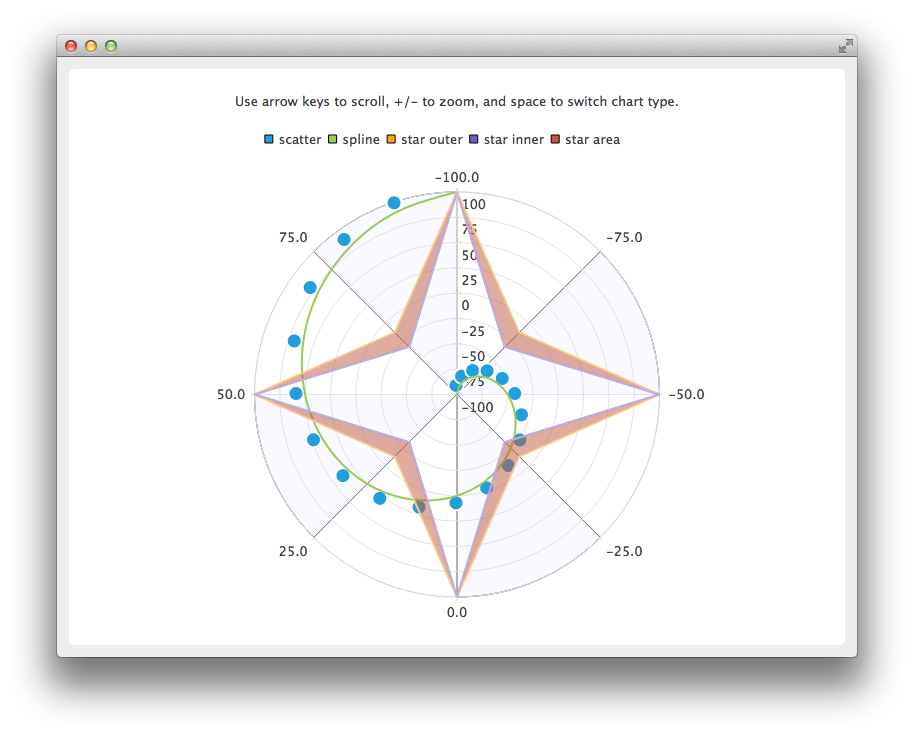
创建极坐标图时,应使用 QPolarChart 实例,而非 QChart 实例。
auto chart = new QPolarChart;坐标轴的创建方式与笛卡尔坐标系图类似,但在将坐标轴添加到图表时,可以使用极坐标方向代替对齐方式。
auto angularAxis = new QValueAxis;
angularAxis->setTickCount(9); // First and last ticks are co-located on 0/360 angle.
angularAxis->setLabelFormat("%.1f");
angularAxis->setShadesVisible(true);
angularAxis->setShadesBrush(QBrush(QColor(249, 249, 255)));
chart->addAxis(angularAxis, QPolarChart::PolarOrientationAngular);

auto radialAxis = new QValueAxis;
radialAxis->setTickCount(9);
radialAxis->setLabelFormat("%d");
chart->addAxis(radialAxis, QPolarChart::PolarOrientationRadial);
极坐标图的缩放和滚动在逻辑上与笛卡尔坐标图的缩放和滚动几乎完全相同。主要区别在于,沿 X 轴(角度轴)滚动时,使用的是角度而非像素数。另一个区别是无法对矩形区域进行缩放。
void PolarChartView::keyPressEvent(QKeyEvent *event)
{
    switch (event->key()) {
    case Qt::Key_Plus:
        chart()->zoomIn();
        break;
    case Qt::Key_Minus:
        chart()->zoomOut();
        break;
    case Qt::Key_Left:
        chart()->scroll(-1.0, 0);
        break;
    case Qt::Key_Right:
        chart()->scroll(1.0, 0);
        break;
    case Qt::Key_Up:
        chart()->scroll(0, 1.0);
        break;
    case Qt::Key_Down:
        chart()->scroll(0, -1.0);
        break;
    case Qt::Key_Space:
        switchChartType();
        break;
    default:
        QGraphicsView::keyPressEvent(event);
        break;
    }
}
笛卡尔坐标图和极坐标图可以使用相同的坐标轴和数据系列,但不能同时使用。要在图表类型之间切换,首先需要从旧图表中移除数据系列和坐标轴,然后将其添加到新图表中。如果要保留坐标轴范围,也需要将其复制过来。
void PolarChartView::switchChartType()
{
    QChart *newChart;
    QChart *oldChart = chart();

    if (oldChart->chartType() == QChart::ChartTypeCartesian)
        newChart = new QPolarChart;
    else
        newChart = new QChart;

    // Move series and axes from old chart to new one
    const QList<QAbstractSeries *> seriesList = oldChart->series();
    const QList<QAbstractAxis *> axisList = oldChart->axes();
    QList<QPair<qreal, qreal> > axisRanges;

    for (QAbstractAxis *axis : axisList) {
        auto valueAxis = static_cast<QValueAxis *>(axis);
        axisRanges.append(QPair<qreal, qreal>(valueAxis->min(), valueAxis->max()));
    }

    for (QAbstractSeries *series : seriesList)
        oldChart->removeSeries(series);

    for (QAbstractAxis *axis : axisList) {
        oldChart->removeAxis(axis);
        newChart->addAxis(axis, axis->alignment());
    }

    for (QAbstractSeries *series : seriesList) {
        newChart->addSeries(series);
        for (QAbstractAxis *axis : axisList)
            series->attachAxis(axis);
    }

    int count = 0;
    for (QAbstractAxis *axis : axisList) {
        axis->setRange(axisRanges[count].first, axisRanges[count].second);
        count++;
    }

    newChart->setTitle(oldChart->title());
    setChart(newChart);
    delete oldChart;
}
© 2026 The Qt Company Ltd. Documentation contributions included herein are the copyrights of their respective owners. The documentation provided herein is licensed under the terms of the GNU Free Documentation License version 1.3 as published by the Free Software Foundation. Qt and respective logos are trademarks of The Qt Company Ltd. in Finland and/or other countries worldwide. All other trademarks are property of their respective owners.
