
GN を使用したビルド
GN(Generate Ninja) は、Ninja用のビルドファイルを生成するメタビルドシステムです。
注: これを使用するには、GN 拡張機能を有効にしてください 。
GNプロジェクトを開く
GN プロジェクトを開くには、[File ] > [Open Project] に移動し、プロジェクト内の `BUILD.gn ` ファイルを選択します。
GNツールの追加
GN実行ファイルへのパスを指定するには:
- 「Preferences 」 > 「GN 」 > 「Tools 」 > 「Add 」を選択します。
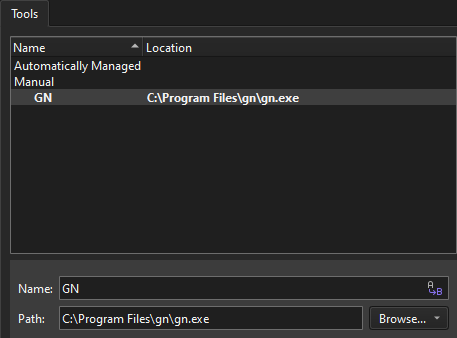
- 「Name 」で、ツールの名前を指定します。
- 「Path 」で、GN実行ファイルへのパスを指定します。
- 「Apply 」を選択して、変更を保存します。
キットに GN ツールを追加する
GN を使用してプロジェクトをビルドするには:
- 「Preferences 」>「Kits 」>「Kits 」の順に移動します。
- 編集するキットを選択します。
- 「GN Tool 」で、GNツールを選択します。
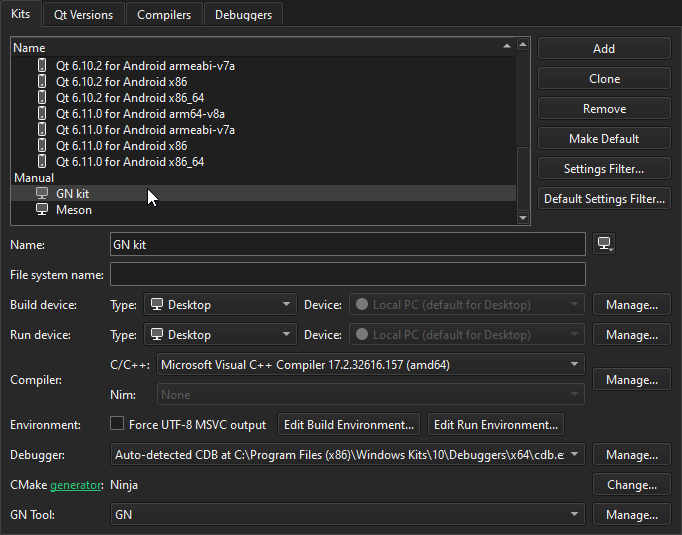
- プロジェクトに対してキットを有効にします。
詳細については、「キットの管理」を参照してください。
「拡張機能の有効化」および「プロジェクトのキットの有効化」も参照してください 。
Copyright © The Qt Company Ltd. and other contributors. Documentation contributions included herein are the copyrights of their respective owners. The documentation provided herein is licensed under the terms of the GNU Free Documentation License version 1.3 as published by the Free Software Foundation. Qt and respective logos are trademarks of The Qt Company Ltd in Finland and/or other countries worldwide. All other trademarks are property of their respective owners.
