
汎用ハイライター
Qt Creator は、KSyntaxHighlightingエンジンとKateの構文定義を使用して、Pythonやシェルスクリプトファイルなど、専用のサポートがないファイル内のコードをハイライト表示します。このエンジンが使用するハイライト定義を管理するには、[Preferences ] > [Text Editor ] > [Generic Highlighter] を選択してください。
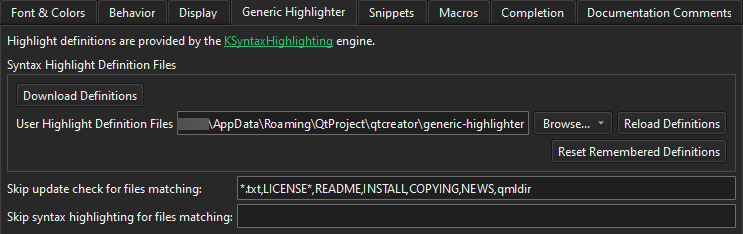
以下の表は、設定可能な項目について説明しています。
| 設定項目 | 説明 |
|---|---|
| Download Definitions | 不足している構文定義ファイルをダウンロードし、既存のものを更新します。 |
| User Highlight Definition Files | Qt Creator が、ダウンロードされたファイルに加えて、独自のハイライト定義ファイルを検索するフォルダを設定します。 |
| Reload Definitions | Qt Creator の外部で変更された定義ファイルを再読み込みします。 |
| Reset Remembered Definitions | 複数の定義に関連付けられるファイルについて、Qt Creator が記憶していたハイライト定義をリセットします。「ハイライト定義のダウンロード」を参照してください。 |
| Skip update check for files matching | Qt Creator が、欠落しているハイライト定義のダウンロードを促さない、ワイルドカードに対応したファイルパターンを、コンマで区切ってリストアップします。 |
| Skip syntax highlighting for files matching | Qt Creator が汎用的な構文ハイライトを一切適用しない、ワイルドカード対応のファイルパターンを、コンマ区切りでリストアップします。 |
「エディタの設定方法」、「 エディタの設定」、および「ハイライト定義のダウンロード」も参照してください 。
Copyright © The Qt Company Ltd. and other contributors. Documentation contributions included herein are the copyrights of their respective owners. The documentation provided herein is licensed under the terms of the GNU Free Documentation License version 1.3 as published by the Free Software Foundation. Qt and respective logos are trademarks of The Qt Company Ltd in Finland and/or other countries worldwide. All other trademarks are property of their respective owners.
