
使用 GN 进行构建
GN(Generate Ninja)是一个元构建系统,可为Ninja 生成构建文件。
注意:需启用 GN 扩展才能使用。
打开 GN 项目
要打开 GN 项目,请转至“File ”>“Open Project ”,然后从您的项目中选择BUILD.gn 文件。
添加 GN 工具
要指定 GN 可执行文件的路径:
- 选择“Preferences ” > “GN ” > “Tools ” > “Add ”。
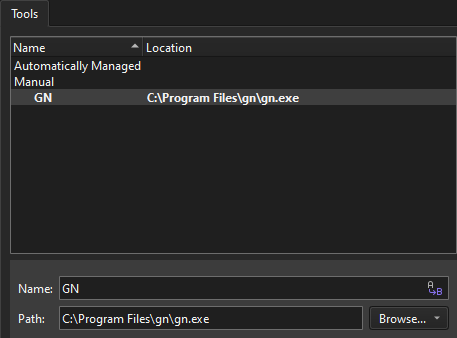
- 在“Name ”中,为该工具指定一个名称。
- 在“Path ”中,指定 GN 可执行文件的路径。
- 选择“Apply ”以保存更改。
将 GN 工具添加到套件中
要使用 GN 构建项目:
- 转到“Preferences ” > “Kits ” > “Kits ”。
- 选择一个套件进行编辑。
- 在“GN Tool ”中,选择一个 GN 工具。
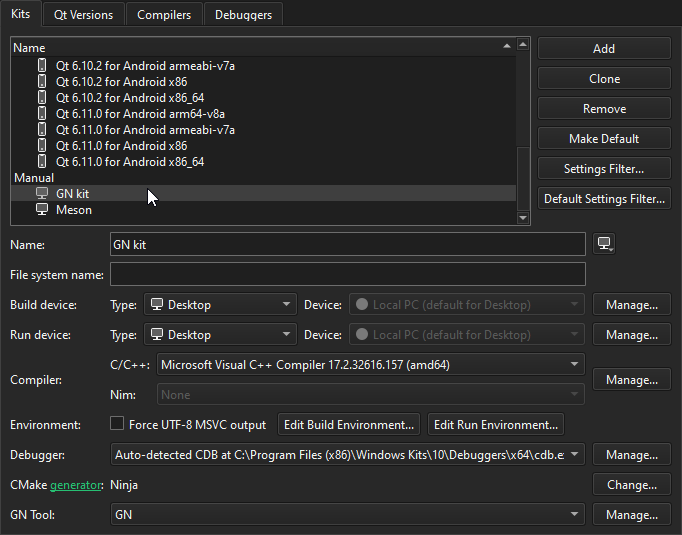
- 为该项目激活该套件。
有关更多信息,请参阅“管理套件”。
Copyright © The Qt Company Ltd. and other contributors. Documentation contributions included herein are the copyrights of their respective owners. The documentation provided herein is licensed under the terms of the GNU Free Documentation License version 1.3 as published by the Free Software Foundation. Qt and respective logos are trademarks of The Qt Company Ltd in Finland and/or other countries worldwide. All other trademarks are property of their respective owners.
