
为 QNX Neutrino 设备创建开发套件
要为 QNX Neutrino 设备生成构建和运行套件:
- 转至“Preferences ” > “Devices ” > “Devices ”。
- 选择“Add ” > “QNX Device ” > “Start Wizard ”以添加 QNX Neutrino 设备。
- 选择“Apply ”以获取创建套件所需的信息。
- 转到“Preferences ” > “SDKs ” > “QNX ”。
- 选择“Create Kit ”以针对特定平台创建套件。
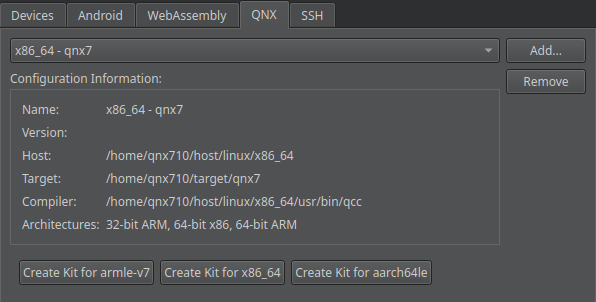
- 为您的项目激活该开发套件。
另请参阅 《QNX Neutrino 设备开发》、《QNX 开发指南》和《为项目激活套件》。
Copyright © The Qt Company Ltd. and other contributors. Documentation contributions included herein are the copyrights of their respective owners. The documentation provided herein is licensed under the terms of the GNU Free Documentation License version 1.3 as published by the Free Software Foundation. Qt and respective logos are trademarks of The Qt Company Ltd in Finland and/or other countries worldwide. All other trademarks are property of their respective owners.
