
指定远程 Linux 运行设置
要为所选套件指定运行设置,请转至Projects >Run Settings 。
要在基于 Linux 的设备上运行和调试应用程序,必须从开发主机建立到该设备的连接,并将设备配置添加到套件中。选择Manage Kits 向套件中添加设备。
运行应用程序时,Qt Creator 会将文件复制到已连接的设备上。
运行设置会显示开发主机和设备上可执行文件的路径。例如,若要指定由另一个应用程序启动您的应用程序,请在“Alternate executable on device ”字段中输入命令,然后选择“Use this command instead ”。
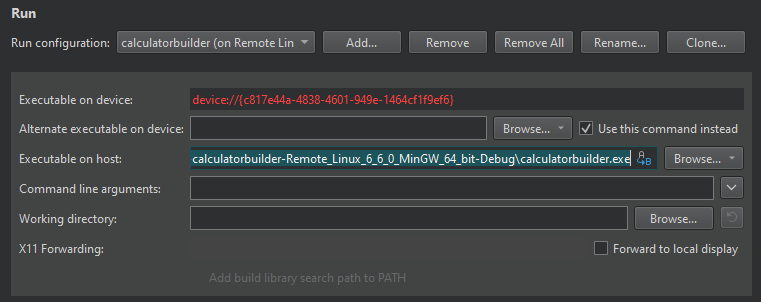
您可以在“Command line arguments ”字段中指定要传递给应用程序的参数。
若要禁用当前项目的库链接,请清除“Add build library search path to PATH ”选项。有关详细信息,请参阅“链接器库”。
查看应用程序用户界面
选择“Use X11 forwarding ”可在本地显示器上显示远程运行的 X11 客户端。
选择“Use the Qt VNC platform for display ”可使用 Qt VNC 平台插件渲染应用程序。Qt Creator 会为应用程序设置QT_QPA_PLATFORM=vnc 环境变量。若要使用 VNC 客户端连接到应用程序 UI,请在“Application Output ”视图中查看 IP 地址和端口。
以其他用户身份运行
在 Linux 和 macOS 上,请在“Run as user ”中选择“Default ”、“root ”或“Other ”,以不同的权限构建、部署和运行应用程序。
另请参阅 “为项目激活套件”、“配置项目以供运行”、“如何:为远程 Linux 设备 开发”、“为远程 Linux 设备开发”以及“管理套件”。
Copyright © The Qt Company Ltd. and other contributors. Documentation contributions included herein are the copyrights of their respective owners. The documentation provided herein is licensed under the terms of the GNU Free Documentation License version 1.3 as published by the Free Software Foundation. Qt and respective logos are trademarks of The Qt Company Ltd in Finland and/or other countries worldwide. All other trademarks are property of their respective owners.
