
GitLab
GitLab 是由 GitLab 公司开发的一款 DevOps 工具。您可以从 GitLab 服务器克隆项目,并使用 Git来管理您的本地和远程仓库。
要使用 GitLab,请先建立与 GitLab 服务器的连接,然后克隆您想要处理的项目。在项目设置中将之前克隆的项目与 GitLab 关联,即可在“版本控制”视图中接收事件通知。
注意:需启用 GitLab 插件才能使用该功能。
连接到 GitLab 服务器
要连接到 GitLab 服务器,请指定服务器主机名和端口号,以及您在 GitLab 中为Qt Creator 创建的访问令牌。该令牌的权限范围必须至少为read_api 或api 。
要配置与 GitLab 服务器的连接,请转至Preferences >Version Control >GitLab :
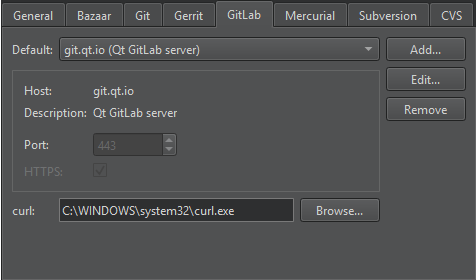
要添加 GitLab 服务器:
- 选择“Add ”以打开“Add Server ”对话框。
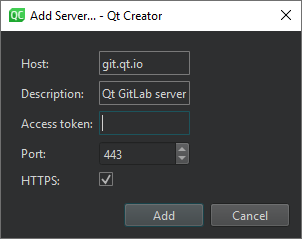
- 在“Host ”中,输入 GitLab 服务器的主机名。
- 在“Description ”中,输入一段自由格式文本,该文本将显示在已关联项目的 GitLab 设置中。
- 在“Access token ”中,输入您在 GitLab 服务器中为Qt Creator 创建的访问令牌,该令牌可在Preferences >Access Tokens 中找到。
- 在“Port ”中,输入端口号。
- 取消勾选“HTTPS ”以使用 HTTP 连接而非安全连接。
- 选中“Add ”以建立连接。
在“GitLab ”选项卡中,“curl ”会显示用于 HTTP 连接的curl 工具的路径。指定另一个路径以使用“Qt Creator ”找到的该工具之外的另一个实例。
要编辑所选连接,请选择“Edit ”。
要删除所选连接,请选择“Remove ”。
克隆项目
您可以从已连接的 GitLab 服务器克隆项目。Qt Creator 会从访问令牌中读取您的用户名和 ID,并显示每个服务器中可用的项目。您可以搜索特定项目,或在列表中浏览项目。
要从 GitLab 克隆项目:
- 转至Tools > “GitLab ”,查看已连接的 GitLab 服务器列表及各服务器中的可用项目。
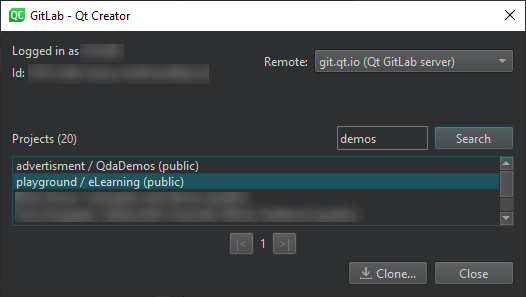
- 在Remote 中,选择一个 GitLab 服务器。
- 在“Projects ”中,选择要克隆的项目。
- 选择“Clone ”以打开“Clone Repository ”对话框。
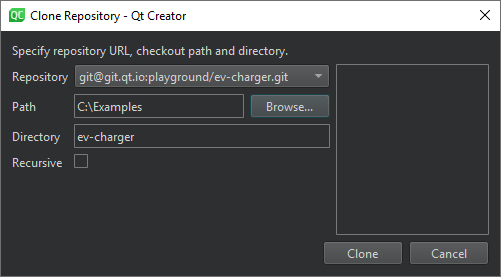
- 在Repository 中,指定仓库的URL。
- 在“Path ”中,指定要克隆仓库的路径。
- 在“Directory ”中,指定克隆仓库的目录名称。
- 选择“Recursive ”以同时克隆存储库的子模块。
- 选择“Clone ”将项目克隆到指定的目录。
Qt Creator 将自动打开该项目。如果克隆的项目包含多个项目文件(例如CMakeList.txt 、.pro 和.qbs ),Qt Creator 会提示您选择要打开的文件。如果该项目没有Qt Creator 能打开的项目文件,请转至File >New Project >Import Project >Import Existing Project ,并将该项目导入为通用项目。
另请参阅 “启用和禁用插件”、“将项目与 GitLab 关联”、“设置版本控制系统”、“使用常见的 VCS 功能”、“使用项目向导”、“版本控制系统”以及“使用 Git”。
Copyright © The Qt Company Ltd. and other contributors. Documentation contributions included herein are the copyrights of their respective owners. The documentation provided herein is licensed under the terms of the GNU Free Documentation License version 1.3 as published by the Free Software Foundation. Qt and respective logos are trademarks of The Qt Company Ltd in Finland and/or other countries worldwide. All other trademarks are property of their respective owners.
