
4.6.2. MISRA® Compliance Checking Guide
4.6.2.1. Checking MISRA® compliance with Axivion Suite
The Axivion Suite can be used to check compliance of your code with MISRA® rules. These checks are implemented as stylechecks.
MISRA and MISRA C are registered trademarks of HORIBA MIRA Ltd., held on behalf of the MISRA Consortium. MISRA, MISRA C and the rule texts are reproduced here under license.
Configuration
MISRA® checks implemented as stylechecks can be selected and configured like other stylechecks, see Stylechecks. For example, to check against the full set of MISRA-C:2025 rules and directives, select the rulegroup MisraC2025 in the graphical user interface.
Many of the MISRA® checks have individual configuration options as shown in the GUI in order to fine-tune them to your needs or your preferred interpretation of the standard.
A few MISRA® checks require special configuration:
Rule MisraC-3.6: All libraries used in production code shall be written to comply with the provisions of this document, and shall have been subject to appropriate validation.
To check libraries used in your project, simply apply all the rules to the source code of these libraries. (We do not support binary analysis).Rule MisraC++-17.0.4: All library code shall conform to MISRA C++.
To check libraries used in your project, simply apply all the rules to the source code of these libraries. (We do not support binary analysis).
Software Development and MISRA® Deviation Workflow
Nomenclature
In the following sections,
A violation is a breach of resp. an issue for a MISRA® rule in the code
A permit is the formal description of an exception to a MISRA® rule (including preconditions and reason)
A justification is a comment in MISRA® context with (optional) reference to a permit
A violation can be relaxed to a DEVIATION, if the violation is is annotated with a justification. Violations can be relaxed to a deviation globally by de-activating the rule check. However, there will be no more violations and as a consequence no more justifications in source code.
For a report it is required to make explicit
Which rules were checked?
Which rules were executed
without violations
with deviations
with violations
Workflow
The deviation workflow in MISRA® can be implemented as depicted in Figure Figure The basic MISRA® deviation workflow and its realisation in Axivion Suite.
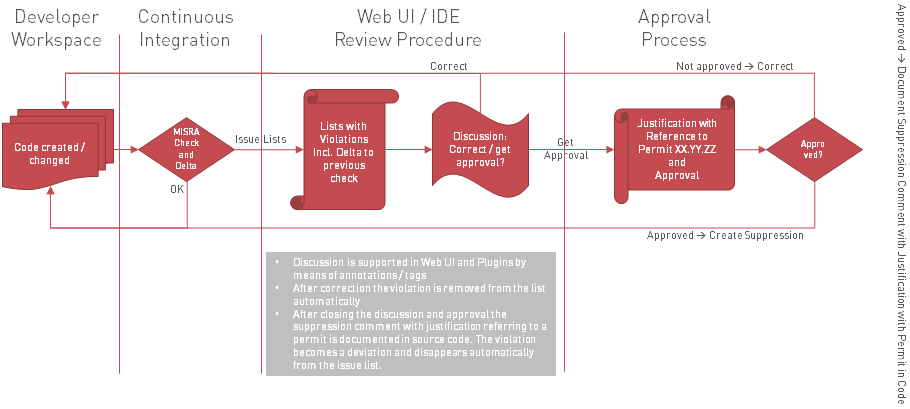
The basic MISRA® deviation workflow and its realisation in Axivion Suite
When development starts in the respective developer’s workspace, users commit new code or changes to existing code to the version control system. The continuous integration then picks up the changes from the version control system, analyses the code, and reports issues (i.e., violations of the MISRA® programming guidelines). The lists of violations are reported in the user interface of Axivion Suite . All user interfaces provide means for annotating and tagging individual issues to facilitate reviews and discussions amongst developers how to solve the issues.
If, for technical reasons, issues cannot be resolved, developers will ask for approval and acceptance of the issue — thus turning violations into deviations. In order to permanently and properly document the approval of violations, control comments (see Justifications and Suppressions with Code Annotations) are added to the source code. This way, the rationale and the permission of the deviation is documented in line with the source code in question. Control comment formats can be defined by the user and checks can be added to ensure that each and every violation refers to a permit.
Dealing with violations: Support for deviations
The Axivion Suite supports handling of deviations in several ways.
See section Exclude files from the Analysis on how to exclude code parts for all rules or for selected MISRA® rules only. That section also describes an approach to apply different rules to different parts of the code, e.g. if you want to run only a subset of MISRA® checks on generated code.
By means of excludes no more issues are reported or logged in any way. The same is true if you turn off individual rules completely. Such an excluded rule will then not be executed. If you require a justification for deactivating some rules, you can first activate all MISRA® rules in one configuration file, then deactivate the selected ones in a more local configuration layer. In this way you have got explicit deactivations that you can comment on, and they are all grouped together in a single file for easier reviews.
Deviations and Suppressing Violations
If you want to suppress certain findings in your code, you can use code annotations to mark these code parts with special comments (see Justifications and Suppressions with Code Annotations). The syntax and scope of these comments can be freely configured to your desired format.
By default, accepted violations marked in this way will not be reported.
But for a complete MISRA® audit report, you will have to import the suppressed
issues into the database, because otherwise the information is not kept.
This can be done by setting option /Results/Database/import_suppressed_issues
to True in the graphical configuration interface. With this option, suppressed issues
are imported into the database, shown in the dashboard and available for reports.
The code annotation comments can also be used to attach a justification to
suppressed (and even to unsuppressed) issues, for example to refer to a
MISRA® permit. The option justification_checker of the rule can then be set to
a Python function that ensure a suppressed issue refers to an appropriate permit
(see section Checking justifications and Referring to Permits).
4.6.2.2. FAQ
Q: Why is the @ character flagged by MisraC2025Directive-1.1?
A: The @ character is only allowed from C23 onwards. For earlier C
standards, it violates the basic character set requirements.
Solutions:
Upgrade to C23 or later (if possible)
Manually allow the character by adding it to
/Analysis/scanner.additional_basic_characters_in_commentsin your configuration (note: use regex syntax, so escape special characters like$)Disable the rule for comments only by disabling
/Analysis/Stylechecks/Misra/MisraC2025/MisraC2025Directive-1/MisraC2025Directive-1.1/msg.nonbasic_char_in_comment
Q: How do I relax translation limits when my compiler supports higher values than the defaults?
A: There are two distinct rules involved, and they behave differently:
1. `MisraC2025-1.1` - Compiler translation limits (adjustable)
Since Axivion 7.4.0, the limits option in the compiler profile rule replaces
the old Python-based approach. You no longer need to modify Python scripts to set
compiler-specific limits.
Almost all translation limits in MisraC2025-1.1 are only bounded by available
memory and can effectively be set to unlimited. The only exceptions, which have specific
internal constraints, are:
recursive_constexpr(default: 512)nested_template_instantiations(default: 64)placeholders(default: 20)
For compilers with native limit profiles (e.g., IAR EWARM support was added in releases
7.10.7 and 7.11.2), Axivion may already apply the correct limits automatically. For other
compilers or older Axivion versions, configure the limits option in the compiler
profile manually.
2. `MisraC2025Directive-1.1` - C/C++ standard translation limits (not adjustable)
This rule is different: it checks adherence to the limits guaranteed by the C/C++ standard itself, not the limits of your specific compiler. Because you cannot change the standard, these limits cannot be configured or relaxed.
Exceeding the standard’s guaranteed minimums - even if your compiler allows it - means relying on implementation-defined behavior and poses a portability risk. This is exactly what Directive-1.1 requires you to document.
Options if violations are not relevant for your project:
Disable specific messages (e.g.,
msg.nested_blocks) for the messages you don’t care aboutDisable the rule entirely - but note this means you are no longer MISRA compliant for Directive 1.1