
3.2. Source Code Analysis Setup Guide for CUDA C++
This guide describes how to set up Axivion static code analysis for CUDA C++ projects. It assumes that you already have a working Axivion Suite installation and have configured an instance of the Axivion Dashboard Server.
3.2.1. Overview
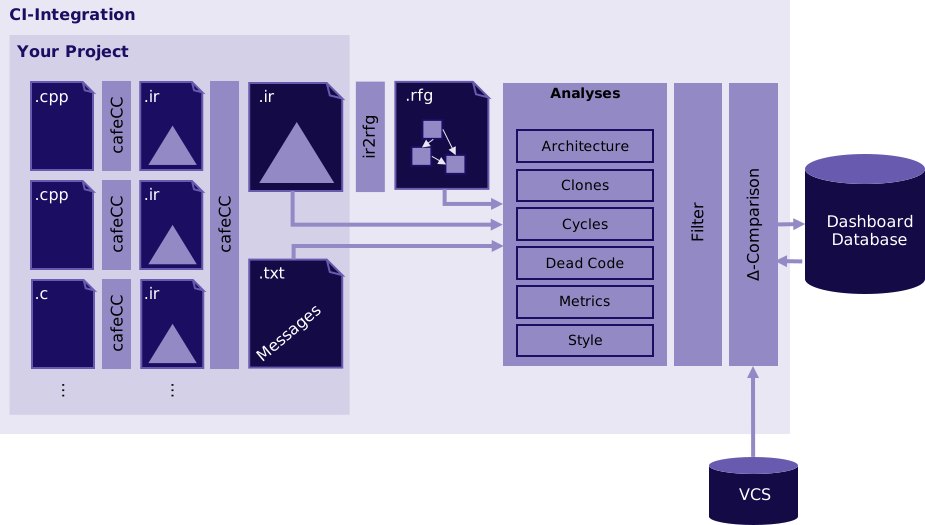
Diagram illustrating the CUDA C++ analysis CI workflow with Axivion
Unlike conventional static code analysis tools/linters, the Axivion Suite not only performs analyses at the source code level, it also extracts a model of the code and its dependencies. This abstraction is called “Resource Flow Graph” (RFG).
The build integration for CUDA C++ works the same way as for C and C++: the original
CUDA compiler (nvcc) is replaced in the project’s build system with the Axivion
compiler wrapper cafeCC. cafeCC processes CUDA C++ translation units
through cafe.
3.2.2. Prerequisites
For the system requirements of CUDA C++ projects, refer to Project Requirements.
The supported CUDA C++ language versions are 12.2, 13.0 and 13.1 as described in the NVIDIA CUDA C++ Programming Guide.
3.2.3. Initial Setup
The initial setup of the analysis for a CUDA C++ project is the same as for C and C++ projects. Follow the instructions in Initial Setup to set up the analysis for your CUDA C++ project. During the project wizard, when configuring the compiler toolchain, be sure to provide the appropriate CUDA command-line.
Note
If you only need to analyze a specific (sub)set of CUDA architectures, you can configure
the compiler profile to only include those architectures to reduce analysis time
(by either setting CustomToolchain/language_cuda.analysis_architectures in your compiler profile
or setting environment variable CUDA_ANALYSIS_ARCH_LIST during your build).
3.2.4. Where To Go From Here
Once you have a working analysis build configuration, you can start customizing your analysis by enabling analysis rules:
For architecture verification, follow the instructions in the architecture guide.
For dead code detection, follow the instructions in the dead code guide.
3.2.5. References
For more detailed information, refer to these resources:
C and C++ Setup Guide: Source Code Analysis Setup Guide for C and C++
Compiler Profile Configuration: Using cafeCC without compiler configuration
Analysis Configuration Reference: Analysis Configuration Reference
3.2.6. FAQ
Q: I have some CUDA code in my project but do not have a CUDA license. Is there an easy way to just ignore any CUDA code for Axivion without having to modify my project?
A: You can configure advanced.ignore_translation_unit_globbings to
*.cu in your compiler profile which will result in all CUDA files in your project
being skipped by the Axivion compiler while otherwise successfully compiling and linking
the project.