
Qt Quick 3D - Ejemplo de Quick Ball
Demuestra cómo crear un juego sencillo utilizando Quick3D.
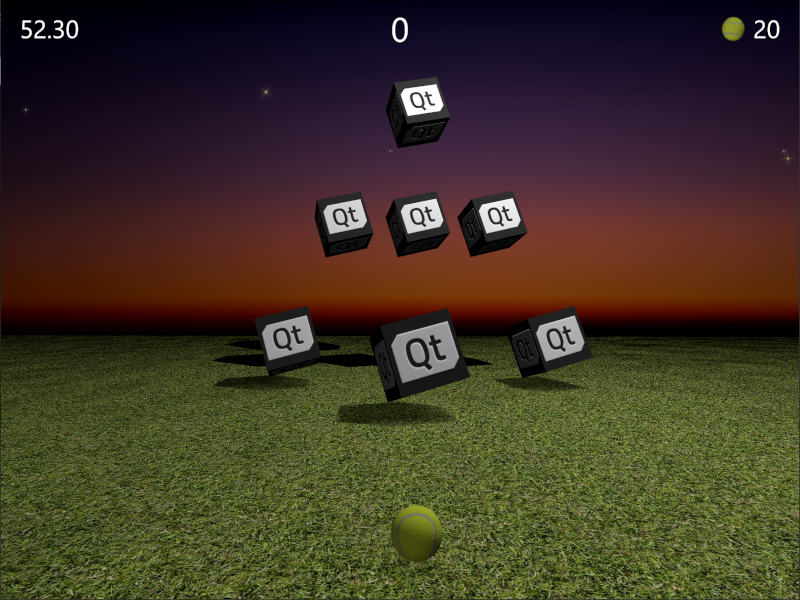
Este ejemplo demuestra cómo combinar Qt Quick y Qt Quick 3D para crear un juego 3D simple. El objetivo del juego es golpear cajas objetivo lanzando una bola. Los puntos se dan en función de lo rápido y con cuántas bolas se derriban todas las dianas. ¡Apunta bien pero sé rápido!
El código fuente está en un único archivo QML para enfatizar lo compacto que es este ejemplo, considerando que es un juego completamente jugable. Empecemos por ver las propiedades principales. Estas son bastante autoexplicativas, y puedes ajustarlas fácilmente para ver cómo afectan al juego.
// Scaling helpper
readonly property real px: 0.2 + Math.min(width, height) / 800
// This is false until the first game has started
property bool playingStarted: false
// This is true whenever game is on
property bool gameOn: false
// Sizes of our 3D models
readonly property real ballSize: 40
readonly property real targetSize: 120
// Playing time in seconds
readonly property real gameTime: 60
property real currentTime: 0
// Amount of balls per game
readonly property int gameBalls: 20
property int currentBalls: 0
// Scores
property int score: 0
property int timeBonus: 0
property int ballsBonus: 0
La lógica del juego se implementa con JavaScript. View3D contiene una función para iniciar el juego, que (re)inicializa todas las variables necesarias y crea los objetivos del nivel. También contiene una función para calcular los puntos finales cuando el juego termina.
function createLevel1() {
    // Simple level of target items
    var level1 = [{ "x": 0, "y": 100, "z": -100, "points": 10 },
                  { "x": -300, "y": 100, "z": -400, "points": 10 },
                  { "x": 300, "y": 100, "z": -400, "points": 10 },
                  { "x": -200, "y": 400, "z": -600, "points": 20 },
                  { "x": 0, "y": 400, "z": -600, "points": 20 },
                  { "x": 200, "y": 400, "z": -600, "points": 20 },
                  { "x": 0, "y": 700, "z": -600, "points": 30 }];
    targetsNode.addTargets(level1);
}

function startGame() {
    ballModel.resetBall();
    targetsNode.resetTargets();
    createLevel1();
    mainWindow.score = mainWindow.timeBonus = mainWindow.ballsBonus = 0;
    mainWindow.currentBalls = mainWindow.gameBalls;
    mainWindow.gameOn = true;
    mainWindow.playingStarted = true;
}

function endGame() {
    if (targetsNode.currentTargets == 0) {
        // If we managed to get all targets down -> bonus points!
        mainWindow.timeBonus = mainWindow.currentTime;
        mainWindow.ballsBonus = mainWindow.currentBalls * 10;
    }
    mainWindow.gameOn = false;
    ballModel.resetBall();
}
La vista también contiene un nodo PointLight para iluminar la escena. Se sitúa por encima de los objetos y se configura para proyectar sombras. Observa cómo se utiliza el brillo para oscurecer el área de juego cuando la partida ha terminado. La propiedad ambientColor se utiliza para suavizar el contraste de la luz, ya que sin ella las partes inferiores de los objetos serían muy oscuras.
PointLight {
    x: 400
    y: 1200
    castsShadow: true
    shadowMapQuality: Light.ShadowMapQualityHigh
    shadowFactor: 50
    quadraticFade: 2
    ambientColor: "#202020"
    brightness: mainWindow.gameOn ? 200 : 40
    Behavior on brightness {
        NumberAnimation {
            duration: 1000
            easing.type: Easing.InOutQuad
        }
    }
}
Para lanzar la pelota se utiliza la propiedad Qt Quick MouseArea , que sólo se activa cuando el juego está activado y la pelota no se está moviendo.
MouseArea {
    anchors.fill: parent
    enabled: mainWindow.gameOn && !ballModel.ballMoving
    onPressed: {
        ballModel.moveBall(mouseX, mouseY);
    }
    onPositionChanged: {
        ballModel.moveBall(mouseX, mouseY);
    }
    onReleased: {
        ballModel.throwBall();
    }
}
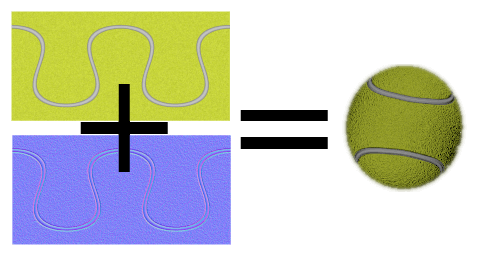
Luego entramos en los modelos 3D reales. El modelo de la pelota es el más grande, ya que contiene la lógica de cómo se comporta la pelota, sus animaciones, y la detección de golpes. Veamos primero las propiedades de la pelota. La pelota usa un modelo de esfera incorporado, escalado en base a ballSize. Usamos PrincipledMaterial con un baseColorMap y un normalMap para crear la apariencia de pelota de tenis.
Model {
    id: ballModel
    property real directionX: 0
    property real directionY: 0
    // How many ms the ball flies
    readonly property real speed: 2000
    readonly property real ballScale: mainWindow.ballSize / 100
    property var moves: []
    readonly property int maxMoves: 5
    readonly property bool ballMoving: ballAnimation.running

    source: "#Sphere"
    scale: Qt.vector3d(ballScale, ballScale, ballScale)

    materials: PrincipledMaterial {
        baseColorMap: Texture {
            source: "images/ball.jpg"
        }
        normalMap: Texture {
            source: "images/ball_n.jpg"
        }
        normalStrength: 1.0
    }
Cuando se mueve el ratón o se desliza la pantalla táctil, las últimas posiciones de maxMoves antes de soltar la pelota se almacenan en la matriz moves. Cuando el usuario suelta la pelota, se llama a throwBall(), que calcula la dirección de la pelota a partir de estas últimas posiciones y comienza a animarla.
function resetBall() {
    moves = [];
    x = 0;
    y = mainWindow.ballSize/2;
    z = 400;
}

function moveBall(posX, posY) {
    if (!mainWindow.gameOn) return;
    var pos = view3D.mapTo3DScene(Qt.vector3d(posX, posY, ballModel.z + mainWindow.ballSize));
    pos.y = Math.max(mainWindow.ballSize / 2, pos.y);
    var point = {"x": pos.x, "y": pos.y };
    moves.push(point);
    if (moves.length > maxMoves) moves.shift();
    // Apply position into ball model
    ballModel.x = pos.x;
    ballModel.y = pos.y;
}

function throwBall() {
    if (!mainWindow.gameOn) return;
    mainWindow.currentBalls--;
    var moveX = 0;
    var moveY = 0;
    if (moves.length >= 2) {
        var first = moves.shift();
        var last = moves.pop();
        moveX = last.x - first.x;
        moveY = last.y - first.y;
        if (moveY < 0) moveY = 0;
    }
    directionX = moveX * 20;
    directionY = moveY * 4;
    ballAnimation.start();
}
La posición de la pelota se anima por separado entre los diferentes ejes. Estas animaciones utilizan directionX y directionY previamente asignados para definir hacia dónde se mueve la pelota, así como speed para el tiempo de vuelo de la pelota. La posición vertical tiene dos animaciones secuenciales, por lo que podemos usar easing para el rebote de la pelota. Cuando terminen las animaciones de posición, comprobaremos si aún quedan bolas o debe terminar el juego. Finalmente animamos también la rotación de la bola, para que el usuario pueda lanzar bolas curvas.
ParallelAnimation {
    id: ballAnimation
    running: false
    // Move forward
    NumberAnimation {
        target: ballModel
        property: "z"
        duration: ballModel.speed
        to: -ballModel.directionY * 5
        easing.type: Easing.OutQuad
    }
    // Move up & down with a bounce
    SequentialAnimation {
        NumberAnimation {
            target: ballModel
            property: "y"
            duration: ballModel.speed * (1 / 3)
            to: ballModel.y + ballModel.directionY
            easing.type: Easing.OutQuad
        }
        NumberAnimation {
            target: ballModel
            property: "y"
            duration: ballModel.speed * (2 / 3)
            to: mainWindow.ballSize / 4
            easing.type: Easing.OutBounce
        }
    }
    // Move sideways
    NumberAnimation {
        target: ballModel
        property: "x"
        duration: ballModel.speed
        to: ballModel.x + ballModel.directionX
    }

    onFinished: {
        if (mainWindow.currentBalls <= 0)
            view3D.endGame();
        ballModel.resetBall();
    }
}

NumberAnimation on eulerRotation.z {
    running: ballModel.ballMoving
    loops: Animation.Infinite
    from: ballModel.directionX < 0 ? 0 : 720
    to: 360
    duration: 10000 / (2 + Math.abs(ballModel.directionX * 0.05))
}
Una parte importante del juego es detectar cuando la pelota golpea los objetivos. Cada vez que la posición z de la pelota cambia, hacemos un bucle a través del array targets y detectamos si la pelota está tocando alguno de ellos usando fuzzyEquals(). Cuando detectamos un golpe, llamamos a la función hit() y comprobamos si todos los objetivos han caído.
onZChanged: {
    // Loop through target items and detect collisions
    var hitMargin = mainWindow.ballSize / 2 + mainWindow.targetSize / 2;
    for (var i = 0; i < targetsNode.targets.length; ++i) {
        var target = targetsNode.targets[i];
        var targetPos = target.scenePosition;
        var hit = ballModel.scenePosition.fuzzyEquals(targetPos, hitMargin);
        if (hit) {
            target.hit();
            if (targetsNode.currentTargets <= 0)
                view3D.endGame();
        }
    }
}
Entonces podemos cambiar a los objetivos. Estos se generan dinámicamente en un nodo de agrupación que contiene funciones de ayuda y permite, por ejemplo, animar todos los objetivos como un grupo. Nótese que la propiedad currentTargets es necesaria porque en los arrays QML los cambios no activan los bindings, por lo que actualizaremos la cantidad de targets manualmente.
Node {
    id: targetsNode

    property var targets: []
    property int currentTargets: 0

    function addTargets(items) {
        items.forEach(function (item) {
            let instance = targetComponent.createObject(
                    targetsNode, { "x": item.x, "startPosY": item.y, "z": item.z, "points": item.points});
            targets.push(instance);
        });
        currentTargets = targets.length;
    }

    function removeTarget(item) {
        var index = targets.indexOf(item);
        targets.splice(index, 1);
        currentTargets = targets.length;
    }

    function resetTargets() {
        while (targets.length > 0)
            targets.pop().destroy();
        currentTargets = targets.length;
    }
}
Los targets son nodos con un modelo de cubo y un elemento de texto para mostrar los puntos. De forma similar al modelo de pelota, usamos baseColorMap y normalMap texturas para crear cubos con un logo Qt. Cuando se detecta el golpe, animamos secuencialmente el cubo alejándose y mostrando los puntos obtenidos de este objetivo. Una vez finalizada la animación, eliminaremos dinámicamente el nodo objetivo.
Component {
    id: targetComponent
    Node {
        id: targetNode

        property int points: 0
        property real hide: 0
        property real startPosY: 0
        property real posY: 0
        property real pointsOpacity: 0

        function hit() {
            targetsNode.removeTarget(this);
            mainWindow.score += points;
            hitAnimation.start();
            var burstPos = targetNode.mapPositionToScene(Qt.vector3d(0, 0, 0));
            hitParticleEmitter.burst(100, 200, burstPos);
        }

        y: startPosY + posY
        SequentialAnimation {
            running: mainWindow.gameOn && !hitAnimation.running
            loops: Animation.Infinite
            NumberAnimation {
                target: targetNode
                property: "posY"
                from: 0
                to: 150
                duration: 3000
                easing.type: Easing.InOutQuad
            }
            NumberAnimation {
                target: targetNode
                property: "posY"
                to: 0
                duration: 1500
                easing.type: Easing.InOutQuad
            }
        }

        SequentialAnimation {
            id: hitAnimation
            NumberAnimation {
                target: targetNode
                property: "hide"
                to: 1
                duration: 800
                easing.type: Easing.InOutQuad
            }
            NumberAnimation {
                target: targetNode
                property: "pointsOpacity"
                to: 1
                duration: 1000
                easing.type: Easing.InOutQuad
            }
            NumberAnimation {
                target: targetNode
                property: "pointsOpacity"
                to: 0
                duration: 200
                easing.type: Easing.InOutQuad
            }
            ScriptAction {
                script: targetNode.destroy();
            }
        }

        Model {
            id: targetModel

            readonly property real targetScale: (1 + targetNode.hide) * (mainWindow.targetSize / 100)

            source: "#Cube"
            scale: Qt.vector3d(targetScale, targetScale, targetScale)
            opacity: 0.99 - targetNode.hide * 2
            materials: PrincipledMaterial {
                baseColorMap: Texture {
                    source: "images/qt_logo.jpg"
                }
                normalMap: Texture {
                    source: "images/qt_logo_n.jpg"
                }
                normalStrength: 1.0
            }
            Vector3dAnimation on eulerRotation {
                loops: Animation.Infinite
                duration: 5000
                from: Qt.vector3d(0, 0, 0)
                to: Qt.vector3d(360, 360, 360)
            }
        }
        Text {
            anchors.centerIn: parent
            scale: 1 + targetNode.pointsOpacity
            opacity: targetNode.pointsOpacity
            text: targetNode.points
            font.pixelSize: 60 * mainWindow.px
            color: "#808000"
            style: Text.Outline
            styleColor: "#f0f000"
        }
    }
}
También necesitamos algunos modelos para el área de juego. El modelo del suelo es un rectángulo con texturas de hierba escaladas para llenar un área mayor.
Model {
    source: "#Rectangle"
    scale: Qt.vector3d(50, 50, 1)
    eulerRotation.x: -90
    materials: PrincipledMaterial {
        baseColorMap: Texture {
            source: "images/grass.jpg"
            tilingModeHorizontal: Texture.Repeat
            tilingModeVertical: Texture.Repeat
            scaleU: 25.0
            scaleV: 25.0
        }
        normalMap: Texture {
            source: "images/grass_n.jpg"
        }
        normalStrength: 0.6
    }
}
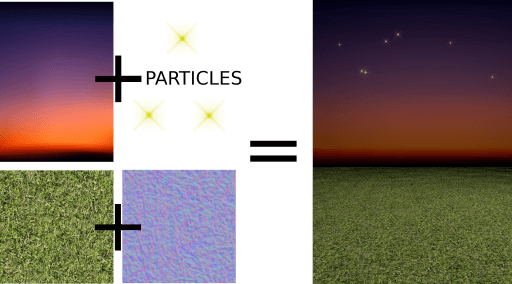
El modelo del cielo está más atrás, y no queremos sombras proyectadas en el cielo, por lo que establecemos receivesShadows a false. Para el cielo también añadimos algunas estrellas usando Qt Quick Particles módulo. De forma similar a otros elementos 2D Qt Quick, también las partículas pueden ser añadidas directamente dentro de los nodos 3D.
Model {
    id: sky
    property real scaleX: 100
    property real scaleY: 20
    source: "#Rectangle"
    scale: Qt.vector3d(sky.scaleX, sky.scaleY, 1)
    position: Qt.vector3d(0, 960, -2000)
    // We don't want shadows casted into sky
    receivesShadows: false
    materials: PrincipledMaterial {
        baseColorMap: Texture {
            source: "images/sky.jpg"
        }
    }
    // Star particles
    Node {
        z: 500
        y: 30
        // Stars are far away, scale up to half the resolution
        scale: Qt.vector3d(2 / sky.scaleX, 2 / sky.scaleY, 1)
        ParticleSystem {
            anchors.horizontalCenter: parent.horizontalCenter
            anchors.top: parent.top
            width: 3000
            height: 400
            ImageParticle {
                source: "qrc:///particleresources/star.png"
                rotationVariation: 360
                color: "#ffffa0"
                colorVariation: 0.1
            }
            Emitter {
                anchors.fill: parent
                emitRate: 4
                lifeSpan: 6000
                lifeSpanVariation: 4000
                size: 30
                sizeVariation: 20
            }
        }
    }
}
Cuando combinamos los modelos del suelo y del cielo obtenemos un mundo 3D como este:
Finalmente añadimos algunos destellos para los objetivos, esta vez usando el módulo QtQuick3D.Particles3D. ParticleSystem3D contiene un SpriteParticle3D y asignamos 200 o ellos, lo que es suficiente para dos estallidos simultáneos de partículas 100. ParticleEmitter3D define las propiedades de emisión para las partículas como escala, rotación, velocidad y lifeSpan. También añadimos Gravity3D affector para arrastrar las partículas hacia abajo con una magnitud adecuada.
ParticleSystem3D {
    id: psystem
    SpriteParticle3D {
        id: sprite
        sprite: Texture {
            source: "images/particle.png"
        }
        color: Qt.rgba(1.0, 1.0, 0.0, 1.0)
        colorVariation: Qt.vector4d(0.4, 0.6, 0.0, 0.0)
        unifiedColorVariation: true
        maxAmount: 200
    }
    ParticleEmitter3D {
        id: hitParticleEmitter
        particle: sprite
        particleScale: 4.0
        particleScaleVariation: 2.0
        particleRotationVariation: Qt.vector3d(0, 0, 180)
        particleRotationVelocityVariation: Qt.vector3d(0, 0, 250)
        velocity: VectorDirection3D {
            direction: Qt.vector3d(0, 300, 0)
            directionVariation: Qt.vector3d(200, 150, 100)
        }
        lifeSpan: 800
        lifeSpanVariation: 200
        depthBias: 100
    }
    Gravity3D {
        magnitude: 600
    }
}
Con esto terminamos las partes 3D de nuestro juego. Todavía hay algunos elementos 2D Qt Quick para mostrar el tiempo, las puntuaciones, el botón de inicio, etc que son importantes para el juego, pero no son relevantes para esta documentación rápida en 3D.
Ahora la pelota está de tu lado. ¡Siéntete libre de ampliar el juego de diferentes maneras y generar nuevos niveles locos!
© 2026 The Qt Company Ltd. Documentation contributions included herein are the copyrights of their respective owners. The documentation provided herein is licensed under the terms of the GNU Free Documentation License version 1.3 as published by the Free Software Foundation. Qt and respective logos are trademarks of The Qt Company Ltd. in Finland and/or other countries worldwide. All other trademarks are property of their respective owners.
