
QGraphicsRectItem Class
QGraphicsRectItem クラスは、QGraphicsScene に追加できる矩形アイテムを提供します。詳細...
| ヘッダー: | #include <QGraphicsRectItem> |
| CMake: | find_package(Qt6 REQUIRED COMPONENTS Widgets) target_link_libraries(mytarget PRIVATE Qt6::Widgets) |
| qmake: | QT += widgets |
| 継承元: | QAbstractGraphicsShapeItem |
パブリック型
| enum { Type } |
パブリック関数
| QGraphicsRectItem(QGraphicsItem *parent = nullptr) | |
| QGraphicsRectItem(const QRectF &rect, QGraphicsItem *parent = nullptr) | |
| QGraphicsRectItem(qreal x, qreal y, qreal width, qreal height, QGraphicsItem *parent = nullptr) | |
| virtual | ~QGraphicsRectItem() |
| QRectF | rect() const |
| void | setRect(const QRectF &rectangle) |
| void | setRect(qreal x, qreal y, qreal width, qreal height) |
再実装されたパブリック関数
| virtual QRectF | boundingRect() const override |
| virtual bool | contains(const QPointF &point) const override |
| virtual bool | isObscuredBy(const QGraphicsItem *item) const override |
| virtual QPainterPath | opaqueArea() const override |
| virtual void | paint(QPainter *painter, const QStyleOptionGraphicsItem *option, QWidget *widget = nullptr) override |
| virtual QPainterPath | shape() const override |
| virtual int | type() const override |
詳細な説明
アイテムの矩形を設定するには、QRectF をQGraphicsRectItemのコンストラクタに渡すか、setRect()関数を呼び出します。rect()関数は、現在の矩形を返します。
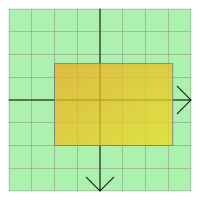
QGraphicsRectItemは、矩形とペンの幅を使用して、boundingRect()、shape()、およびcontains()の適切な実装を提供します。paint()関数は、アイテムに関連付けられたペンとブラシを使用して矩形を描画します。これらの設定は、setPen()およびsetBrush()関数を呼び出すことで行えます。
注: 幅や高さが負の値であるなど、無効な矩形の描画結果は未定義です 。有効な矩形を使用しているか確信が持てない場合(たとえば、信頼性の低いソースからのデータを使用して矩形を作成している場合など)は、QRectF::normalized() を使用して正規化された矩形を作成し、代わりにそれらを使用してください。
関連項目: QGraphicsPathItem 、QGraphicsEllipseItem 、QGraphicsPolygonItem 、QGraphicsTextItem 、QGraphicsLineItem 、QGraphicsPixmapItem 、およびGraphics View Framework。
メンバ関数のドキュメント
[explicit] QGraphicsRectItem::QGraphicsRectItem(QGraphicsItem *parent = nullptr)
QGraphicsRectItem を作成します。parent は、QAbstractGraphicsShapeItem のコンストラクタに渡されます。
QGraphicsScene::addItem()も参照してください 。
[explicit] QGraphicsRectItem::QGraphicsRectItem(const QRectF &rect, QGraphicsItem *parent = nullptr)
rect をデフォルトの矩形として使用して、QGraphicsRectItemを生成します。parent は、QAbstractGraphicsShapeItem のコンストラクタに渡されます。
QGraphicsScene::addItem()も参照してください 。
[explicit] QGraphicsRectItem::QGraphicsRectItem(qreal x, qreal y, qreal width, qreal height, QGraphicsItem *parent = nullptr)
(x,y) で定義されたデフォルトの矩形と、指定されたwidth およびheight を用いて、QGraphicsRectItemを生成します。
parent がQAbstractGraphicsShapeItem のコンストラクタに渡されます。
QGraphicsScene::addItem()も参照してください 。
[virtual noexcept] QGraphicsRectItem::~QGraphicsRectItem()
QGraphicsRectItem を削除します。
[override virtual] QRectF QGraphicsRectItem::boundingRect() const
QGraphicsItem::boundingRect() const を再実装します。
[override virtual] bool QGraphicsRectItem::contains(const QPointF &point) const
QGraphicsItem::contains (const QPointF &point)const を再実装します。
[override virtual] bool QGraphicsRectItem::isObscuredBy(const QGraphicsItem *item) const
QAbstractGraphicsShapeItem::isObscuredBy (const QGraphicsItem *item)const の再実装です。
[override virtual] QPainterPath QGraphicsRectItem::opaqueArea() const
QAbstractGraphicsShapeItem::opaqueArea() const を再実装します。
[override virtual] void QGraphicsRectItem::paint(QPainter *painter, const QStyleOptionGraphicsItem *option, QWidget *widget = nullptr)
QGraphicsItem::paint (QPainter *painter, const QStyleOptionGraphicsItem *option, QWidget *widget)を再実装します。
QRectF QGraphicsRectItem::rect() const
アイテムの矩形を返します。
setRect()も参照してください 。
void QGraphicsRectItem::setRect(const QRectF &rectangle)
アイテムの矩形を、指定されたrectangle に設定します。
rect()も参照してください 。
void QGraphicsRectItem::setRect(qreal x, qreal y, qreal width, qreal height)
アイテムの矩形を、(x 、y) で定義された矩形と、指定されたwidth およびheight に設定します。
この便利関数は、setRect(QRectF(x, y, width, height))
rect()も参照してください 。
[override virtual] QPainterPath QGraphicsRectItem::shape() const
QGraphicsItem::shape() const を再実装します。
[override virtual] int QGraphicsRectItem::type() const
QGraphicsItem::type() const を再実装します。
© 2026 The Qt Company Ltd. Documentation contributions included herein are the copyrights of their respective owners. The documentation provided herein is licensed under the terms of the GNU Free Documentation License version 1.3 as published by the Free Software Foundation. Qt and respective logos are trademarks of The Qt Company Ltd. in Finland and/or other countries worldwide. All other trademarks are property of their respective owners.
