
QGraphicsTextItem Class
QGraphicsTextItem クラスは、QGraphicsScene に追加して、書式設定されたテキストを表示できるテキストアイテムを提供します。詳細...
| ヘッダー: | #include <QGraphicsTextItem> |
| CMake: | find_package(Qt6 REQUIRED COMPONENTS Widgets) target_link_libraries(mytarget PRIVATE Qt6::Widgets) |
| qmake: | QT += widgets |
| 継承元: | QGraphicsObject |
パブリック型
| enum { Type } |
プロパティ
- openExternalLinks : bool
- textCursor : QTextCursor
パブリック関数
| QGraphicsTextItem(QGraphicsItem *parent = nullptr) | |
| QGraphicsTextItem(const QString &text, QGraphicsItem *parent = nullptr) | |
| virtual | ~QGraphicsTextItem() |
| void | adjustSize() |
| QColor | defaultTextColor() const |
| QTextDocument * | document() const |
| QFont | font() const |
| bool | openExternalLinks() const |
| void | setDefaultTextColor(const QColor &col) |
| void | setDocument(QTextDocument *document) |
| void | setFont(const QFont &font) |
| void | setHtml(const QString &text) |
| void | setOpenExternalLinks(bool open) |
| void | setPlainText(const QString &text) |
| void | setTabChangesFocus(bool b) |
| void | setTextCursor(const QTextCursor &cursor) |
| void | setTextInteractionFlags(Qt::TextInteractionFlags flags) |
| void | setTextWidth(qreal width) |
| bool | tabChangesFocus() const |
| QTextCursor | textCursor() const |
| Qt::TextInteractionFlags | textInteractionFlags() const |
| qreal | textWidth() const |
| QString | toHtml() const |
| QString | toPlainText() const |
再実装されたパブリック関数
| virtual QRectF | boundingRect() const override |
| virtual bool | contains(const QPointF &point) const override |
| virtual bool | isObscuredBy(const QGraphicsItem *item) const override |
| virtual QPainterPath | opaqueArea() const override |
| virtual void | paint(QPainter *painter, const QStyleOptionGraphicsItem *option, QWidget *widget) override |
| virtual QPainterPath | shape() const override |
| virtual int | type() const override |
シグナル
| void | linkActivated(const QString &link) |
| void | linkHovered(const QString &link) |
再実装された保護関数
| virtual void | contextMenuEvent(QGraphicsSceneContextMenuEvent *event) override |
| virtual void | dragEnterEvent(QGraphicsSceneDragDropEvent *event) override |
| virtual void | dragLeaveEvent(QGraphicsSceneDragDropEvent *event) override |
| virtual void | dragMoveEvent(QGraphicsSceneDragDropEvent *event) override |
| virtual void | dropEvent(QGraphicsSceneDragDropEvent *event) override |
| virtual void | focusInEvent(QFocusEvent *event) override |
| virtual void | focusOutEvent(QFocusEvent *event) override |
| virtual void | hoverEnterEvent(QGraphicsSceneHoverEvent *event) override |
| virtual void | hoverLeaveEvent(QGraphicsSceneHoverEvent *event) override |
| virtual void | hoverMoveEvent(QGraphicsSceneHoverEvent *event) override |
| virtual void | inputMethodEvent(QInputMethodEvent *event) override |
| virtual QVariant | inputMethodQuery(Qt::InputMethodQuery query) const override |
| virtual void | keyPressEvent(QKeyEvent *event) override |
| virtual void | keyReleaseEvent(QKeyEvent *event) override |
| virtual void | mouseDoubleClickEvent(QGraphicsSceneMouseEvent *event) override |
| virtual void | mouseMoveEvent(QGraphicsSceneMouseEvent *event) override |
| virtual void | mousePressEvent(QGraphicsSceneMouseEvent *event) override |
| virtual void | mouseReleaseEvent(QGraphicsSceneMouseEvent *event) override |
| virtual bool | sceneEvent(QEvent *event) override |
詳細な説明
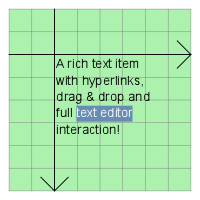
アイテムにプレーンテキストのみを表示する必要がある場合は、代わりにQGraphicsSimpleTextItem の使用を検討してください。
アイテムのテキストを設定するには、QString を QGraphicsTextItem のコンストラクタに渡すか、setHtml() またはsetPlainText() を呼び出してください。
QGraphicsTextItemは、テキストの書式付きサイズと関連付けられたフォントを使用して、boundingRect()、shape()、およびcontains()の適切な実装を提供します。フォントは、setFont()を呼び出すことで設定できます。
setTextInteractionFlags() を使用してQt::TextEditorInteraction フラグを設定することで、アイテムを編集可能にすることができます。
項目の推奨テキスト幅は、setTextWidth() を使用して設定し、textWidth() を使用して取得できます。
注: HTMLテキストを中央揃えにするには 、アイテムのテキスト幅を設定する必要があります。それ以外の場合は、アイテムのテキストを設定した後、adjustSize() を呼び出すことができます。
注:QGraphicsTextItemは デフォルトでhover events を受け付けます。これはsetAcceptHoverEvents()を使用して変更できます。
関連項目: QGraphicsSimpleTextItem 、QGraphicsPathItem 、QGraphicsRectItem 、QGraphicsEllipseItem 、QGraphicsPixmapItem 、QGraphicsPolygonItem 、QGraphicsLineItem 、およびGraphics View Framework。
プロパティのドキュメント
openExternalLinks : bool
QGraphicsTextItem が、linkActivated シグナルを発生させる代わりに、QDesktopServices::openUrl() を使用してリンクを自動的に開くかどうかを指定します。
デフォルト値は false です。
アクセス関数:
| bool | openExternalLinks() const |
| void | setOpenExternalLinks(bool open) |
textCursor : QTextCursor
このプロパティは、編集可能なテキスト項目内の表示されているテキストカーソルを表します。
デフォルトでは、項目のテキストが設定されていない場合、このプロパティにはヌルのテキストカーソルが含まれます。それ以外の場合は、項目のドキュメントの先頭に配置されたテキストカーソルが含まれます。
アクセス関数:
| QTextCursor | textCursor() const |
| void | setTextCursor(const QTextCursor &cursor) |
メンバ関数のドキュメント
[explicit] QGraphicsTextItem::QGraphicsTextItem(QGraphicsItem *parent = nullptr)
QGraphicsTextItem を作成します。parent は、QGraphicsItem のコンストラクタに渡されます。
QGraphicsScene::addItem()も参照してください 。
[explicit] QGraphicsTextItem::QGraphicsTextItem(const QString &text, QGraphicsItem *parent = nullptr)
text をデフォルトのプレーンテキストとして使用して、QGraphicsTextItemを生成します。parent は、QGraphicsItem のコンストラクタに渡されます。
QGraphicsScene::addItem()も参照してください 。
[virtual noexcept] QGraphicsTextItem::~QGraphicsTextItem()
QGraphicsTextItem を削除します。
void QGraphicsTextItem::adjustSize()
テキスト項目を適切なサイズに調整します。
[override virtual] QRectF QGraphicsTextItem::boundingRect() const
QGraphicsItem::boundingRect() const を再実装します。
[override virtual] bool QGraphicsTextItem::contains(const QPointF &point) const
QGraphicsItem::contains (const QPointF &point)const を再実装します。
[override virtual protected] void QGraphicsTextItem::contextMenuEvent(QGraphicsSceneContextMenuEvent *event)
QGraphicsItem::contextMenuEvent(QGraphicsSceneContextMenuEvent *event) を再実装します。
QColor QGraphicsTextItem::defaultTextColor() const
書式設定されていないテキストに使用されるデフォルトのテキスト色を返します。
setDefaultTextColor()も参照してください 。
QTextDocument *QGraphicsTextItem::document() const
その項目のテキストドキュメントを返します。
setDocument()も参照してください 。
[override virtual protected] void QGraphicsTextItem::dragEnterEvent(QGraphicsSceneDragDropEvent *event)
QGraphicsItem::dragEnterEvent(QGraphicsSceneDragDropEvent *event) を再実装します。
[override virtual protected] void QGraphicsTextItem::dragLeaveEvent(QGraphicsSceneDragDropEvent *event)
QGraphicsItem::dragLeaveEvent(QGraphicsSceneDragDropEvent *event) を再実装します。
[override virtual protected] void QGraphicsTextItem::dragMoveEvent(QGraphicsSceneDragDropEvent *event)
QGraphicsItem::dragMoveEvent(QGraphicsSceneDragDropEvent *event) を再実装します。
[override virtual protected] void QGraphicsTextItem::dropEvent(QGraphicsSceneDragDropEvent *event)
QGraphicsItem::dropEvent (QGraphicsSceneDragDropEvent *event)を再実装します。
[override virtual protected] void QGraphicsTextItem::focusInEvent(QFocusEvent *event)
QGraphicsItem::focusInEvent(QFocusEvent *event) の再実装です。
[override virtual protected] void QGraphicsTextItem::focusOutEvent(QFocusEvent *event)
QGraphicsItem::focusOutEvent(QFocusEvent *event) を再実装します。
QFont QGraphicsTextItem::font() const
テキストの描画に使用される、アイテムのフォントを返します。
setFont()も参照してください 。
[override virtual protected] void QGraphicsTextItem::hoverEnterEvent(QGraphicsSceneHoverEvent *event)
QGraphicsItem::hoverEnterEvent(QGraphicsSceneHoverEvent *event) を再実装します。
[override virtual protected] void QGraphicsTextItem::hoverLeaveEvent(QGraphicsSceneHoverEvent *event)
QGraphicsItem::hoverLeaveEvent(QGraphicsSceneHoverEvent *event) を再実装します。
[override virtual protected] void QGraphicsTextItem::hoverMoveEvent(QGraphicsSceneHoverEvent *event)
QGraphicsItem::hoverMoveEvent(QGraphicsSceneHoverEvent *event) を再実装します。
[override virtual protected] void QGraphicsTextItem::inputMethodEvent(QInputMethodEvent *event)
QGraphicsItem::inputMethodEvent(QInputMethodEvent *event) を再実装します。
[override virtual protected] QVariant QGraphicsTextItem::inputMethodQuery(Qt::InputMethodQuery query) const
QGraphicsItem::inputMethodQuery (Qt::InputMethodQuery query)const を再実装します。
[override virtual] bool QGraphicsTextItem::isObscuredBy(const QGraphicsItem *item) const
QGraphicsItem::isObscuredBy (const QGraphicsItem *item)const の再実装です。
[override virtual protected] void QGraphicsTextItem::keyPressEvent(QKeyEvent *event)
QGraphicsItem::keyPressEvent(QKeyEvent *event) の再実装です。
[override virtual protected] void QGraphicsTextItem::keyReleaseEvent(QKeyEvent *event)
QGraphicsItem::keyReleaseEvent(QKeyEvent *event) を再実装します。
[signal] void QGraphicsTextItem::linkActivated(const QString &link)
このシグナルは、ユーザーがQt::LinksAccessibleByMouse またはQt::LinksAccessibleByKeyboard を有効にするテキスト項目のリンクをクリックしたときに発火します。link は、クリックされたリンクです。
setTextInteractionFlags()も参照してください 。
[signal] void QGraphicsTextItem::linkHovered(const QString &link)
このシグナルは、Qt::LinksAccessibleByMouse を有効にするテキストアイテム上のリンクにユーザーがカーソルを合わせると発火します。link は、カーソルが合わせられたリンクです。
「setTextInteractionFlags()」も参照してください 。
[override virtual protected] void QGraphicsTextItem::mouseDoubleClickEvent(QGraphicsSceneMouseEvent *event)
QGraphicsItem::mouseDoubleClickEvent(QGraphicsSceneMouseEvent *event) を再実装します。
[override virtual protected] void QGraphicsTextItem::mouseMoveEvent(QGraphicsSceneMouseEvent *event)
QGraphicsItem::mouseMoveEvent(QGraphicsSceneMouseEvent *event) を再実装します。
[override virtual protected] void QGraphicsTextItem::mousePressEvent(QGraphicsSceneMouseEvent *event)
QGraphicsItem::mousePressEvent(QGraphicsSceneMouseEvent *event) を再実装します。
[override virtual protected] void QGraphicsTextItem::mouseReleaseEvent(QGraphicsSceneMouseEvent *event)
QGraphicsItem::mouseReleaseEvent(QGraphicsSceneMouseEvent *event) を再実装します。
[override virtual] QPainterPath QGraphicsTextItem::opaqueArea() const
QGraphicsItem::opaqueArea() const を再実装します。
[override virtual] void QGraphicsTextItem::paint(QPainter *painter, const QStyleOptionGraphicsItem *option, QWidget *widget)
QGraphicsItem::paint (QPainter *painter, const QStyleOptionGraphicsItem *option, QWidget *widget)を再実装します。
[override virtual protected] bool QGraphicsTextItem::sceneEvent(QEvent *event)
QGraphicsItem::sceneEvent(QEvent *event) を再実装します。
void QGraphicsTextItem::setDefaultTextColor(const QColor &col)
書式設定されていないテキストの色を「col 」に設定します。
defaultTextColor()も参照してください 。
void QGraphicsTextItem::setDocument(QTextDocument *document)
アイテムにテキストドキュメント「document 」を設定します。
document()も参照してください 。
void QGraphicsTextItem::setFont(const QFont &font)
テキスト項目の表示に使用するフォントを「font 」に設定します。
font()も参照してください 。
void QGraphicsTextItem::setHtml(const QString &text)
項目のテキストを `text` に設定します。このテキストは HTML 形式であるとみなされます。項目がキーボード入力フォーカスを持っている場合、この関数は `ensureVisible()` も呼び出し、すべてのビューポートでテキストが表示されるようにします。
toHtml()、hasFocus()、およびQGraphicsSimpleTextItemも参照してください 。
void QGraphicsTextItem::setPlainText(const QString &text)
項目のテキストを「text 」に設定します。項目がキーボードの入力フォーカスを持っている場合、この関数はensureVisible()も呼び出し、すべてのビューポートでテキストが表示されるようにします。
toHtml() およびhasFocus()も参照してください 。
void QGraphicsTextItem::setTabChangesFocus(bool b)
b が true の場合、Tab キーを押すとウィジェットのフォーカスが切り替わります。そうでない場合、Tabキーを押すと文書にタブが挿入されます。
場合によっては、フォーカスチェーンが途切れてしまうため、テキスト編集時にユーザーがタブ文字を入力したり、Tab キーを使用してインデントを変更したりできないようにする必要があります。デフォルトはfalseです。
tabChangesFocus()、ItemIsFocusable 、およびtextInteractionFlags()も参照してください 。
void QGraphicsTextItem::setTextInteractionFlags(Qt::TextInteractionFlags flags)
フラグ `flags ` を設定し、テキスト項目がユーザー入力に対してどのように反応するかを指定します。
QGraphicsTextItem のデフォルト値はQt::NoTextInteraction です。この関数は、ItemIsFocusableQGraphicsItem フラグにも影響を与え、flags がQt::NoTextInteraction と異なる場合はこのフラグをセットし、そうでない場合はクリアします。
デフォルトでは、テキストは読み取り専用です。アイテムをエディタに変換するには、Qt::TextEditable フラグを設定してください。
textInteractionFlags()も参照してください 。
void QGraphicsTextItem::setTextWidth(qreal width)
項目のテキストの推奨幅を設定します。実際のテキストが指定された幅より広い場合、テキストは複数行に分割されます。
width が-1に設定されている場合、明示的な改行や新しい段落によって強制されない限り、テキストは複数行に分割されません。
デフォルト値は -1 です。
QGraphicsTextItem は内部で `QTextDocument ` を保持しており、これがテキストの幅の計算に使用されることに注意してください。
textWidth() およびQTextDocument::setTextWidth()も参照してください 。
[override virtual] QPainterPath QGraphicsTextItem::shape() const
QGraphicsItem::shape() const を再実装します。
bool QGraphicsTextItem::tabChangesFocus() const
Tab キーの押下によってウィジェットのフォーカスが移動する場合、true を返します。そうでない場合は、falseを返します。
デフォルトでは、この動作は無効になっており、この関数は false を返します。
setTabChangesFocus()も参照してください 。
Qt::TextInteractionFlags QGraphicsTextItem::textInteractionFlags() const
現在のテキスト操作フラグを返します。
setTextInteractionFlags()も参照してください 。
qreal QGraphicsTextItem::textWidth() const
テキストの幅を返します。
幅は、QGraphicsTextItem が内部で保持しているQTextDocument を用いて計算されます。
setTextWidth() およびQTextDocument::textWidth()も参照してください 。
QString QGraphicsTextItem::toHtml() const
アイテムのテキストをHTML形式に変換したものを返します。テキストが設定されていない場合は、空のQString を返します。
setHtml()も参照してください 。
QString QGraphicsTextItem::toPlainText() const
アイテムのテキストをプレーンテキストに変換したものを返します。テキストが設定されていない場合は、空のQString を返します。
setPlainText()も参照してください 。
[override virtual] int QGraphicsTextItem::type() const
QGraphicsItem::type() const を再実装します。
© 2026 The Qt Company Ltd. Documentation contributions included herein are the copyrights of their respective owners. The documentation provided herein is licensed under the terms of the GNU Free Documentation License version 1.3 as published by the Free Software Foundation. Qt and respective logos are trademarks of The Qt Company Ltd. in Finland and/or other countries worldwide. All other trademarks are property of their respective owners.
