
LineSeries QML Type
데이터를 선 그래프로 표시합니다. 더 보기...
| Import Statement: | import QtCharts 2.12 |
| In C++: | QLineSeries |
| Inherits: | |
| Status: | Deprecated |
이 유형은 더 이상 권장되지 않습니다. 새로운 코드에서는 이 유형을 사용하지 않는 것이 좋습니다.
속성
상세 설명
선 차트는 일련의 데이터 포인트를 직선으로 연결하여 정보를 표시하는 데 사용됩니다.
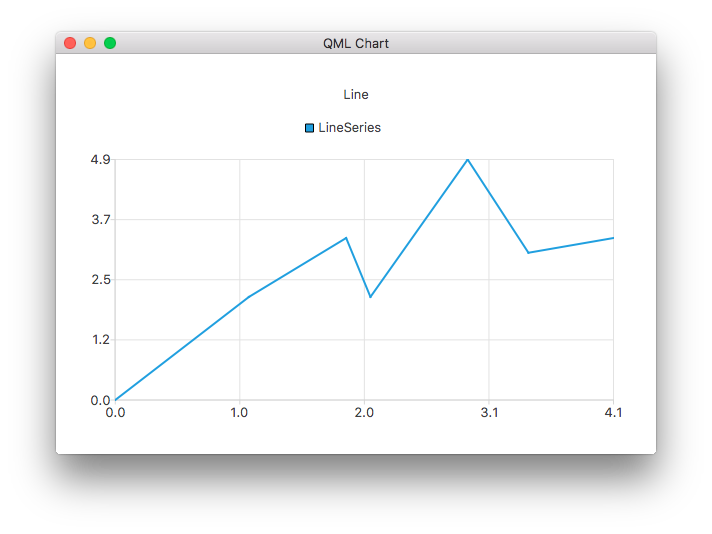
다음 QML 예제는 간단한 선 차트를 만드는 방법을 보여줍니다:
ChartView {
    title: "Line Chart"
    anchors.fill: parent
    antialiasing: true

    LineSeries {
        name: "Line"
        XYPoint { x: 0; y: 0 }
        XYPoint { x: 1.1; y: 2.1 }
        XYPoint { x: 1.9; y: 3.3 }
        XYPoint { x: 2.1; y: 2.1 }
        XYPoint { x: 2.9; y: 4.9 }
        XYPoint { x: 3.4; y: 3.0 }
        XYPoint { x: 4.1; y: 3.3 }
    }
}
속성 설명
capStyle : Qt::PenCapStyle
선의 끝단 스타일을 제어합니다. Qt.FlatCap, Qt.SquareCap 또는 Qt.RoundCap 중 하나로 설정합니다. 기본적으로 끝단 스타일은 Qt.SquareCap입니다.
Qt::PenCapStyle도 참조하십시오 .
count : int
시리즈의 데이터 포인트 수.
style : Qt::PenStyle
선의 스타일을 제어합니다. Qt.NoPen, Qt.SolidLine, Qt.DashLine, Qt.DotLine, Qt.DashDotLine 또는 Qt.DashDotDotLine 중 하나로 설정합니다. QML API에서는 Qt.CustomDashLine 사용이 지원되지 않습니다. 기본적으로 스타일은 Qt.SolidLine입니다.
Qt::PenStyle도 참조하십시오 .
width : real
선의 너비입니다. 기본적으로 너비는 2.0입니다.
© 2026 The Qt Company Ltd. Documentation contributions included herein are the copyrights of their respective owners. The documentation provided herein is licensed under the terms of the GNU Free Documentation License version 1.3 as published by the Free Software Foundation. Qt and respective logos are trademarks of The Qt Company Ltd. in Finland and/or other countries worldwide. All other trademarks are property of their respective owners.
