
ChartView QML Type
차트의 시리즈, 범례 및 축을 그래픽으로 표시하는 기능을 관리합니다. 더 보기...
| Import Statement: | import QtCharts 2.12 |
| Inherited By: | |
| Status: | Deprecated |
이 유형은 더 이상 사용되지 않습니다. 새로운 코드에서는 이 유형을 사용하지 않도록 강력히 권장합니다.
속성
- animationDuration : int
- animationEasingCurve : easing
- animationOptions : enumeration
- axes : list<AbstractAxis>
- backgroundColor : color
- backgroundRoundness : real
- count : int
- dropShadowEnabled : bool
- legend : Legend
- locale : locale
(since QtCharts 2.0) - localizeNumbers : bool
(since QtCharts 2.0) - margins : Margins
- plotArea : rect
- plotAreaColor : color
- theme : enumeration
- title : string
- titleColor : color
- titleFont : font
신호
- seriesAdded(AbstractSeries series)
- seriesRemoved(AbstractSeries series)
방법
- Axis axisX(AbstractSeries series)
- Axis axisY(AbstractSeries series)
- AbstractSeries createSeries(enumeration type, string name, AbstractAxis axisX, AbstractAxis axisY)
- bool isZoomed()
- point mapToPosition(point value, AbstractSeries series)
- point mapToValue(point position, AbstractSeries series)
- void removeAllSeries()
- void removeSeries(AbstractSeries series)
- void scrollDown(real pixels)
- void scrollLeft(real pixels)
- void scrollRight(real pixels)
- void scrollUp(real pixels)
- AbstractSeries series(int index)
- AbstractSeries series(string name)
- void setAxisX(AbstractAxis axis, AbstractSeries series)
- void setAxisY(AbstractAxis axis, AbstractSeries series)
- void zoom(real factor)
- void zoomIn()
- void zoomIn(rect rectangle)
- void zoomOut()
- void zoomReset()
상세 설명
ChartView 유형은 다양한 시리즈 유형을 차트로 표시합니다.
이 예제는 간단한 선 차트를 만드는 방법을 보여줍니다:
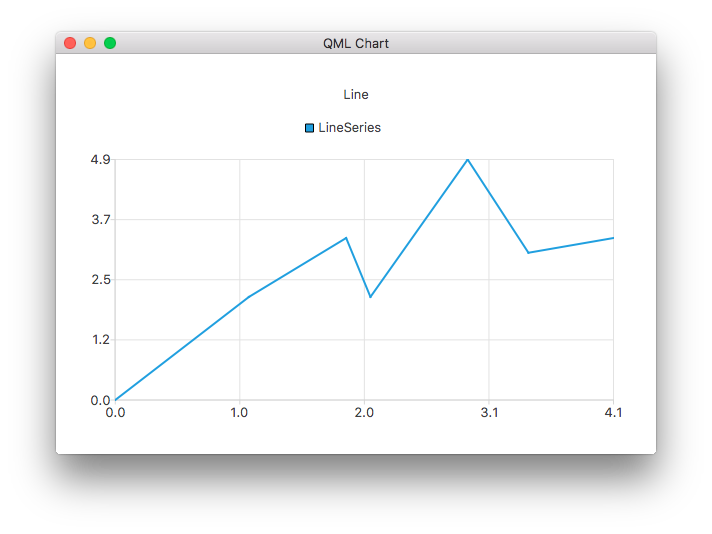
ChartView {
    title: "Line Chart"
    anchors.fill: parent
    antialiasing: true

    LineSeries {
        name: "Line"
        XYPoint { x: 0; y: 0 }
        XYPoint { x: 1.1; y: 2.1 }
        XYPoint { x: 1.9; y: 3.3 }
        XYPoint { x: 2.1; y: 2.1 }
        XYPoint { x: 2.9; y: 4.9 }
        XYPoint { x: 3.4; y: 3.0 }
        XYPoint { x: 4.1; y: 3.3 }
    }
}
속성 설명
animationDuration : int
차트의 애니메이션 재생 시간.
animationEasingCurve : easing
차트 애니메이션의 완화 곡선.
animationOptions : enumeration
차트에서 활성화된 애니메이션:
| 상수 | 설명 |
|---|---|
ChartView.NoAnimation | 차트에서 애니메이션이 비활성화됩니다. 이 값이 기본값입니다. |
ChartView.GridAxisAnimations | 차트에서 격자 축 애니메이션이 활성화되어 있습니다. |
ChartView.SeriesAnimations | 차트에서 시리즈 애니메이션이 활성화되어 있습니다. |
ChartView.AllAnimations | 차트에서 모든 애니메이션 유형이 활성화되어 있습니다. |
axes : list<AbstractAxis>
그래프의 축.
backgroundColor : color
차트의 배경색입니다. 기본적으로 배경색은 차트 테마에 따라 지정됩니다.
theme도 참조하십시오 .
backgroundRoundness : real
차트 배경의 모서리에 표시되는 둥글림 원의 지름입니다.
count : int
차트에 추가된 시리즈의 수.
dropShadowEnabled : bool
배경 드롭 섀도우 효과가 활성화되어 있는지 여부입니다.
true 로 설정하면 배경 드롭 섀도우 효과가 활성화됩니다. false 로 설정하면 비활성화됩니다.
legend : Legend
차트의 범례. 범례에는 차트에 추가된 모든 시계열, 원형 차트의 각 부분, 막대 차트 세트가 나열되어 있습니다.
locale : locale [since QtCharts 2.0]
다양한 차트 레이블의 서식을 지정하는 데 사용되는 로케일입니다.
localizeNumbers 가 true 인 경우에만 레이블이 현지화되며, DateTimeAxis 레이블은 예외로, 이 속성으로 설정된 QLocale 를 항상 사용합니다.
차트가 생성될 당시의 애플리케이션 기본 로캘이 기본값으로 설정됩니다.
이 속성은 QtCharts 2.0에서 도입되었습니다.
localizeNumbers도 참조하십시오 .
localizeNumbers : bool [since QtCharts 2.0]
숫자가 현지화되는지 여부.
true 인 경우, 다양한 시리즈 및 축 레이블에 표시되는 모든 생성된 숫자는 locale 속성으로 설정된 QLocale 를 사용하여 현지화됩니다. false 인 경우, 항상 C 로케일이 사용됩니다. 기본값은 false 입니다.
참고: 이 속성은 DateTimeAxis 레이블에는 영향을 미치지 않으며, DateTimeAxis 레이블은 항상 locale 속성으로 설정된 QLocale 을 사용합니다.
이 속성은 QtCharts 2.0에서 도입되었습니다.
locale도 참조하십시오 .
margins : Margins
차트 사각형의 가장자리와 플롯 영역 사이에 허용되는 최소 여백입니다. 이 여백은 제목, 축 및 범례를 그리는 데 사용됩니다.
plotArea : rect
차트가 그려지는 직사각형 영역입니다.
플롯 영역에는 여백으로 정의된 영역은 포함되지 않습니다. 기본적으로 이 영역은 ` ChartView` 내부에 있을 경우 크기가 조정됩니다. 플롯 영역에 명시적인 직사각형이 설정된 경우 이를 따르며, 기본 동작으로 되돌리려면 ` Qt.rect(0, 0, 0, 0) `로 설정하면 됩니다.
margins도 참조하십시오 .
plotAreaColor : color
차트 플롯 영역의 배경색입니다. 기본적으로 플롯 영역의 배경은 차트 테마에 지정된 차트 배경색을 사용합니다.
backgroundColor 및 theme도 참조하십시오 .
theme : enumeration
차트에서 사용하는 테마입니다.
테마는 차트의 모든 시각적 요소(시리즈의 색상, 펜, 브러시, 글꼴은 물론 축, 제목, 범례 등)에 적용되는 UI 스타일 관련 설정을 모아둔 내장된 모음입니다. Qml Oscilloscope 예제는 테마를 설정하는 방법을 보여줍니다.
참고: 테마를변경하면 시리즈에 이전에 적용된 모든 사용자 정의 설정이 덮어쓰게 됩니다.
다음 값들이 지원됩니다:
| 상수 | 설명 |
|---|---|
ChartView.ChartThemeLight | 기본 테마인 밝은 테마입니다. |
ChartView.ChartThemeBlueCerulean | 청록색 테마입니다. |
ChartView.ChartThemeDark | 어두운 테마입니다. |
ChartView.ChartThemeBrownSand | 모래 갈색 테마. |
ChartView.ChartThemeBlueNcs | NCS(Natural Color System) 블루 테마. |
ChartView.ChartThemeHighContrast | 고대비 테마. |
ChartView.ChartThemeBlueIcy | 얼음빛 파란색 테마. |
ChartView.ChartThemeQt | Qt 테마. |
title : string
제목은 차트 상단의 헤드라인으로 표시됩니다. 차트 제목은 HTML 서식을 지원합니다.
titleColor도 참조하십시오 .
titleColor : color
제목 텍스트의 색상.
titleFont : font
차트의 제목 글꼴.
자세한 내용은 font 을 참조하십시오.
Signal 문서
seriesAdded(AbstractSeries series)
이 신호는 series 시리즈가 차트에 추가될 때 발생합니다.
참고: 해당 핸들러는 onSeriesAdded 입니다.
seriesRemoved(AbstractSeries series)
이 신호는 차트에서 시계열 series 이 제거될 때 발생합니다. 신호 핸들러가 완료되면 시계열 객체는 무효화됩니다.
참고: 해당 핸들러는 onSeriesRemoved 입니다.
메서드 설명서
Axis axisX(AbstractSeries series)
series 의 x축.
setAxisX()도 참조하십시오 .
Axis axisY(AbstractSeries series)
series 의 y축.
setAxisY()도 참조하십시오 .
AbstractSeries createSeries(enumeration type, string name, AbstractAxis axisX, AbstractAxis axisY)
차트에 “ type ” 유형의 시계를 “ name ”라는 이름으로 추가하고, 선택적으로 “ axisX ” 및 “ axisY ” 축을 지정합니다. 예:
// lineSeries is a LineSeries object that has already been added to the ChartView; re-use its axes
var myAxisX = chartView.axisX(lineSeries);
var myAxisY = chartView.axisY(lineSeries);
var scatter = chartView.createSeries(ChartView.SeriesTypeScatter, "scatter series", myAxisX, myAxisY);
type 의 값으로는 다음 열거형 값들을 사용할 수 있습니다:
| 상수 | 설명 |
|---|---|
ChartView.SeriesTypeLine | 선형 시리즈입니다. |
ChartView.SeriesTypeArea | 영역 시리즈. |
ChartView.SeriesTypeBar | 막대형 시리즈. |
ChartView.SeriesTypeStackedBar | 누적 막대 시리즈. |
ChartView.SeriesTypePercentBar | 백분율 막대 차트. |
ChartView.SeriesTypeBoxPlot | 박스 플롯 시계열. |
ChartView.SeriesTypeCandlestick | 캔들스틱 시리즈. |
ChartView.SeriesTypePie | 원형 차트. |
ChartView.SeriesTypeScatter | 산점도 시리즈. |
ChartView.SeriesTypeSpline | 스플라인 시리즈. |
ChartView.SeriesTypeHorizontalBar | 가로 막대 차트. |
ChartView.SeriesTypeHorizontalStackedBar | 수평 누적 막대 차트. |
ChartView.SeriesTypeHorizontalPercentBar | 가로형 백분율 막대 차트. |
bool isZoomed()
시리즈 중 확대된 영역을 가진 것이 있으면 ` true `를 반환합니다.
point mapToPosition(point value, AbstractSeries series)
시리즈 series 내의 값 value 이 차트상 어디에 위치하는지 반환합니다.
point mapToValue(point position, AbstractSeries series)
차트에서 position 위치에 있는 series 시리즈의 값을 반환합니다.
void removeAllSeries()
차트에서 모든 시계열을 제거하고 모든 시계열 객체를 영구적으로 삭제합니다.
void removeSeries(AbstractSeries series)
차트에서 series 시리즈를 제거하고 해당 시리즈 객체를 영구적으로 삭제합니다.
void scrollDown(real pixels)
pixels 에서 지정한 픽셀 수만큼 아래로 스크롤합니다. 이 메서드는 예를 들어 키보드 탐색 등에 적합한 편리한 메서드입니다.
void scrollLeft(real pixels)
pixels 에서 지정한 픽셀 수만큼 왼쪽으로 스크롤합니다. 이는 예를 들어 키보드 탐색에 적합한 편리한 메서드입니다.
void scrollRight(real pixels)
pixels 에서 지정한 픽셀 수만큼 오른쪽으로 스크롤합니다. 이 메서드는 예를 들어 키를 이용한 탐색에 적합한 편리한 메서드입니다.
void scrollUp(real pixels)
pixels 로 지정된 픽셀 수만큼 위로 스크롤합니다. 이는 예를 들어 키보드 탐색에 적합한 편의 메서드입니다.
AbstractSeries series(int index)
차트에서 인덱스 index 를 가진 시리즈를 반환합니다. 차트의 count 속성과 함께 사용하면 차트의 시리즈를 순회할 수 있습니다.
count도 참조하십시오 .
AbstractSeries series(string name)
차트에서 “ name ”라는 이름을 가진 첫 번째 시리를 반환합니다. 해당 이름의 시리가 없으면 null을 반환합니다.
void setAxisX(AbstractAxis axis, AbstractSeries series)
series 의 x축을 axis 로 설정합니다.
axisX()도 참조하십시오 .
void setAxisY(AbstractAxis axis, AbstractSeries series)
series 의 y축을 axis 로 설정합니다.
axisY()도 참조하십시오 .
void zoom(real factor)
사용자 지정 배율 factor 에 따라 차트를 확대합니다.
1.0보다 큰 배율을 지정하면 뷰가 확대되고, 0.0과 1.0 사이의 배율을 지정하면 뷰가 축소됩니다.
void zoomIn()
화면을 2배로 확대합니다.
void zoomIn(rect rectangle)
사각형 rectangle 이 여전히 완전히 보이게 되는 최대 수준까지 뷰를 확대합니다.
참고: 이 기능은 극좌표 차트에서는 지원되지 않습니다.
void zoomOut()
보이는 영역을 2배로 축소합니다.
참고: 결과값에 유효하지 않은 로그 축 범위가 포함될 경우,이 작업은 아무런 효과도 없습니다.
void zoomReset()
시리즈 도메인을 어떤 확대/축소 메서드도 호출되기 전의 상태로 재설정합니다.
참고: 이 메서드를 호출하면 첫 번째 확대/축소 작업과 이 메서드 호출 사이에 지정된 스크롤 및 명시적 축 범위 설정도 재설정됩니다. 확대/축소 작업이 수행되지 않은 경우, 이 메서드는 아무런 작업도 수행하지 않습니다.
© 2026 The Qt Company Ltd. Documentation contributions included herein are the copyrights of their respective owners. The documentation provided herein is licensed under the terms of the GNU Free Documentation License version 1.3 as published by the Free Software Foundation. Qt and respective logos are trademarks of The Qt Company Ltd. in Finland and/or other countries worldwide. All other trademarks are property of their respective owners.
