
Qt Quick 3D - View3D 예제
View3D 를 사용하여 여러 대의 카메라 시점으로 장면을 표시하는 방법을 보여줍니다.
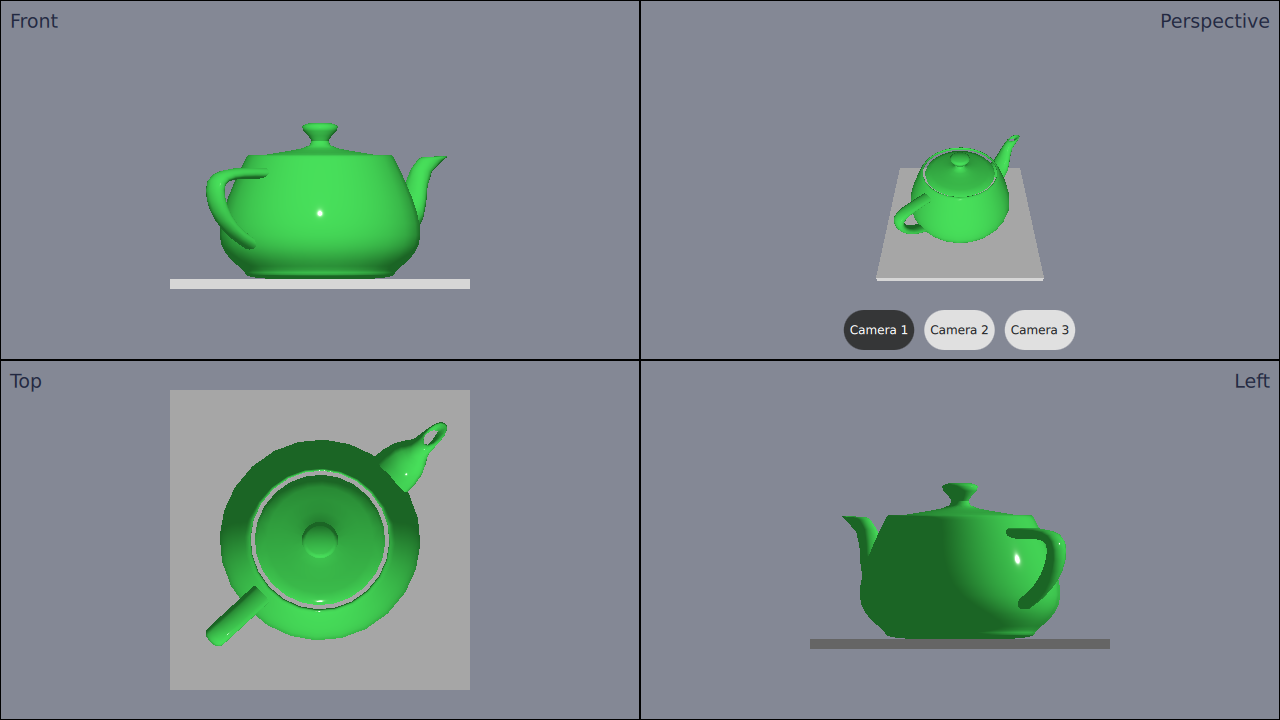
이 예제는 애플리케이션 내에서 서로 다른 카메라를 가진 네 개의 개별 ` View3D`를 사용하는 방법을 보여줍니다.
카메라 정의
먼저 ` cameras`를 정의합니다. 4개의 뷰만 추가할 예정이지만, 여러 개의 서로 다른 카메라를 정의할 것입니다. 이는 뷰 중 하나에서 카메라를 전환할 수 있도록 하기 위함입니다.
카메라는 루트 Node 내부에서 정의해야 합니다. 카메라 정의 방법은 다음과 같습니다:
Node {
    id: standAloneScene
    ...
// The predefined cameras. They have to be part of the scene, i.e. inside the root node.
// Animated perspective camera
Node {
    PerspectiveCamera {
        id: cameraPerspectiveOne
        z: 600
    }

    PropertyAnimation on eulerRotation.x {
        loops: Animation.Infinite
        duration: 5000
        to: -360
        from: 0
    }
}

// Stationary perspective camera
PerspectiveCamera {
    id: cameraPerspectiveTwo
    z: 600
}
    ...
    // Stationary orthographic camera viewing from left
    OrthographicCamera {
        id: cameraOrthographicLeft
        x: -600
        eulerRotation.y: -90
    }
}
뷰 추가하기
카메라를 정의한 후에는 뷰( views)를 추가할 수 있습니다. 화면을 네 부분으로 나누고, 다음과 같이 뷰를 하나씩 추가합니다:
// The views
Rectangle {
    id: topLeft
    anchors.top: parent.top
    anchors.left: parent.left
    width: parent.width * 0.5
    height: parent.height * 0.5
    color: "#848895"
    border.color: "black"

    View3D {
        id: topLeftView
        anchors.fill: parent
        importScene: standAloneScene
        camera: cameraOrthographicFront
    }

    Label {
        text: "Front"
        anchors.top: parent.top
        anchors.left: parent.left
        anchors.margins: 10
        color: "#222840"
        font.pointSize: 14
    }
}
    ...
오른쪽 상단 뷰에는 세 개의 버튼이 있습니다. 이 버튼들을 사용하면 해당 뷰에서 사용되는 카메라를 실시간으로 전환할 수 있습니다. 전환은 카메라 속성을 설정하기만 하면 됩니다:
RoundButton {
    text: "Camera 1"
    highlighted: topRightView.camera == cameraPerspectiveOne
    implicitWidth: controlsContainer.buttonWidth
    onClicked: {
        topRightView.camera = cameraPerspectiveOne
    }
}
...© 2026 The Qt Company Ltd. Documentation contributions included herein are the copyrights of their respective owners. The documentation provided herein is licensed under the terms of the GNU Free Documentation License version 1.3 as published by the Free Software Foundation. Qt and respective logos are trademarks of The Qt Company Ltd. in Finland and/or other countries worldwide. All other trademarks are property of their respective owners.
