
プロジェクトのCMake設定を上書きする
現在のプロジェクトの CMake 設定を上書きするには:
- 「Projects 」>「Project Settings 」>「CMake 」の順に移動します。
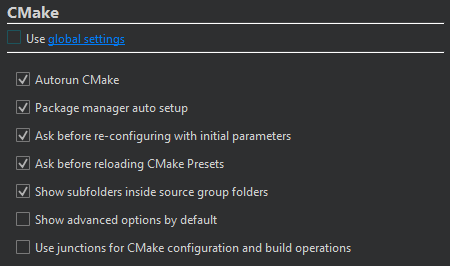
- 「Use global settings 」のチェックを外します。
- プロジェクトの CMake を設定します。
ここで選択した設定は、「Preferences 」>「CMake 」>「General 」で設定した値を上書きします。
| 設定 | 値 | 詳細 |
|---|---|---|
| Autorun CMake | プロジェクト内の「CMakeLists.txt 」設定ファイルを編集したときに、CMake を実行してプロジェクト情報を更新します。また、プロジェクトをビルドしたときにも、プロジェクト情報を更新します。 | CMake プロジェクトの内容を表示 |
| Clear old CMake output on a new run | CMakeを再度実行した際に、古い出力を削除します。 | CMakeの出力を表示する |
| Package manager auto setup | CMakeで使用するために、Conanまたはvcpkgパッケージマネージャーを設定します。 | パッケージマネージャーでのCMakeの使用 |
| Maintenance Tool dependency provider | Qt Online Installer を使用して、不足している Qt モジュールをインストールします。 | 不足しているQtパッケージをインストールする |
| Ask before re-configuring with initial parameters | Re-configure with Initial Variables を選択した際、実行前に確認を行います。 | 初期変数を用いた再設定 |
| Ask before reloading CMake presets | Build へ移動し、Reload CMake Presets を選択した際、実行前に確認を行います。 | CMake プリセット |
| Show subfolders inside source group folders | 「Projects 」ビューで、サブフォルダ名を非表示にし、ソースグループごとにファイルを並べ替えます。 | 「プロジェクト」ビューでサブフォルダ名を非表示にする |
| Show advanced options by default | Initial Configuration およびCurrent Configuration で、デフォルトですべての CMake 変数を表示します。 | 詳細変数の表示 |
| Use junctions for CMake configuration and build operations | Windows では、CMake の configure、build、および install 操作にジャンクションポイントを使用します。 | Windows でジャンクションポイントを使用する |
これらの設定は、CMake の configure プリセットとして、または CMakeLists.txt.shared ファイル内で設定できます。
「CMake を使用したビルド方法」、「 CMake」、および「プロジェクトのビルドと実行」も参照してください 。
Copyright © The Qt Company Ltd. and other contributors. Documentation contributions included herein are the copyrights of their respective owners. The documentation provided herein is licensed under the terms of the GNU Free Documentation License version 1.3 as published by the Free Software Foundation. Qt and respective logos are trademarks of The Qt Company Ltd in Finland and/or other countries worldwide. All other trademarks are property of their respective owners.
