
Qbsプロファイルディレクトリの設定
デフォルトでは、QbsプロファイルはQt Creator の設定ディレクトリ内のqbs ディレクトリに保存されます。これは、異なるQt Creator インスタンスが互いのプロファイルを上書きしないようにするためです。Qt Creator インスタンスを1つしか実行しない場合は、代わりにQbsの設定ディレクトリにプロファイルを保存することもできます。
Qbsの設定を指定するには:
- [Preferences ] > [Qbs ] > [General] を選択します。
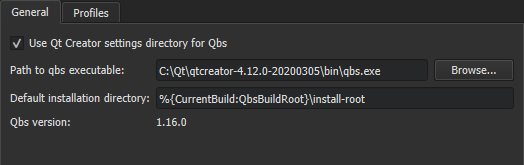
- QbsプロファイルをQbs設定ディレクトリに保存するには、 Use Qt Creator settings directory for Qbs チェックボックスをオフにすると、Qbs プロファイルは Qbs 設定ディレクトリに保存されます。
- [Path to qbs executable ] フィールドでは、Qbs 実行ファイルへのパスを確認および変更できます。[Qbs version ] フィールドには、実行ファイルのバージョン番号が表示されます。
- [Default installation directory ] フィールドでは、Qbs のインストールディレクトリを確認および変更できます。
- 「Profiles 」タブを選択すると、Qbsプロファイルの設定を指定できます。
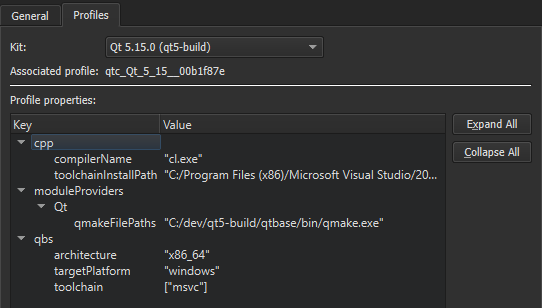
- 「Kit 」フィールドで、ビルドおよび実行キットを選択すると、関連付けられたプロファイルのプロパティを表示できます。プロパティを変更するには、「Preferences 」>「Kits 」を選択します。詳細については、「Qbs プロファイルの編集」を参照してください。
「プロジェクトの開く」、「Qbs」、「Qbs ビルド構成」、および「実行設定の指定」も参照してください 。
Copyright © The Qt Company Ltd. and other contributors. Documentation contributions included herein are the copyrights of their respective owners. The documentation provided herein is licensed under the terms of the GNU Free Documentation License version 1.3 as published by the Free Software Foundation. Qt and respective logos are trademarks of The Qt Company Ltd in Finland and/or other countries worldwide. All other trademarks are property of their respective owners.
