
教程:编译与运行
要测试您的 Qt Online Installer 安装是否成功,请打开一个现有的示例应用程序项目。
要在 Android 或 iOS 设备上运行示例应用程序,您必须先设置相应的开发环境。有关详细信息,请参阅《Android 开发》和《iOS 开发》。
要在Boot to Qt 设备上运行示例应用程序,您必须在开发主机上设置Boot to Qt ,并在主机与设备之间建立连接。有关更多信息,请参阅《Boot to Qt :文档》。
如果您已 Qt Design Studio 已安装该软件,则可从Qt Design Studio 中的Qt Creator 打开Qt Design Studio 示例。
- 在Welcome 模式下,选择Examples (1)。
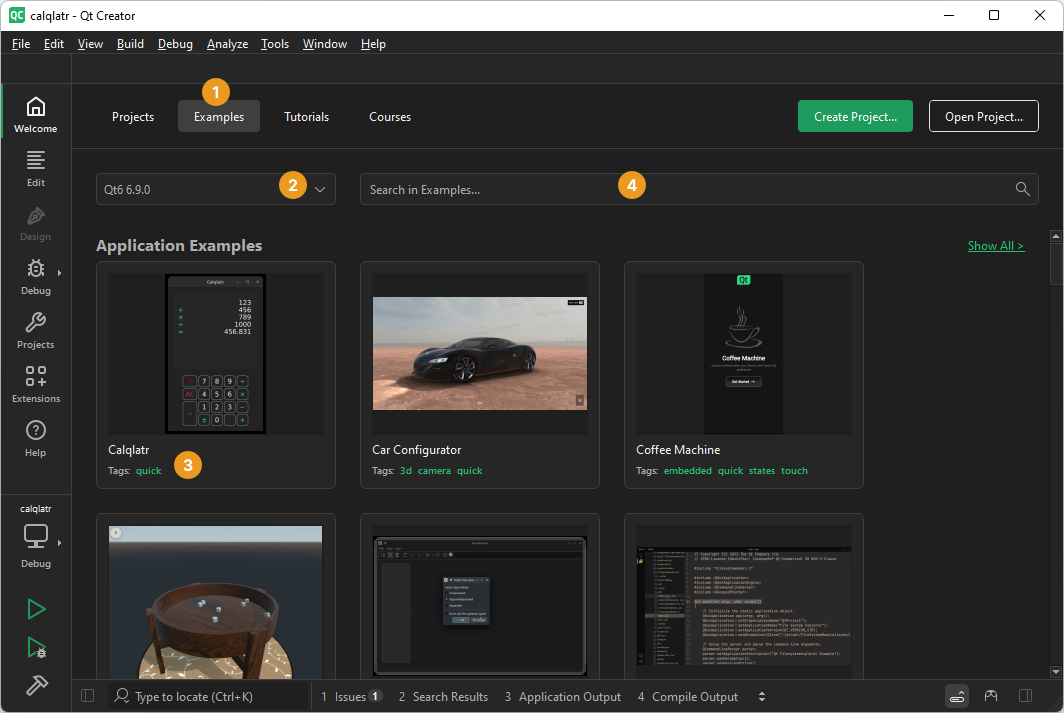
如果看不到任何示例,请检查Qt 版本列表 (2) 是否为空。如果您选择了适用于 Android 或 iOS 的 Qt 版本,则只能看到可在 Android 或 iOS 上运行的示例。
- 在示例列表中选择一个示例。
您还可以使用标签 (3) 来筛选示例。例如,在搜索字段 (4) 中输入 Boot to Qt 标签(仅限商业版),即可列出可在Boot to Qt 设备上运行的示例。
- 在Configure Project 中,选择用于为目标平台构建示例的开发套件。
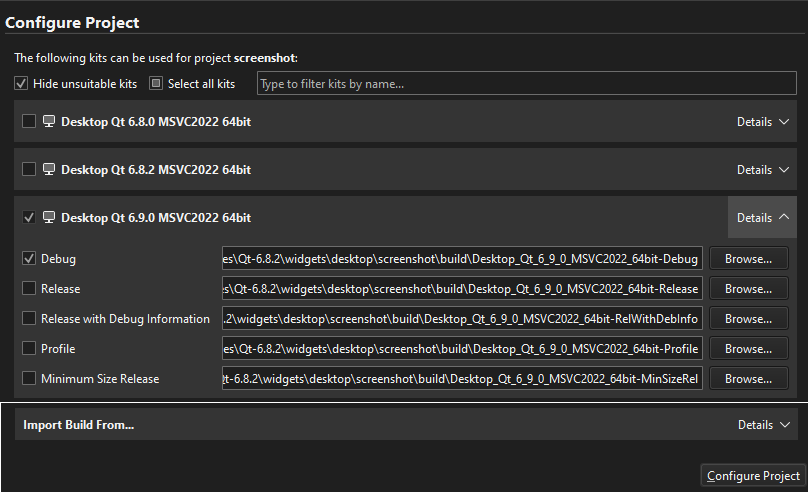
- 选择Configure Project 。
- 要检查是否可以为设备编译和链接应用程序代码,请选择Kit Selector ,然后选择该设备的套件。
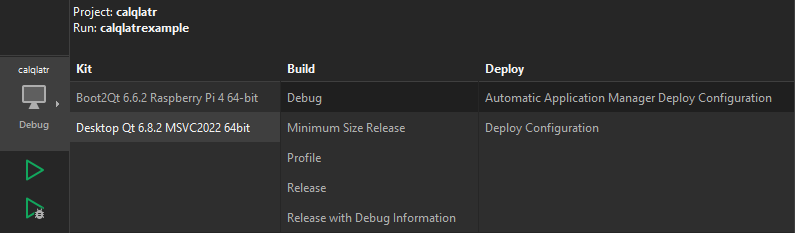
如果您是在安装 Qt XML 时一并安装了Qt Creator ,它应该已自动检测到已安装的套件。如果看不到任何套件,请参阅“添加套件”。
- 选择“
 ”(Run )以构建并运行应用程序。
 - 要查看编译进度,请按Alt+4打开“编译输出”。
如果出现构建错误,请检查是否已安装 Qt 版本、编译器以及必要的套件。如果您正在为 Android 或 iOS 设备构建,请检查是否已正确设置开发环境。
当项目构建成功时,工具栏上的“Build ”进度条将变为绿色。应用程序将在设备上打开。
另请参阅 《如何:管理套件》、《打开项目》、《Android 开发》、《iOS 开发》、《编译输出》、《Boot to Qt :文档》以及《Qt Design Studio 文档》。
Copyright © The Qt Company Ltd. and other contributors. Documentation contributions included herein are the copyrights of their respective owners. The documentation provided herein is licensed under the terms of the GNU Free Documentation License version 1.3 as published by the Free Software Foundation. Qt and respective logos are trademarks of The Qt Company Ltd in Finland and/or other countries worldwide. All other trademarks are property of their respective owners.
