
UI 文件
如果您创建了Qt Quick UI原型项目,或在Qt Creator 和Qt Design Studio 之间切换,您的项目中可能会包含UI文件(.ui.qml )。您应仅在Qt Quick Designer或Qt Design Studio 中编辑这些文件。
默认情况下,Qt Creator 会以Design 模式打开 UI 文件。若要使用Qt Design Studio 打开这些文件,请在 或 视图的右键菜单中选择Open With > Qt Design StudioFile System Projects 。
.ui.qml 文件不支持以下功能:
- JavaScript 代码块
- 纯表达式以外的绑定
- 信号处理程序
- 根组件以外的其他组件中的状态
- 未从QQuickItem 派生的根组件,或Item
- 引用根组件的父组件
以下组件不受支持:
- 行为
- 绑定
- Canvas
- 着色器效果
- 计时器
- 变换
支持的方法
Qt Creator 支持 QML 引擎支持的大多数 JavaScript 函数,以及 Qt Qml 方法的一子集。
本节列出了您可以在.ui.qml 文件中使用的函数。
JavaScript 函数
一般而言,支持纯函数。它们仅依赖于其作用域内的参数并修改这些参数的状态,因此当给定相同参数时,总是返回相同的结果。这使得可以在不破坏.ui.qml 文件的情况下转换和重新格式化属性绑定。
支持以下 JavaScript 函数:
charAt()charCodeAt()concat()endsWith()includes()indexOf()isFinite()isNaN()lastIndexOf()substring()toExponential()toFixed()toLocaleLowerCase()toLocaleStringtoLocaleUpperCase()toLowerCase()toPrecision()toString()toUpperCase()valueOf()
此外,还支持Math 和Date 对象的所有函数。
有关更多信息,请参阅《JavaScript 对象和函数列表》。
Qt Qml 方法
Qt Creator 支持颜色方法、用于创建特定数据类型对象的辅助方法以及转换方法。
支持以下颜色方法:
支持以下辅助方法:
- Qt.formatDate()
- Qt.formatDateTime()
- Qt.formatTime()
- Qt.matrix4x4()
- Qt.point()
- Qt.quaternion()
- Qt.rect()
- Qt.size()
- Qt.vector2d()
- Qt.vector3d()
- Qt.vector4d()
支持以下翻译方法:
- qsTr()
- qsTranslate()
- QT_TRANSLATE_NOOP()
- qsTrId()
- QT_TRID_NOOP()
- QT_TR_NOOP()
注意:请 勿在 UI 文件中混合使用不同的翻译方法。
有关这些方法的更多信息,请参阅Qt Qml 方法。
使用 UI 文件
在“Design ”模式下编辑 UI 文件。要在代码中使用组件,请将其导出为属性:
Item {
    width: 640
    height: 480

    property alias button: button

    Button {
        anchors.centerIn: parent
        id: button
        text: qsTr("Press Me")
    }
}该属性别名将按钮导出到使用该表单的代码中。您可以在Navigator 中使用“ ”(Export )按钮,将组件导出为属性:
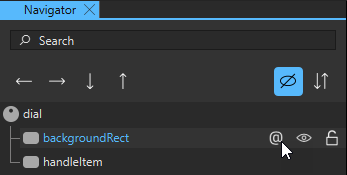
在使用该组件的 UI 文件中,您可以使用button 属性别名来实现信号处理程序等。在下面的代码片段中,UI 文件名为MainForm.ui.qml :
MainForm {
    anchors.fill: parent
    button.onClicked: messageDialog.show(qsTr("Button pressed"))
}
您还可以为其赋值属性,或定义行为及过渡效果。
若要从2D 或Navigator 视图直接跳转到.qml 文件中的组件实现,请右键单击该组件,并在上下文菜单中选择“Go to Implementation ”。
另请参阅 《如何:设计Qt Quick 用户界面》、《Qt Quick 用户界面设计》以及《设计Qt Quick 用户界面》。
Copyright © The Qt Company Ltd. and other contributors. Documentation contributions included herein are the copyrights of their respective owners. The documentation provided herein is licensed under the terms of the GNU Free Documentation License version 1.3 as published by the Free Software Foundation. Qt and respective logos are trademarks of The Qt Company Ltd in Finland and/or other countries worldwide. All other trademarks are property of their respective owners.
