
连接到 Squish 服务器
要建立与 Squish 服务器的连接:
- 选择“Preferences ” > “Squish ” > “General ”。
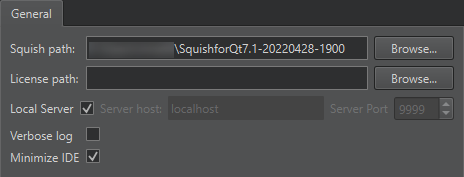
- 在“Squish path ”中,指定 Squish 安装目录的路径。
- 在“License path ”中,如果 Squish 许可证文件不在您的主文件夹中,请指定其路径。例如,如果您有一个包含多个用户的全局安装,且许可证密钥安装在全局文件夹中。
- 选择“Local server ”以使用本地安装的
squishserver.exe。若要使用运行在另一台计算机上的服务器,请清除该复选框,并在“Server host ”中指定服务器地址,并在“Server port ”中指定端口号。如果未指定端口,Qt Creator 将以允许其自动选择可用端口的方式启动squishserver。 - 选择“Verbose log ”可在日志输出中包含额外的日志级别。
- 选择“Minimize IDE ”可在运行或录制测试用例时自动将Qt Creator 最小化。
另请参阅 “创建 Squish 测试套件”、“启用和禁用插件”、“管理 Squish 测试套件和测试用例”、“选择 Squish AUT ”以及“Squish”。
Copyright © The Qt Company Ltd. and other contributors. Documentation contributions included herein are the copyrights of their respective owners. The documentation provided herein is licensed under the terms of the GNU Free Documentation License version 1.3 as published by the Free Software Foundation. Qt and respective logos are trademarks of The Qt Company Ltd in Finland and/or other countries worldwide. All other trademarks are property of their respective owners.
