
QML 快速修复
对 QML 代码应用以下类型的快速修复:
- 重命名 ID
- 拆分初始化表达式
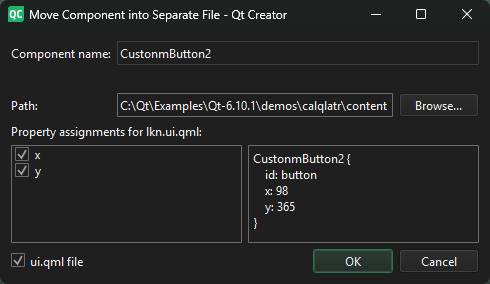
- 将 QML 类型移至单独的文件中,以便在其他
.qml文件中重用
下表总结了 QML 代码的快速修复功能。当光标位于“触发条件”列中描述的位置时,即可执行相应操作。
| 快速修复 | 描述 | 触发条件 |
|---|---|---|
| 将组件移至单独文件 | 将 QML 类型移至单独的文件中。请为新组件命名,并选择属性是针对新组件还是原始组件进行设置。
| QML类型名称。此操作在“2D ”视图中也可用。 |
| 拆分初始化器 | 将一行类型的代码重新格式化为多行类型。例如,重写Item { x: 10; y: 20; width: 10 }为 Item {
x: 10;
y: 20;
width: 10
} | QML 类型属性 |
| 将组件封装在 Loader 中 | 将该类型封装为 Component 类型,并在 Loader 类型中动态加载它。此操作通常用于缩短启动时间。 | QML 类型名称 |
| 添加消息抑制注释 | 在行首添加注释,阻止生成相应消息。 | 静态分析产生的错误、警告或提示 |
另请参 阅“应用快速修复”、“从待办事项列表中排除文件”、“查找符号”、“重命名符号”、“指定快速修复设置”、“快速修复”和“C++ 快速修复”。
Copyright © The Qt Company Ltd. and other contributors. Documentation contributions included herein are the copyrights of their respective owners. The documentation provided herein is licensed under the terms of the GNU Free Documentation License version 1.3 as published by the Free Software Foundation. Qt and respective logos are trademarks of The Qt Company Ltd in Finland and/or other countries worldwide. All other trademarks are property of their respective owners.
