
快速修复
要设置 C++ 快速修复的全局首选项,请转至“Preferences ” > “C++ ” > “Quick Fixes ”。
函数位置
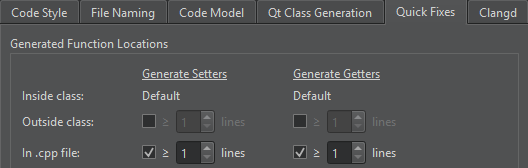
在“Generated Function Locations ”组中,设置快速修复应将 getter 和 setter 函数生成在头文件中(类内或类外),还是生成在实现文件中。
函数名称和属性
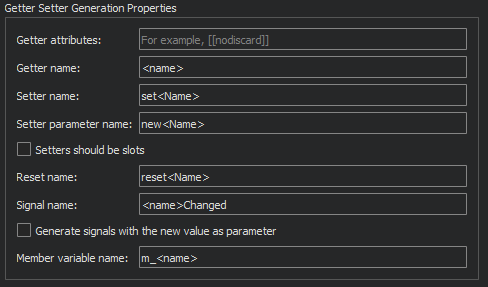
在“Getter Setter Generation Properties ”组中,可针对getter和setter的名称、属性及参数指定额外设置。您可以指定将setter函数作为槽(slot)创建,并生成以新值作为参数的信号。
命名空间处理
在“Missing Namespace Handling ”组中,选择是生成缺失的命名空间、在必要时添加 `using namespace `,还是重写类型以匹配现有名称空间。

自定义参数类型
在“Custom Getter Setter Templates ”组中,指定特定数据类型的获取器或设置器函数的代码应呈现何种形式。对于无法使用operator= 进行赋值的类型(如unique_ptr 的预定义设置),或者operator== 不适用于比较的类型(如浮点类型的预定义设置),此设置必不可少。 例如,如果您有一个特殊类型MyClass ,您可以指定应使用函数myCompare 进行比较,而不是默认的== 。
要为自定义参数类型指定特殊处理,请选择“Add ”,并设置参数类型、比较方式、返回表达式和返回类型。在“Return type ”字段中,使用<new> 和<cur> 访问参数和当前值。使用<type> 访问类型,使用<T> 访问模板参数。
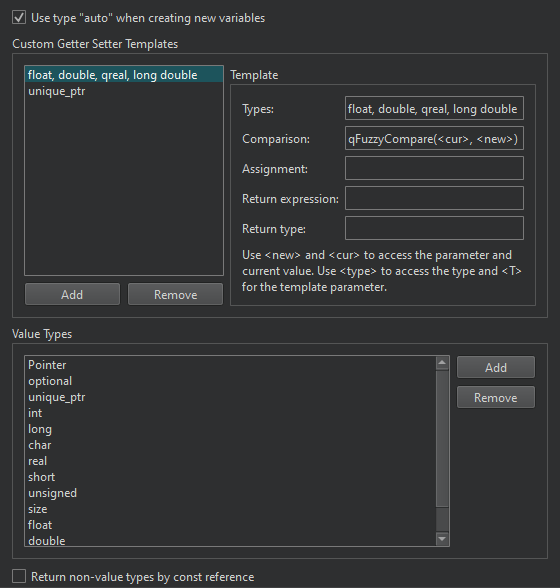
通常,参数是通过const 引用传递的。若要将特定类型的参数作为值传递,请在Value types 字段中列出它们。此时将移除命名空间和模板参数。实际类型(Type)必须包含给定类型。例如,int 匹配int32_t 但不匹配vector<int> ,而vector 匹配std::pmr::vector<int> 但不匹配std::optional<vector<int>> 。
若要使用const 引用返回非平凡对象,请选择“Return non-value types by const reference ”。
另请参 阅“应用快速修复”、“查找符号”、“重命名符号”、“指定快速修复设置”、“C++ 快速修复”和“QML 快速修复”。
Copyright © The Qt Company Ltd. and other contributors. Documentation contributions included herein are the copyrights of their respective owners. The documentation provided herein is licensed under the terms of the GNU Free Documentation License version 1.3 as published by the Free Software Foundation. Qt and respective logos are trademarks of The Qt Company Ltd in Finland and/or other countries worldwide. All other trademarks are property of their respective owners.
