
配置 Git
要设置 Git,请访问Preferences >Version Control >General 。
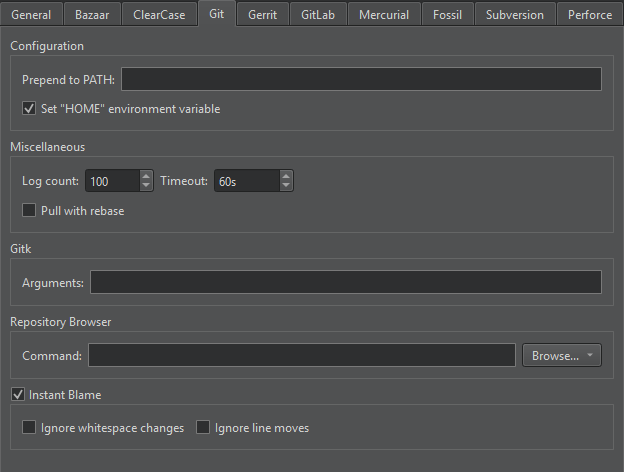
“版本控制”首选项中的“Git”选项卡
您可以设置以下首选项:
- 如果 Git 可执行文件不在
PATH变量中,请在Git command 中指定该可执行文件的完整路径。 - 或者,将包含 Git 可执行文件的文件夹添加到 `Prepend to PATH` 中。
- 在 Windows 中,Git 需要知道
HOME目录,以便保存其自身设置,并让SSH能够找到相关键值。如果HOME目录未正确设置,请选择“Set HOME environment variable ”进行设置。有关更多信息,请参阅《使用 Git for Windows》。 - 若要限制git log 中的条目数量,请修改Log count 。
- 若要避免 Git 命令无限期运行(例如在网络问题发生时),请将Timeout 设为 。
- 若要在执行 `git pull` 时对本地提交进行重基(rebase)而非合并,请选择 `Pull with rebase`。
- 若要在交互式重基(Interactive rebase)过程中允许对合并进行重基,请选择Allow rebasing merges 。这是一项高级选项,需要 Git 2.18 或更高版本。
- 若要在交互式重基过程中允许更新引用,请选择“Allow updating references ”。这是一项高级选项,需要 Git 2.38 或更高版本。
- 若要在运行Gitk 时指定额外参数,请将其添加至Gitk >Arguments 。
- 若要使用其他应用程序(如 GitX 或 QGit)查看 Git 历史,请在“Repository Browser ”>“Command ”中指定可执行文件的路径。有关更多信息,请参阅“其他仓库浏览器”。
- 有关“即时指责”的设置,请参阅“显示即时指责”。
另请参阅 《如何:使用 Git》和《使用 Git》。
Copyright © The Qt Company Ltd. and other contributors. Documentation contributions included herein are the copyrights of their respective owners. The documentation provided herein is licensed under the terms of the GNU Free Documentation License version 1.3 as published by the Free Software Foundation. Qt and respective logos are trademarks of The Qt Company Ltd in Finland and/or other countries worldwide. All other trademarks are property of their respective owners.
