
Install Offline Qt License Server
Offline Qt License Server is hosted on your own infrastructure and operates without an internet connection. It reads license information from a local entitlement.json file. To learn how it compares to the other server types, see Overview.
Before you install Qt License Server, see Prerequisites.
The following illustration describes the workflow of setting up Offline Qt License Server.
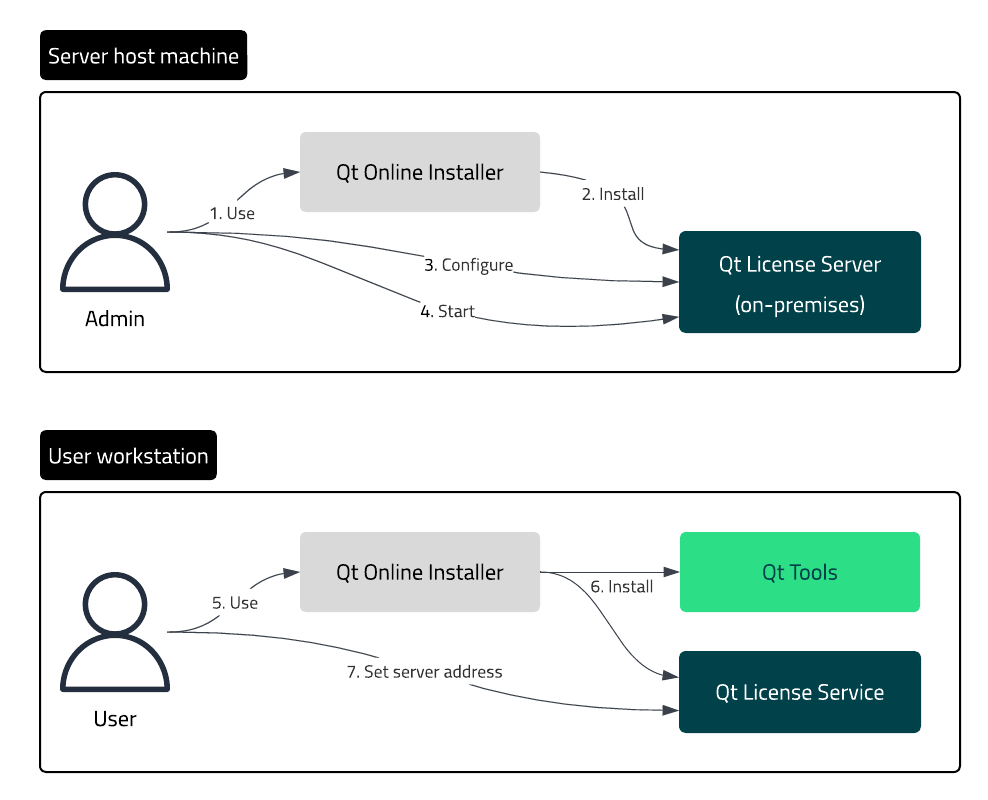
The workflow of installing and setting up Offline Qt License Server.
Setup workflow
To set up Offline Qt License Server:
- As the server administrator:
- Get Qt Online Installer from Qt Customer Portal.
- Install the Qt License Server on-premises package on the server host machine.
- Obtain a node-locked
entitlement.jsonlicense file. See Manage license node-locking. - Configure Offline Qt License Server according to the needs of your organization.
- Start the server.
- As the end user:
- Get Qt Online Installer from Qt Customer Portal.
- Install the client-side tools on your workstation.
- Set the server address of Offline Qt License Server for Qt License Service.
Using Qt Online Installer
First, download Qt Online Installer from your Qt Account.
To install Qt License Server with Qt Online Installer:
- Open Qt Online Installer and log in to your Qt Account.
- Select Custom Installation.
- In Customize > License Management Tools > Qt License Server (on-prem), select the correct Qt License Server version and the operating system of the host computer.
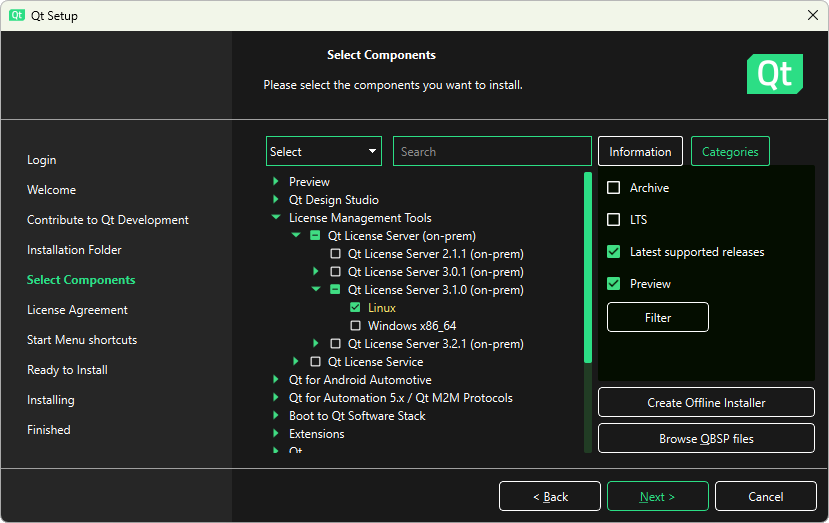
- Select Next and follow the instructions of the installer.
Using Qt Maintenance Tool
Qt Maintenance Tool is included in each Qt installation. If you already have Qt, use Qt Maintenance Tool to install Qt License Server.
To install Qt License Server with Qt Maintenance Tool:
- Open Qt Maintenance Tool and log in to your Qt Account.
- Select Add or remove components.
- In Customize > License Management Tools > Qt License Server (on-prem), select the correct Qt License Server version and the operating system of the host computer.
- Select Next and follow the instructions of the installer.
Package contents
The Qt License Server package is installed in the following folder:
<QtSDK>/LicenseManagementTools/QtLicenseServer/<version>/QtLicenseServer/<platform>
<QtSDK>\LicenseManagementTools\QtLicenseServer\<version>\QtLicenseServer\<platform>
The Qt License Server package contents depend on your operating system.
| File | Description |
|---|---|
qt-license-server | Qt License Server executable file |
qt-license-server.service | Configuration file |
installer.sh | Installation script file |
uninstaller.sh | Uninstallation script file |
| File | Description |
|---|---|
qt-license-server.exe | Qt License Server executable file |
qt-service.xml | Configuration file |
qt-service.exe | Qt License Server wrapper, (WinSW version 2.12.0 x64) |
Next steps
After the package is installed, configure Offline Qt License Server and start the server.
See also Qt License Server command-line interface, Configure Offline Qt License Server, Prerequisites, and Manage license node-locking.
© 2024 The Qt Company Ltd. Documentation contributions included herein are the copyrights of their respective owners. The documentation provided herein is licensed under the terms of the GNU Free Documentation License version 1.3 as published by the Free Software Foundation. Qt and respective logos are trademarks of The Qt Company Ltd in Finland and/or other countries worldwide. All other trademarks are property of their respective owners.
