
Manage license node-locking
To reserve licenses with Offline Qt License Server, you need a node-locked offline license file, entitlement.json. It lists valid licenses with the hardware fingerprint of the machine running Offline Qt License Server and the port number of the Offline Qt License Server instance.
The hardware fingerprint is unique to the Offline Qt License Server host computer, which means that it locks the license file for the host machine running Offline Qt License Server.
Note: Updating the node-locking information for a license can be done every 180 days. If you need to edit the hardware fingerprint or port number of the license sooner, contact Qt Support.
To obtain a node-locked offline license file, follow these steps:
- Ensure you have defined the port number of the running Offline Qt License Server instance in the configuration file (Linux:
qt-license-server.service, Windows:qt-service.xml). For example:
Environment="QLS_PORT=8080"<env name="QLS_PORT" value="8080" />Note: Provide the port number you plan to use in production.
- Generate the hardware fingerprint on the Offline Qt License Server host computer with qt-license-server:
./qt-license-server generate-server-fingerprint.\qt-license-server.exe generate-server-fingerprintNote: Run this command on the machine you intend to use in production.
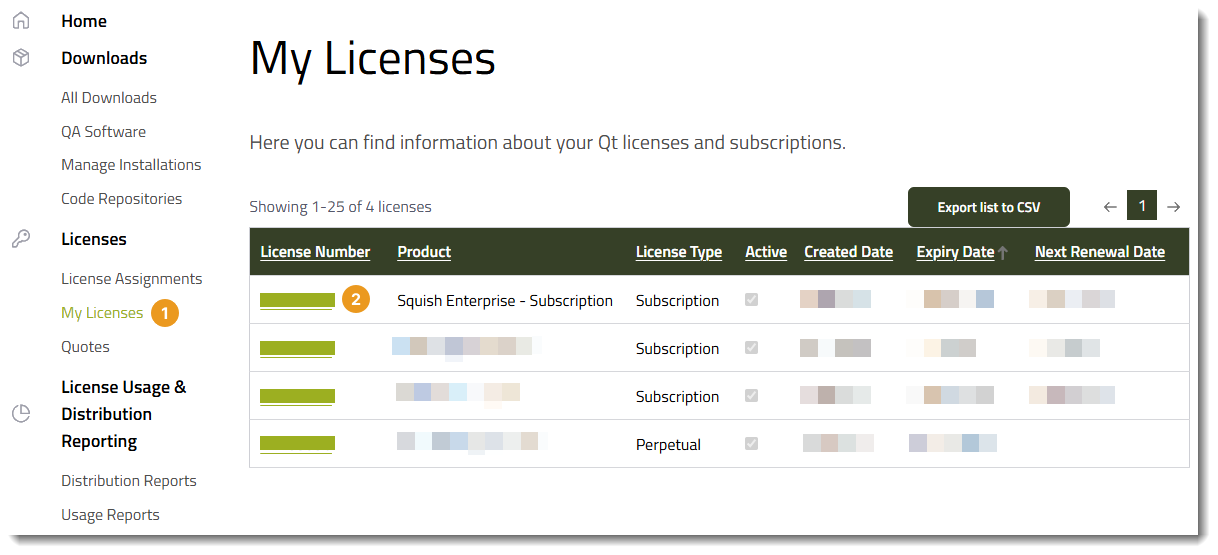
- Go to Qt Customer Portal > My Licenses (1), and select the license number of the license (2).
- In License Details, enter:
- Hardware Fingerprint (3).
- Port Number (4).
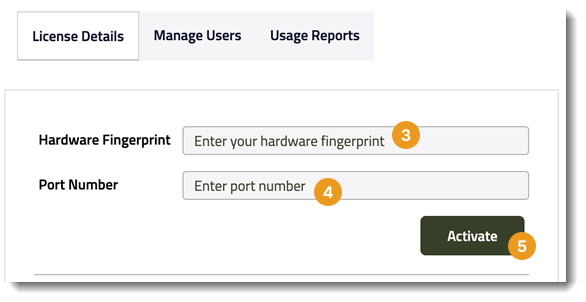
- Select Activate (5).
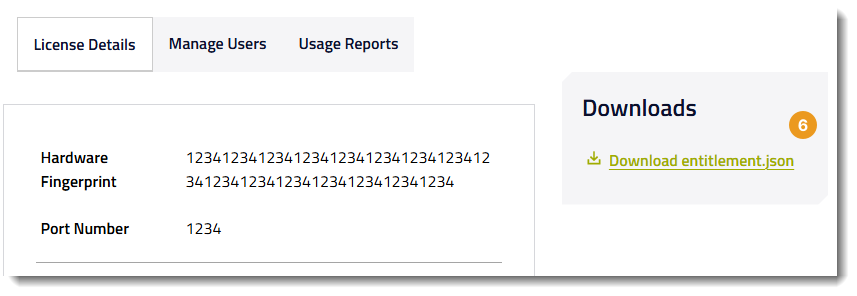
- Select Download entitlement.json (6) in Downloads to download the entitlement.json file.
- Copy the
entitlement.jsonfile to the folder where Qt License Server runs. If you already have a license file in the folder, replace it with the new one. - Restart Offline Qt License Server to apply the new license file:
systemctl daemon-reload systemctl restart qt-license-server.serviceqt-service.exe stop qt-service.exe start - Verify that the correct licenses are loaded by Offline Qt License Server:
./qt-license-server status --url <URL>.\qt-license-server.exe status --url <URL>In case the licenses are not imported correctly, check the logs. Contact Qt Support if needed.
When Offline Qt License Server starts, the new entitlement.json file is automatically imported. A license that includes the node-locking is imported if the hardware fingerprint matches the Offline Qt License Server host computer and the port number matches the port number of the running Offline Qt License Server instance.
Hardware fingerprint generation
Qt License Server generates a hardware fingerprint from CPU and disk details. Changes to these might cause signature mismatches and potentially invalidate existing licenses.
© 2024 The Qt Company Ltd. Documentation contributions included herein are the copyrights of their respective owners. The documentation provided herein is licensed under the terms of the GNU Free Documentation License version 1.3 as published by the Free Software Foundation. Qt and respective logos are trademarks of The Qt Company Ltd in Finland and/or other countries worldwide. All other trademarks are property of their respective owners.
