
C
ベクターグラフィックスのサポートの実装
このトピックでは、ターゲットプラットフォームがハードウェアアクセラレーションによるベクターグラフィックス機能をサポートしている場合に、その機能をどのように実装できるかについて説明します。
概要
ベクターパス
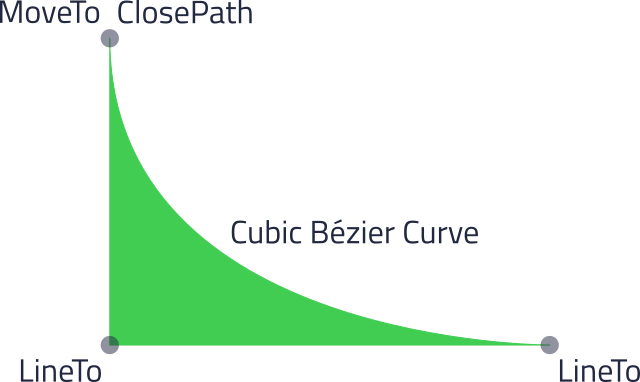
ベクターパスは通常、一連のパスコマンドとして表現されます。たとえば、前の画像のパスは、SVGパスとして次のように定義できます:
M 21,26.50 V 60 H 69 C 69,60 21,60 21,26.50 Z
ここで、M: MoveTo、V: LineTo(垂直)、H: LineTo(水平)、C: 3次ベジエ曲線、Z: ClosePath がパスコマンドです。数値は各コマンドの座標を表します。これらのコマンドは大文字で記述されているため、その引数は絶対座標として扱われます。
ベクトルパスの表現
プラットフォームインターフェースにおけるベクトルパスは、PlatformInterface::PathData クラスによって表現されます。前述の例のパスについて、出力は次のようになります:
| 関数 | 出力 |
|---|---|
| PathData::segmentCount() | 5 |
| PathData::segments() | Qul::PlatformInterface::PathData::SegmentType [5] {
MoveSegment, LineSegment, LineSegment, CubicBezierSegment, CloseSegment
} |
| PathData::controlElementCount() | 12 |
| PathData::controlElements() | 例示されたパスの値は、次のように格納されます:float [12] { x1, y1, x2, y2, x3, y3, cx1, cy1, cx2, cy2, x4, y4 }座標は以下の通りです: float [12] { 21.0f, 26.5f, 21.0f, 60.0f, 69.0f, 60.0f, 69.0f, 60.0f, 21.0f, 60.0f, 21.0f, 26.5f } |
注:垂直線 および水平線は、x座標とy座標の両方を含むLineSegmentとして保存されます。
グラフィックスドライバのパスの例
この例のグラフィックスドライバインターフェースでは、ベクトルパスを表現するために、パスコマンドと引数の両方にint32_t を使用しています。座標にはS16.15固定小数点形式が使用され、すべてのベクトルパスはEND コマンドで終了します。パスコマンドはあらかじめ定義された整数値です。前述の例で使用されたベクトルパスは、次のように指定されます:
int32_t [] { MOVETO, x1, y1, LINETO, x2, y2, LINETO, x3, y3, CUBIC, cx1, cy1, cx2, cy2, x4, y4, CLOSE, END }座標は S16.15 形式に変換されます:
int32_t [] { MOVETO, 21.0*(1<<15), 26.5*(1<<15), LINETO, 21.0*(1<<15), 60.0*(1<<15), LINETO, ... }ベクターグラフィックスのサポートの実装
描画エンジンのオーバーライド
ベクターグラフィックスのサポートを実装するには、PlatformInterface::DrawingEngine をサブクラス化し、以下の関数をオーバーライドします:
- PlatformInterface::DrawingEngine::allocatePath
- PlatformInterface::DrawingEngine::setStrokeProperties
- PlatformInterface::DrawingEngine::blendPath
class ExampleDrawingEngine : public PlatformInterface::DrawingEngine
{
public:
    ...
    PlatformInterface::DrawingEngine::Path *allocatePath(const PlatformInterface::PathData *pathData,
                                                         PlatformInterface::PathFillRule fillRule) QUL_DECL_OVERRIDE;

    void setStrokeProperties(PlatformInterface::DrawingEngine::Path *path,
                             const PlatformInterface::StrokeProperties &strokeProperties) QUL_DECL_OVERRIDE;

    void blendPath(PlatformInterface::DrawingDevice *drawingDevice,
                   PlatformInterface::DrawingEngine::Path *path,
                   const PlatformInterface::Transform &transform,
                   const PlatformInterface::Rect &clipRect,
                   const PlatformInterface::Brush *fillBrush,
                   const PlatformInterface::Brush *strokeBrush,
                   int sourceOpacity,
                   PlatformInterface::DrawingEngine::BlendMode blendMode) QUL_DECL_OVERRIDE;

    PlatformInterface::RenderHints supportedRenderHints() const QUL_DECL_OVERRIDE;
};
パスの前処理
次に、プラットフォーム固有のパスデータを格納するために、PlatformInterface::DrawingEngine::Path のサブクラスを作成します。このExamplePath は、前述のサンプルグラフィックスドライバと同じ形式を使用しています。
struct ExamplePath : public PlatformInterface::DrawingEngine::Path
{
    // S16.15 fixed point factor
    static const int32_t fixedPointFactor = (1 << 15);

    int16_t fillRule;

    ExamplePath(const PlatformInterface::PathData *pathData, PlatformInterface::PathFillRule fillRule);

    void free() { PlatformInterface::qul_delete(this); }

    const PlatformInterface::PathData *getPathData() { return path; }

    // Functions to access stored path/stroke elements
    int32_t *getFillPathData(void) { return fillElements.data(); }
    int32_t *getStrokePathData(void) { return strokeElements.data(); }

    // Functions to store fill elements in the platform optimized format
    inline void addElement(int32_t element) { fillElements.push_back(element); }
    inline void addElement(float element)
    {
        // Convert floating point values to fixed point
        fillElements.push_back(static_cast<int32_t>(element * fixedPointFactor));
    }

    // Functions to store stroke elements in the platform optimized format
    inline void addStrokeElement(int32_t element) { strokeElements.push_back(element); }
    inline void addStrokeElement(float element)
    {
        // Convert floating point values to fixed point
        strokeElements.push_back(static_cast<int32_t>(element * fixedPointFactor));
    }

    // Function to convert fill path data to platform optimized format
    void processFillPath();

    // Functions to return current element counts
    int32_t fillPathSize() { return fillElements.size() * sizeof(int32_t); }
    int32_t strokePathSize() { return strokeElements.size() * sizeof(int32_t); }

    // Functions to remove fill/stroke elements
    void clearStroke() { strokeElements.clear(); }
    void clearFill() { fillElements.clear(); }

private:
    // Status flag of the vector path preprocessing
    bool processingDone;

    // Path data in the common format
    const PlatformInterface::PathData *path;

    // Fill/stroke data format optimized for the platform
    std::vector<int32_t, Qul::PlatformInterface::Allocator<int32_t> > fillElements;
    std::vector<int32_t, Qul::PlatformInterface::Allocator<int32_t> > strokeElements;
};
fillRule は、構造体のコンストラクタ内でプラットフォーム固有の形式に変換することができます。
ExamplePath::ExamplePath(const PlatformInterface::PathData *pathData, PlatformInterface::PathFillRule fillRule)
    : fillRule(fillRule == PlatformInterface::PathWindingFill ? HW_PATH_FILL_NON_ZERO : HW_PATH_FILL_FILL_EVEN_ODD)
    , processingDone(false)
    , path(pathData)
{}
次に、PlatformInterface::PathDataIterator を使用してパスデータを走査し、それをプラットフォーム固有の形式に変換する関数を作成します。
void ExamplePath::processFillPath()
{
    if (processingDone)
        return;

    PlatformInterface::PointF current(0.0, 0.0);

    PlatformInterface::PathDataIterator it(path);

    while (it.hasNext()) {
        PlatformInterface::PathDataSegment segment = it.next();
        switch (segment.type()) {
        case PlatformInterface::PathData::CloseSegment:
            addElement(static_cast<int32_t>(HW_PATH_CLOSE));
            break;
        case PlatformInterface::PathData::PathSeparatorSegment:
            break;
        case PlatformInterface::PathData::MoveSegment: {
            const PlatformInterface::PathDataMoveSegment *moveSegment
                = segment.as<PlatformInterface::PathDataMoveSegment>();
            addElement(static_cast<int32_t>(HW_PATH_MOVETO));
            addElement(moveSegment->target().x());
            addElement(moveSegment->target().y());
            current = moveSegment->target();
            break;
        }
        case PlatformInterface::PathData::LineSegment: {
            const PlatformInterface::PathDataLineSegment *lineSegment
                = segment.as<PlatformInterface::PathDataLineSegment>();
            addElement(static_cast<int32_t>(HW_PATH_LINETO));
            addElement(lineSegment->target().x());
            addElement(lineSegment->target().y());
            current = lineSegment->target();
            break;
        }
        case PlatformInterface::PathData::QuadraticBezierSegment: {
            const PlatformInterface::PathDataQuadraticBezierSegment *bezierSegment
                = segment.as<PlatformInterface::PathDataQuadraticBezierSegment>();
            // ...
            break;
        }
        case PlatformInterface::PathData::CubicBezierSegment: {
            const PlatformInterface::PathDataCubicBezierSegment *bezierSegment
                = segment.as<PlatformInterface::PathDataCubicBezierSegment>();
            // ...
            break;
        }
        case PlatformInterface::PathData::SmallCounterClockWiseArcSegment: {
            const PlatformInterface::PathDataSmallCounterClockWiseArcSegment *arcSegment
                = segment.as<PlatformInterface::PathDataSmallCounterClockWiseArcSegment>();
            // ...
            break;
        }
        case PlatformInterface::PathData::SmallClockWiseArcSegment: {
            const PlatformInterface::PathDataSmallClockWiseArcSegment *arcSegment
                = segment.as<PlatformInterface::PathDataSmallClockWiseArcSegment>();
            // ...
            break;
        }
        case PlatformInterface::PathData::LargeCounterClockWiseArcSegment: {
            const PlatformInterface::PathDataLargeCounterClockWiseArcSegment *arcSegment
                = segment.as<PlatformInterface::PathDataLargeCounterClockWiseArcSegment>();
            // ...
            break;
        }
        case PlatformInterface::PathData::LargeClockWiseArcSegment: {
            const PlatformInterface::PathDataLargeClockWiseArcSegment *arcSegment
                = segment.as<PlatformInterface::PathDataLargeClockWiseArcSegment>();
            // ...
            break;
        }
        default:
            QUL_ASSERT(false, QulError_PathData_UnknownSegmentType, segment.type());
            return;
        }
    }

    addElement(static_cast<int32_t>(HW_PATH_END));
    processingDone = true;
}
パスの割り当て
次に、パスハンドルが割り当てられた際に呼び出されるPlatformInterface::DrawingEngine::allocatePath 関数を実装します。
PlatformInterface::DrawingEngine::Path *ExampleDrawingEngine::allocatePath(const PlatformInterface::PathData *pathData,
                                                                           PlatformInterface::PathFillRule fillRule)
{
    return PlatformInterface::qul_new<Private::ExamplePath>(pathData, fillRule);
}
描画デバイスへのパスの合成
次に、PlatformInterface::DrawingEngine::blendPath 関数を実装する必要があります。(これには、「ハードウェアアクセラレーションによるブレンド」で説明されているような、カスタム描画エンジンの作成が必要となります。) この関数は、transform およびblendMode を使用して、パスが描画デバイス上にブレンドされようとしている際に呼び出されます。結果は、描画デバイスの座標系にあるclipRect によってクリップされる必要があります。さらに、sourceOpacity は、0から256の範囲で全体的な不透明度を定義します。256は完全に不透明であることを示します。
fillBrushがnullptrに設定されていない場合、パスは、パスの割り当て時に設定されたPathFillRuleに従って、指定されたfillBrushで塗りつぶされます。strokeBrushがnullptrに設定されていない場合、パスは、setStrokePropertiesで設定されたStrokePropertiesに従って、指定されたstrokeBrushでストロークされます。
void ExampleDrawingEngine::blendPath(PlatformInterface::DrawingDevice *drawingDevice,
                                     PlatformInterface::DrawingEngine::Path *path,
                                     const PlatformInterface::Transform &transform,
                                     const PlatformInterface::Rect &clipRect,
                                     const PlatformInterface::Brush *fillBrush,
                                     const PlatformInterface::Brush *strokeBrush,
                                     int sourceOpacity,
                                     PlatformInterface::DrawingEngine::BlendMode blendMode)
{
    Private::ExamplePath *destinationPath = static_cast<Private::ExamplePath *>(path);

    float matrix[3][3];
    toHwMatrix3x3(transform, matrix);

    // HW_SetClip(clipRect.x(), clipRect.y(), clipRect.width(), clipRect.height());

    // HW_BlendMode_t HWblendMode =
    //     (blendMode == PlatformInterface::DrawingEngine::BlendMode_SourceOver ? HW_BLEND_SRC_OVER : HW_BLEND_NONE);

    if (fillBrush) {
        destinationPath->processFillPath();

        // HW_Path_t hw_path = {..., destinationPath->fillPathSize(), destinationPath->getFillPathData(), ...};

        if (fillBrush->pattern() == Qul::PlatformInterface::Brush::LinearGradientPattern) {
            const Qul::PlatformInterface::GradientStops &gradientStops = fillBrush->linearGradient().stops();
            // HW_GradientColorTable_Handle hw_gradientColorTable = nullptr;
            // hw_gradientColorTable = generateHW_GradientColorTable(gradientStops);

            // HW_DrawWithLinearGradient(..., &hw_path, destinationPath->fillRule, &matrix, HWblendMode, hw_gradientColorTable, hwLinearGradientParameters(fillBrush->linearGradient()), ...);

            // As an optimization it might make sense to keep a cache of HW gradient color tables
            // if (hw_gradientColorTable)
            //     freeHW_GradientColorTable(hw_gradientColorTable);
        } else if (fillBrush->pattern() == Qul::PlatformInterface::Brush::SolidPattern) {
            // HW_Draw(..., &hw_path, destinationPath->fillRule, &matrix, HWblendMode, fillBrush->color().value, ...);
        }
    }

    if (strokeBrush) {
        // HW_Path_t hw_path = {..., destinationPath->strokePathSize(), destinationPath->getStrokePathData(), ...};

        if (strokeBrush->pattern() == Qul::PlatformInterface::Brush::LinearGradientPattern) {
            const Qul::PlatformInterface::GradientStops &gradientStops = fillBrush->linearGradient().stops();
            // HW_GradientColorTable_Handle hw_gradientColorTable = nullptr;
            // hw_gradientColorTable = generateHW_GradientColorTable(gradientStops);

            // HW_DrawWithLinearGradient(..., &hw_path, destinationPath->fillRule, &matrix, HWblendMode, hw_gradientColorTable, hwLinearGradientParameters(strokeBrush->linearGradient()), ...);

            // As an optimization it might make sense to keep a cache of HW gradient color tables
            // if (hw_gradientColorTable)
            //     freeHW_GradientColorTable(hw_gradientColorTable);
        } else if (strokeBrush->pattern() == Qul::PlatformInterface::Brush::SolidPattern) {
            // HW_Draw(..., &hw_path, destinationPath->fillRule, &matrix, HWblendMode, strokeBrush->color().value, ...);
        }
    }

    // HW_SetClip(0, 0, screen->width(), screen->height());
}
パスの描画
最後に、Qul::PlatformInterface::DrawingEngine::setStrokeProperties 関数を実装します。LineCapStyle やMiterLimit といったStrokeのプロパティには、Qul::PlatformInterface::StrokeProperties からアクセスできます。
void ExampleDrawingEngine::setStrokeProperties(PlatformInterface::DrawingEngine::Path *path,
                                               const PlatformInterface::StrokeProperties &strokeProperties)
{
    Private::ExamplePath *destinationPath = static_cast<Private::ExamplePath *>(path);
    ...
}
ストローク用のパスの生成
Qul::PlatformInterface::PathDataStroker を使用すると、指定されたパスのストロークアウトラインパスを作成できます。これは、プラットフォームのドライバインターフェースがストロークプロパティをサポートしていない場合に役立ちます。PathDataStroker を使用するには、これをサブクラス化し、以下の関数をオーバーライドします:
- Qul::PlatformInterface::PathDataStroker::beginStroke
- Qul::PlatformInterface::PathDataStroker::endStroke
- Qul::PlatformInterface::PathDataStroker::lineTo
- Qul::PlatformInterface::PathDataStroker::moveTo
- Qul::PlatformInterface::PathDataStroker::cubicTo
- Qul::PlatformInterface::PathDataStroker::arcTo
class ExamplePathDataStroker : public PlatformInterface::PathDataStroker
{
public:
    ExamplePathDataStroker(ExamplePath *data);

protected:
    void beginStroke() QUL_DECL_OVERRIDE;
    void endStroke() QUL_DECL_OVERRIDE;
    void lineTo(float x, float y) QUL_DECL_OVERRIDE;
    void moveTo(float x, float y) QUL_DECL_OVERRIDE;
    void cubicTo(float c1x, float c1y, float c2x, float c2y, float ex, float ey) QUL_DECL_OVERRIDE;
    void arcTo(float x, float y, float rx, float ry, float rotation, bool largeArc, bool clockwise) QUL_DECL_OVERRIDE;

private:
    ExamplePath *destinationPath;
    PlatformInterface::PointF current;
};
各関数のサポートを実装し、プラットフォーム向けに最適化された形式でパスデータを設定します。これにより、ストロークを表すパスが生成され、そのパスが塗りつぶされます。
ExamplePathDataStroker::ExamplePathDataStroker(ExamplePath *data)
    : PathDataStroker(data->getPathData())
    , destinationPath(data)
{}

void ExamplePathDataStroker::beginStroke()
{
    destinationPath->clearStroke();
}

void ExamplePathDataStroker::endStroke()
{
    destinationPath->addStrokeElement(static_cast<int32_t>(HW_PATH_END));
}

void ExamplePathDataStroker::lineTo(float x, float y)
{
    destinationPath->addStrokeElement(static_cast<int32_t>(HW_PATH_LINETO));
    destinationPath->addStrokeElement(x);
    destinationPath->addStrokeElement(y);
    current.setX(x);
    current.setY(y);
}

void ExamplePathDataStroker::moveTo(float x, float y)
{
    destinationPath->addStrokeElement(static_cast<int32_t>(HW_PATH_MOVETO));
    destinationPath->addStrokeElement(x);
    destinationPath->addStrokeElement(y);
    current.setX(x);
    current.setY(y);
}

void ExamplePathDataStroker::cubicTo(float c1x, float c1y, float c2x, float c2y, float ex, float ey)
{
    // ...
    current.setX(ex);
    current.setY(ey);
}

void ExamplePathDataStroker::arcTo(float x, float y, float rx, float ry, float rotation, bool largeArc, bool clockwise)
{
    // ...
    current.setX(x);
    current.setY(y);
}
ストロークパスは、Qul::PlatformInterface::DrawingEngine::setStrokeProperties 関数内で事前に計算しておくことができます。
void ExampleDrawingEngine::setStrokeProperties(PlatformInterface::DrawingEngine::Path *path,
                                               const PlatformInterface::StrokeProperties &strokeProperties)
{
    Private::ExamplePath *destinationPath = static_cast<Private::ExamplePath *>(path);

    Private::ExamplePathDataStroker stroker(destinationPath);
    stroker.setStrokeProperties(strokeProperties);
    stroker.stroke();
}
特定の Qt ライセンスの下で利用可能です。
詳細はこちら。
