C
Qt Quick Ultralite 自動車用計器クラスター デモ
QMLとC++の統合、およびサードパーティ製ライブラリの使用方法を実演します。
概要
これは、Qt Quick Ultraliteで構築されたアプリケーションのさまざまな側面を実演する、複雑なアプリケーションです:
- C++のビジネスロジックとQMLアプリケーションの統合
- 複数のQMLコンポーネントに分割することで、複雑なユーザーインターフェースを処理する
- パフォーマンスを損なうことなく、最高のユーザー体験を実現するための複雑なアニメーションの活用
画面の中央部分では、4つの異なるページを切り替えることができます:
- メディアプレーヤー
- 電話
- ターンバイターンナビゲーション
- 設定
ページやメニューは、デスクトップコンピュータのキーボードによるキー入力で操作できます。また、Renesas Mangoメインボードに搭載された物理的なHMIノブおよび4方向スイッチを使用して操作することも可能です:
| 操作 | デスクトップ | RH850-D1M1A |
|---|---|---|
| 上へ移動 | 上矢印キー | 上へ移動上矢印キー |
| 下へ移動 | 下キー | 下へ切り替え |
| 左へ移動 | 左キー | 左へ切り替え |
| 右へ移動 | 右キー | 右へ切り替え |
| 次へ移動 | スペースキー | 中央のボタンを切り替える |
| 次のページ | Page Upキー | 右ノブ |
| 前のページ | Page Down キー | ノブを左に回す |
| 確定 | Enterキー | ノブを押し込む |
シミュレーションコントローラーを使用したデモの操作
また、automotive/src/simulationcontroller.h に掲載されている C 言語用リンク API を使用して、デモを制御することもできます。
各キーには、qul_application_control_ というプレフィックスが付いた対応するAPI関数があります。pressed をtrue として指定し、pressed をfalse として指定して関数を呼び出すことで、アプリケーションに対してキー押下をトリガーできます。
ページ、メニュー、モードの自動切り替えを無効にするには、true としてforce_interactive_mode を指定してqul_application_force_interactive_mode を呼び出します。
ドライブデータのシミュレーションを無効にするには、simulated_drive_data をfalse として指定し、qul_application_show_simulated_drive_data を1回呼び出します。その後、セッター関数(例:qul_application_set_speed )を呼び出して速度値を設定します。
レーンアシストのアニメーションを無効にするには、false にenabled を指定してqul_application_set_lane_assistant_enabled を呼び出してください。
シミュレートされたウインカーを無効にするには、`simulated_light_indicators `を`false`として指定し、`qul_application_show_simulated_light_indicators `を1回呼び出します。その後、セッター関数を呼び出し、例えば`qul_application_set_left_blinker_on `を`left_blinker_on `を`true `として指定して、左ウインカーを点灯させます。
ファイルのバリエーション
自動車向けデモでは、ファイルバリアントとセレクタを使用して、さまざまなデモ地域に合わせてアプリケーションをカスタマイズしています。
セレクタが適用されていない場合、デモ地域はドイツに設定され、メートル法単位およびドイツの道路名や標識が表示されます。インペリアル単位や、米国向けにローカライズされた道路名および速度制限標識を表示するファイルバリアントを使用して、デモを構築することも可能です。インペリアル単位を表示するには「"imperial" 」ファイルセレクタを、米国向けにローカライズされた道路名および標識を表示するには「"usa" 」セレクタを適用してください。
qmlprojectexporter demos/automotive/qmlproject/automotive.qmlproject --outdir=<output_dir> --selector=imperial,usa
CMakeを使用してデモをビルドする際、DEMO_REGION 変数を"usa" に設定すると、"imperial" セレクタも追加され、米国向けのアプリケーションのビルドが簡素化されます:
cmake -DDEMO_REGION="usa" <additional args>
ターゲットプラットフォーム
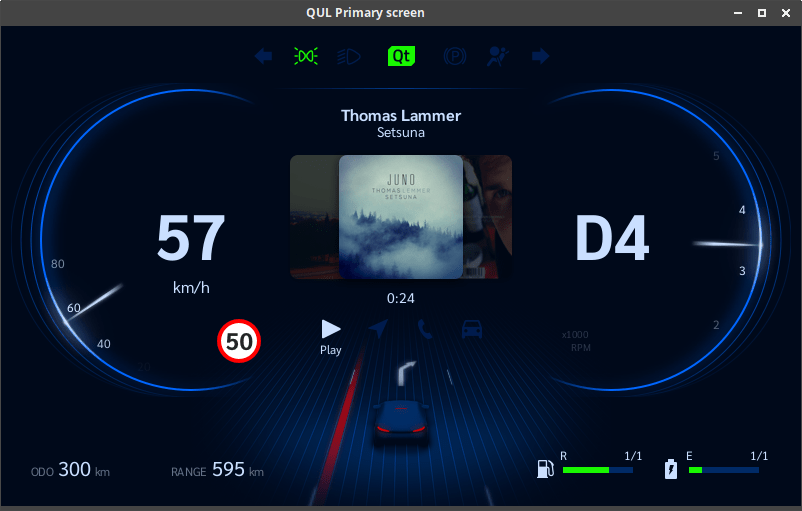
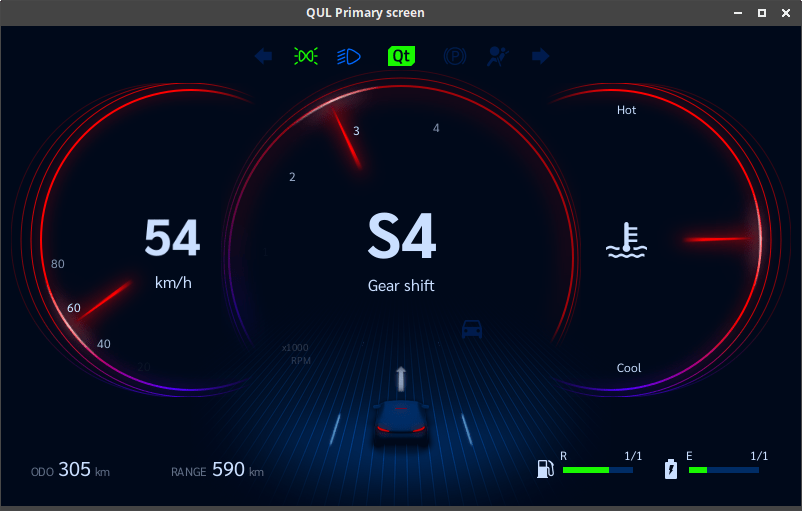
スクリーンショット
通常モード
スポーツモード
ベンチマークモード
ベンチマークモードでは、アプリケーションはあらかじめ定義された30秒間実行され、30秒間の終了時にパフォーマンス指標が画面に表示されます。Qt Quick のUltralite CoreライブラリがQUL_ENABLE_PERFORMANCE_CONSOLE_OUTPUT=ON でビルドされている場合、同じ結果がシリアルコンソールにも表示されます。
テスト終了時には、以下のパフォーマンス指標が表示されます:
| パラメータ | 説明 | |
|---|---|---|
| 1 | 総フレーム数 | 録画間隔内のフレーム総数。 |
| 2 | 平均FPS | 録画期間中に測定された1秒あたりの平均フレーム数。 |
| 3 | 最小FPS | 録画中に記録された最低FPS値。 |
| 4 | 最大ヒープ使用量 | アプリケーションの起動以降に記録された、最大ヒープ使用量(バイト単位)。 |
| 5 | スタック使用量の最大値 | アプリケーションの起動以降に記録されたスタックの最大使用量(バイト単位)。 |
| 6 | 平均 CPU 負荷 | 記録間隔におけるCPU負荷の平均値(パーセント)。 |
ベンチマークモードは、automotive_benchmark という名前の独立したCMakeターゲットとして提供されています。ベンチマークモードを実行するには、automotive_benchmark ターゲットをビルドしてフラッシュしてください。
automotive_benchmark ターゲットを使用するには、コンパイル定義QUL_DEMO_BENCHMARK_MODE を追加する必要があります。
target_compile_definitions(automotive_benchmark PRIVATE
    QUL_DEMO_BENCHMARK_MODE
)
automotive.qmlproject ファイルは、以下に示すようにbenchmark_module.qmlproject ファイルをインクルードしています:
ModuleFiles {
  files: [
  "benchmark/benchmark_module.qmlproject"
  ]
}
ルートQMLファイルで、以下のモジュールをインポートしてください。
import QtQuickUltralite.Extras 2.0
import Benchmark 1.0
import QtQuickUltralite.Profiling
- Qt Quick Ultralite Extras このモジュールは、測定の開始と停止を可能にするQulPerf オブジェクトを提供します。
Benchmarkこのモジュールは、benchmark_module.qmlprojectファイルによって提供されます。フリック操作のためのタッチジェスチャーをシミュレートするメソッドを提供します。- Qt Quick Ultralite Profiling このモジュールは、アプリケーションのユーザーインターフェース上にパフォーマンス指標を表示するための画面オーバーレイ「QulPerfOverlay 」を提供します。
ベンチマーク結果用のQulPerfOverlay QMLオブジェクトをルートqmlに追加します。このオーバーレイは、30秒後にbenchmarkTimer がトリガーされると表示されます。
QulPerfOverlay {
    id: benchmarkResult
    anchors.horizontalCenter: parent.horizontalCenter;
    anchors.verticalCenter: parent.verticalCenter;
    visible: false
}ルートオブジェクトがインスタンス化され、Component.onCompleted シグナルがトリガーされた時点で、ルートQMLアイテム内で記録を開始します。
Component.onCompleted: {
    QulPerf.recording = true
}
アプリケーションは30秒間実行されます。30秒後に録画が停止され、ベンチマーク結果画面のオーバーレイが表示されます。
Timer {
    id: benchmarkTimer
    interval: 30000
    running: true
    repeat: false
    onTriggered: {
        QulPerf.recording = false;
        benchmarkResult.visible = true
    }
}
注:ベンチマークモードを使用するには 、Qt Quick のUltralite CoreおよびPlatformライブラリを、QUL_ENABLE_PERFORMANCE_LOGGING=ON およびQUL_ENABLE_HARDWARE_PERFORMANCE_LOGGING=ON でビルドする必要があります。
ファイル:
- automotive/+imperial/SpeedLimitImage.qml
- automotive/+imperial/SpeedLimitValues.qml
- automotive/+imperial/Units.qml
- automotive/+ra8d1/automotive.qml
- automotive/BaseGauge.qml
- automotive/CMakeLists.txt
- automotive/CarStatus.qml
- automotive/DriveModeSelector.qml
- automotive/Gauge.qml
- automotive/GuideArrow.qml
- automotive/GuideArrowItem.qml
- automotive/LaneAssist.qml
- automotive/LaneAssistWhiteLine.qml
- automotive/LinearGauge.qml
- automotive/MediaPlayer.qml
- automotive/Menu.qml
- automotive/MiddleGauge.qml
- automotive/Navi.qml
- automotive/NormalMode.qml
- automotive/NormalModeContentItem.qml
- automotive/Phone.qml
- automotive/SpeedLimitImage.qml
- automotive/SpeedLimitValues.qml
- automotive/SpeedWarningIndicator.qml
- automotive/SportGauge.qml
- automotive/SportMode.qml
- automotive/TellTales.qml
- automotive/TellTalesIndicator.qml
- automotive/TempGauge.qml
- automotive/Units.qml
- automotive/automotive.qml
- automotive/benchmark/benchmark_module.qmlproject
- automotive/benchmark/benchmarkmode.h
- automotive/imports/Automotive/MainModel.qml
- automotive/imports/Automotive/MathAPI.qml
- automotive/imports/Automotive/MediaPlayerModel.qml
- automotive/imports/Automotive/NaviModel.qml
- automotive/imports/Automotive/NormalModeModel.qml
- automotive/imports/Automotive/PhoneModel.qml
- automotive/imports/Automotive/SettingsMenuModel.qml
- automotive/imports/Automotive/SportModeModel.qml
- automotive/imports/Automotive/Style.qml
- automotive/imports/Automotive/TellTalesModel.qml
- automotive/imports/Automotive/qmldir
- automotive/qmlproject/automotive.qmlproject
- automotive/qmlproject/automotive_module.qmlproject
- automotive/qmlproject/automotive_ra8d1.qmlproject
- automotive/qmlproject/automotive_traveo_t2g.qmlproject
- automotive/region/+usa/Region.qml
- automotive/region/Region.qml
- automotive/src/connectivityservice.cpp
- automotive/src/connectivityservice.h
- automotive/src/hmi_input/CMakeLists.txt
- automotive/src/hmi_input/hmi_input.cpp
- automotive/src/hmi_input/hmi_input.h
- automotive/src/hmi_input/hmi_input_event.h
- automotive/src/hmi_input/rh850-d1m1a-baremetal/CMakeLists.txt
- automotive/src/hmi_input/rh850-d1m1a-baremetal/rh850.cpp
- automotive/src/mathutils.h
- automotive/src/platform/baremetal/main.cpp
- automotive/src/simulation/drivestates.cpp
- automotive/src/simulation/drivestates.h
- automotive/src/simulation/drivetrain.cpp
- automotive/src/simulation/drivetrain.h
- automotive/src/simulation/lights.cpp
- automotive/src/simulation/lights.h
- automotive/src/simulation/smfwd.h
- automotive/src/simulation/speedlimits.cpp
- automotive/src/simulation/speedlimits.h
- automotive/src/simulation/stateid.h
- automotive/src/simulation/states.cpp
- automotive/src/simulation/states.h
- automotive/src/simulationcontroller.cpp
- automotive/src/simulationcontroller.h
- automotive/src/statemachine.h
画像:
- automotive/images/airbag.png
- automotive/images/albums/ak.png
- automotive/images/albums/juno.png
- automotive/images/albums/phazz.png
- automotive/images/albums/thievery-corp.png
- automotive/images/albums/tycho.png
- automotive/images/arrow-0.png
- automotive/images/arrow-45.png
- automotive/images/arrow-90.png
- automotive/images/arrow-round.png
- automotive/images/assets-phone-list-pseudo-mask.png
- automotive/images/battery.png
- automotive/images/bg-mask.png
- automotive/images/car-highlights.png
- automotive/images/clock.png
- automotive/images/fuel.png
- automotive/images/gauge-gauge-frame-sport-center.png
- automotive/images/gauge-gauge-frame-sport-side.png
- automotive/images/gauge-gauge-frame.png
- automotive/images/gauge-normal.png
- automotive/images/highlight-big-sport.png
- automotive/images/highlight-normal.png
- automotive/images/highlight-standard-sport.png
- automotive/images/leaf.png
- automotive/images/low-beam-headlights.png
- automotive/images/navi.png
- automotive/images/needle-normal.png
- automotive/images/needle-standard-sport.png
- automotive/images/oil-temp.png
- automotive/images/parked.png
- automotive/images/parking-lights.png
- automotive/images/phone.png
- automotive/images/photos/aryn.png
- automotive/images/photos/beatriz.png
- automotive/images/photos/caspar.png
- automotive/images/photos/hirini.png
- automotive/images/photos/joslin.png
- automotive/images/play.png
- automotive/images/pseudo-mask-vertical.png
- automotive/images/ready.png
- automotive/images/red-border-left.png
- automotive/images/red-border-right.png
- automotive/images/road.png
- automotive/images/setup.png
- automotive/images/speed-limit-warning.png
- automotive/images/speed-limit-warnings/140.png
- automotive/images/speed-limit-warnings/20mph.png
- automotive/images/speed-limit-warnings/30.png
- automotive/images/speed-limit-warnings/35mph.png
- automotive/images/speed-limit-warnings/45mph.png
- automotive/images/speed-limit-warnings/50.png
- automotive/images/speed-limit-warnings/55mph.png
- automotive/images/speed-limit-warnings/70.png
- automotive/images/speed-limit-warnings/85mph.png
- automotive/images/speed-limit-warnings/90.png
- automotive/images/sport.png
- automotive/images/top-line.png
- automotive/images/turn_left.png
- automotive/images/turn_right.png
- automotive/images/white-line-left.png
- automotive/images/white-line-right.png
特定のQtライセンスの下で利用可能です。
詳細はこちら。