
C
Qt Quick Ultralite 塗装済みアイテムの例
Qt Quick のUltraliteアプリケーションにおけるPaintedItem の使用例を示しています。
概要
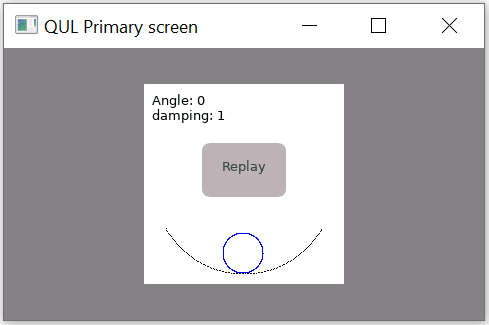
このpainteditem のサンプルでは、PaintedItem のQML型を使用して、フレームバッファ上に直接描画を行います。曲線の傾斜面上で、円形のブロブが振動する動きをエミュレートしたアニメーションを表示します。
このサンプルでは、OscillatorPaintedItemクラスを使用しており、このクラスはpaint() メソッドをオーバーライドして、曲線の傾斜面と円形のブロブを描画します。paint() メソッドは、angleプロパティの更新イベントが発生するたびに呼び出され、angleプロパティは100msごとに更新されます。
対象プラットフォーム
プロジェクトの構成
painteditem のサンプルは、以下のファイルで構成されています。
CMakeLists.txtmcu_painteditem.qmlprojectoscillator.qmlmain_baremetal.cpposcPaintedItem.cpposcPaintedItem.h
CMake プロジェクトファイルには、アプリケーションの UI を定義する基本的なビルドスクリプト「oscillator.qml 」が含まれており、プロジェクトの設定は「mcu_painteditem.qmlproject」で定義されています。
main_baremetal.cpp には、ベアメタルプラットフォーム上でアプリケーションをセットアップするための main 関数が含まれています。
oscPaintedItem.h およびoscPaintedItem.cpp ファイルには、PaintedItemDelegate クラスを継承した OscillatorPaintedItem クラスの定義が含まれています。
CMake プロジェクトファイル
# Copyright (C) 2025 The Qt Company Ltd.
# SPDX-License-Identifier: LicenseRef-Qt-Commercial
cmake_minimum_required (VERSION 3.21.1)

project(painteditem VERSION 0.0.1 LANGUAGES C CXX ASM)
if (NOT TARGET Qul::Core)
    find_package(Qul)
endif()

string(TOLOWER ${QUL_PLATFORM} PLATFORM_LOWERCASE)

set (GENERATE_ENTRYPOINT_ARG "")
if (QUL_OS STREQUAL "FreeRTOS")
    set(GENERATE_ENTRYPOINT_ARG GENERATE_ENTRYPOINT)
endif()

qul_add_target(painteditem QML_PROJECT mcu_painteditem.qmlproject oscPaintedItem.cpp ${GENERATE_ENTRYPOINT_ARG})

if (PLATFORM_LOWERCASE MATCHES "^rh850" OR PLATFORM_LOWERCASE MATCHES "^tvii")
    target_compile_definitions(painteditem PRIVATE NO_TOUCH)
endif()

app_target_setup_os(painteditem)

if (NOT QUL_OS STREQUAL "FreeRTOS")
    target_sources(painteditem PRIVATE
                   main_baremetal.cpp
    )
endif()
QmlProject ファイル
// Copyright (C) 2026 The Qt Company Ltd.
// SPDX-License-Identifier: LicenseRef-Qt-Commercial

import QmlProject 1.3

Project {
        mainFile: "oscillator.qml"

        InterfaceFiles {
                files: [
                        "oscPaintedItem.h"
                ]
        }

        ModuleFiles {
                MCU.qulModules: ["Controls"]
        }
}
PaintedItem
PaintedItem Qml 型の delegate_ プロパティは、OscillatorPaintedItem インスタンスを指します。
                    //PaintedItem Object
                    PaintedItem {
                        id: oscillator
                        anchors.right: parent.right
                        anchors.top: parent.top
                        anchors.fill: parent

                        delegate_: OscillatorPaintedItem {
                            id: delegate
                            angle: 0.0
                            initialAngle: 50
                            pivotLength: 50

                            onAngleChanged: {
                                delegate.update()
                            }
                        }
                    }
テキストアイテム
振動の初期角度と固定減衰係数が左上隅に表示されます。
                    Text {
                        anchors.top: parent.top
                        anchors.topMargin: 8
                        anchors.left: parent.left
                        anchors.leftMargin: 8
                        text: "Angle: " + delegate.initialAngle + "\ndamping: " + app.dampingFactor
                        font.pixelSize: 13
                    }
再生ボタン
振動角度が 0 に達すると、円形のブロブは静止状態になります。Replay ボタンを押すと、initialAngle が最大値にリセットされ、アニメーションが再開されます。
                    Button {
                        id: replay

                        //For platforms not supporting touch input, hide Replay button.
                        visible: !root.automaticAnimation

                        anchors.horizontalCenter: parent.horizontalCenter
                        anchors.bottom: parent.verticalCenter
                        height: 40
                        width: 70
                        font.pixelSize: 13
                        text: "Replay"

                        background: Rectangle {
                            color: replay.down ? "#A39D9C" : "#B8B3B2"
                            radius: 8
                        }

                        onClicked: {
                          /*Setting the initialAngle property to maximum value disturbs the equilibrium and
                          triggers the animation again.*/
                          delegate.initialAngle = 50
                        }
アニメーションタイマー
アニメーションは angle プロパティに基づいており、このプロパティは 100ms ごとに更新されます。angle プロパティが更新されるたびにデリゲート更新がトリガーされ、OscillatorPaintedItem のpaint() メソッドが呼び出されます。
                    Timer {
                        running: root.automaticAnimation
                        repeat: true
                        interval: 8000
                        onTriggered: delegate.initialAngle = 50
                    }
ファイル:
特定のQtライセンスの下で利用可能です。
詳細はこちら。
