
C
Qt Quick Ultralite studio_components の例
Qt Quick のUltralite Studioコンポーネントの使用方法を示します。
概要
この例では、Qt Quick のUltralite Studioコンポーネントの使用方法を示します。
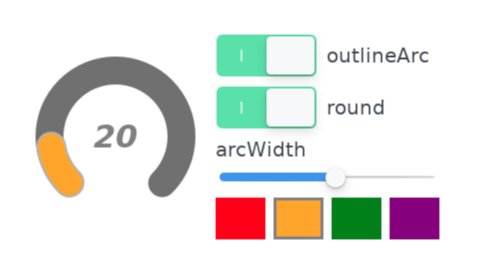
ArcItem のQMLタイプを使用して円形のゲージを描画し、右側にゲージの外観を操作するためのコントロールを用意しています。一定時間ユーザー操作がない場合、プロパティは自動的に更新されます。
対象プラットフォーム
プロジェクト構造
メインアプリケーション
メインアプリケーションウィンドウは、studio_components.qml
ArcItem ページ
ArcItemPage.qml は、左側のArcItem を使用した円形ゲージ、ゲージの外観を変更するための右側のコントロール、およびそれを自動的にデモするためのタイマーの3つの部分で構成されています。
Gauge.qml は、2つのArcItem インスタンスを使用して円形ゲージを実装しています。1つ目は背景用で、その最小角度および最大角度(度単位)は、それぞれbegin およびend プロパティによって定義されます。
ArcItem {
    id: bg
    anchors.centerIn: parent
    arcWidth: arc.arcWidth
    begin: root.beginAngle
    end: root.endAngle
    fillColor: "#707070"
    height: arc.width
    outlineArc: arc.outlineArc
    round: arc.round
    strokeWidth: 0
    strokeColor: Theme.backgroundArcStrokeColor
    width: root.width
}
2つ目のインスタンスは、ゲージの実際の値レベルを描画します。そのbegin プロパティは背景の弧と同じ角度ですが、end プロパティは0から100の範囲のゲージ値に応じて変化します。各領域は、gradient によってグラデーションカラーで塗り分けられます。メインカラーは、右側に表示されている色のいずれかによって指定されます。 ゲージ内の色は、徐々に濃い色へと変化していきます。
ArcItem {
    id: arc
    anchors.centerIn: parent
    arcWidth: 28
    begin: root.beginAngle
    end: root.valueAngle
    fillColor: "#00414a"
    height: arc.width
    outlineArc: true
    round: true
    strokeColor: Theme.foregroundArcStrokeColor
    strokeWidth: 2
    width: root.width

    gradient: LinearGradient {
        x1: 0
        y1: 20
        x2: 160
        y2: 140

        GradientStop {
            id: gradientStop1
            color: arc.fillColor
            position: 0.5
        }

        GradientStop {
            id: gradientStop2
            color: "#400006"
            position: 1
        }
    }
}
ArcItem のarcWidth 、fillColor 、outlineArc 、およびround プロパティは、Gauge コンポーネントのプロパティとして公開されています。右側のUIコントロールを使用すると、これらのプロパティを変更できます。
property alias arcWidth: arc.arcWidth
property alias fillColor: arc.fillColor
property alias fillDarkColor: gradientStop2.color
property alias outlineArc: arc.outlineArc
property alias round: arc.round
一定期間ユーザー操作がない場合、タイマーはあらかじめ定義されたシグナルを送信し、ArcItem の公開プロパティを変更します。ユーザーがコントロールに触れると、タイマーはリセットされます。
制限事項
qmlprojectexporter を使用してアプリケーションをエクスポートする際は、以下のプラットフォーム向けにエクスポートを行う場合、--selectorコマンドライン引数を使用して"transparent" ファイルセレクタを適用してください:
qmlprojectexporter --selector transparent examples/studio_components/mcu_studio_components.qmlproject
ファイル:
特定のQtライセンスの下で利用可能です。
詳細はこちら。
