
5.1.2. Dashboard Administration
Dashboard Administration refers to tasks that mostly can be done by dashboard users
having the special permission Configure Dashboard which basically is the right to
install new projects, manage user logins and assign permissions to other users. Most
of these tasks can be done from within the Dashboard User interface on special,
administrative pages that regular users normally won’t see or have access to.
Most of these pages can be reached via the settings menu that you will see in the Navigation Area when logging in as a user with administrator permissions.
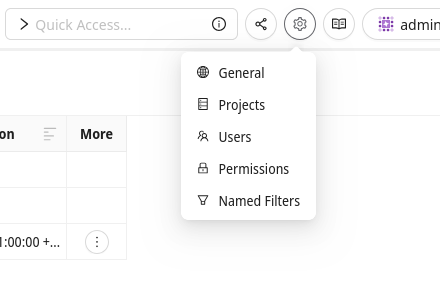
The settings menu.
It can consist of the following entries:
- General
Here you can configure global options like the mail server or various security settings.
- Projects
Here you can configure configure and add analysis projects to the dashboard.
- Users
Here you can add, remove and configure users and manage their group memberships.
- Permissions
Here you can configure dashboard user and group permissions.
- Single Sign-On / OIDC
Here you can configure SSO providers used to log into the dashboard
- Named Filters
Here you can manage the so called
Global Named Filters. This is a special settings page that administrators don’t necessarily see, because it is tied to a special permission. Likewise it is possible for filter managers to be able to see this entry but none of the others.
There are also some other topics covered in this section like Erosion Notifications, Trend Charts or Jira Integration.