
5.1.2.4. Permissions
There are global permissions and project specific permissions that can be associated with a dashboard user. The effective permissions (global and project specific) of a user are determined by the permissions either directly associated with the user or associated with one of the groups, the user is directly or indirectly member of.
The most important permissions are the two global permissions Log in (User)
and Administrate (Admin) as well as the project specific permission
View. Log in decides over the ability to use the dashboard
at all and Administrate provides the ability to configure the Dashboard,
i.e. administrate it. Note, that this permission does not automatically grant all other
permissions as well. The permission View is necessary in order to be able
to see actual project analysis results.
Caution
LDAP/ActiveDirectory users are not automatically deleted from the internal user database when they are deleted from the LDAP/ActiveDirectory server. To prevent these users from being usable in the Dashboard (via internal password or Dashboard provided Application Tokens) after deletion from your LDAP/ActiveDirectory server you have to make sure that the Login permission is only granted to these users via an LDAP group membership.
There are several more permissions and not all of them are necessarily visible in the exemplary screenshot, see Figure The permission configuration view.. You can get a description of the individual permissions in the tooltip that appears when hovering your mouse over the respective table header in the dashboard.
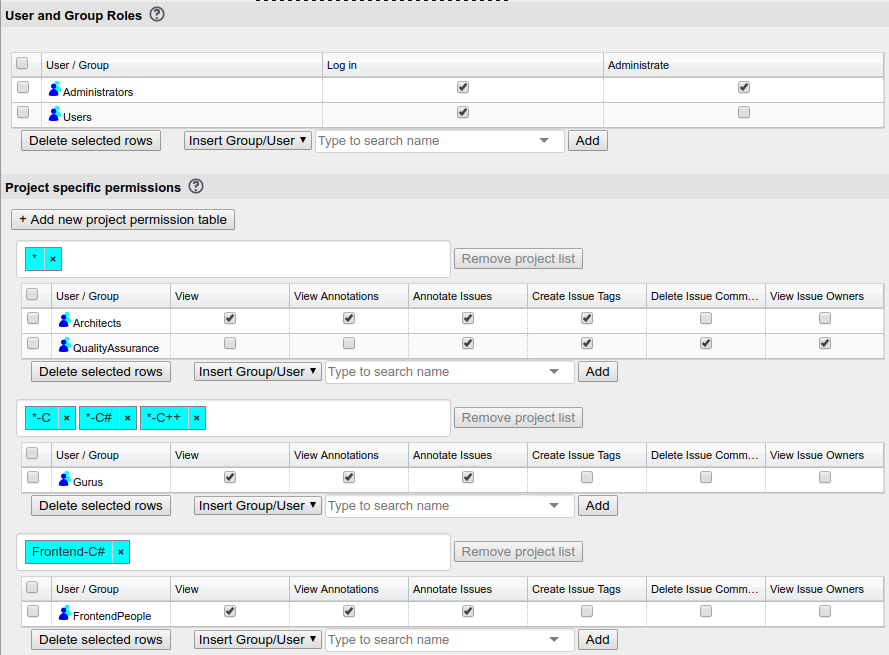
The permission configuration view.
All permissions are configured in tables where each row belongs to either a user or a
group. Users as well as groups can be known through an external authentication source.
Most importantly, if you want LDAP users of a specific LDAP group to be able to use the
dashboard you can give that LDAP group the permission Log in. For further
fine-tuning the permissions of these users you may want to have certain non-LDAP groups,
associate users with those groups and give these groups more specific permissions on
certain projects.
Note
You can grant permissions to users regardless of whether or not they are listed in the user-management. If a user with a matching name or group appears (either by adding it later or by authentication via external authenticator) these permissions are automatically associated with the new entry in the user table. On the other hand, when deleting a user from user management, the permissions explicitly granted to him are also deleted on the permissions page.
Project-Specific permissions can be configured in multiple tables, where each table is
associated with a list of projects or project patterns, the most simple one being
* which means the permissions granted in the table will be granted for
all current and future projects in the dashboard. This way you can create “groups of
projects” and grant rights on these “groups of projects” to users and user groups.
The most important project-specific permission is the ability to view issues of the
project at all: View. Other permissions include the ability to view or
create annotations as well as view the issues of other users. The meaning of the
individual permissions is explained when hovering over the table column header in the
UI.
Note
Project-specific permissions are independent of the existence of the project they grant rights to. So you can grant permissions on a project before installing it and when deleting a project you cannot accidentally loose complex permission configuration. On the other hand permission configuration can get stale this way, which is indicated by a brown background of the project or project-pattern