
Qt für Android – Notifier
Veranschaulicht den Aufruf von Java-Code aus Qt in einer Android-Anwendung.
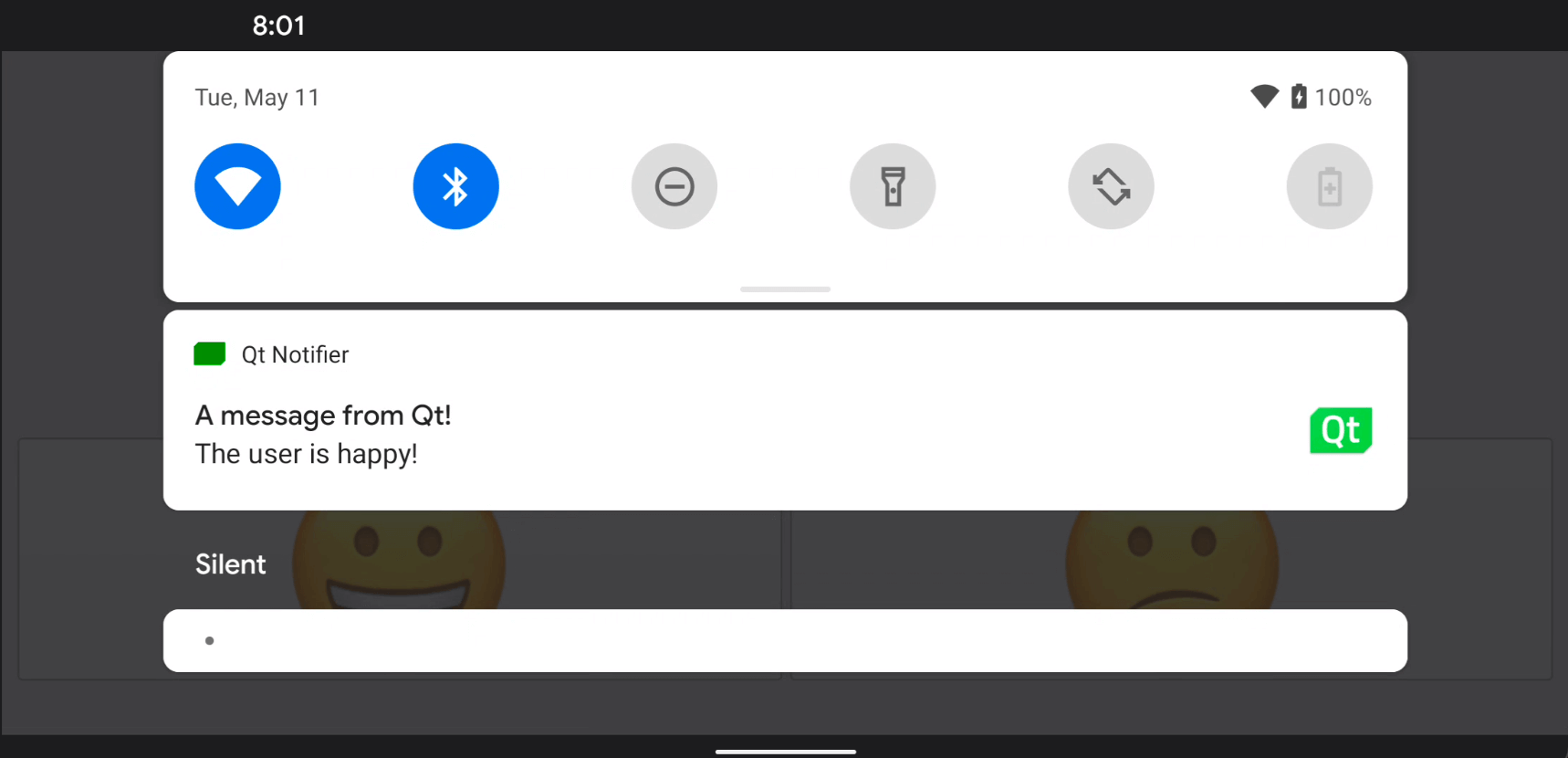
Dieses Beispiel zeigt, wie man eine benutzerdefinierte Java-Klasse zu einer Android-Anwendung hinzufügt und wie man sie mithilfe der JNI-Komfort-APIs in Qt aufruft.
Klicken Sie auf eines der Smileys, um eine Benachrichtigung in der Statusleiste des Android-Bildschirms zu senden.
Ausführen des Beispiels
Sie können das Beispiel wie folgt ausführen:
- Qt Creator
Öffnen Sie den Modus „ Welcome “ und wählen Sie das Beispiel unter „ Examples “ aus. Weitere Informationen finden Sie unter Qt Creator: Tutorial: Erstellen und Ausführen.
- Qt Extension for Visual Studio Code
Führen Sie den Befehl „ Qt: Open Qt examples “ über Command Palette aus und wählen Sie das Beispiel aus der Liste aus. Weitere Informationen finden Sie unter Qt Extension for Visual Studio Code: Tutorial: Erstellen und Ausführen.
Aufruf von Java-Methoden aus C++-Code
Wir definieren eine benutzerdefinierte Java-Klasse namens „ NotificationClient “ in der Datei „NotificationClient.java“:
package org.qtproject.example.androidnotifier;

import android.app.Notification;
import android.app.NotificationManager;
import android.content.Context;
import android.graphics.Bitmap;
import android.graphics.Color;
import android.graphics.BitmapFactory;
import android.app.NotificationChannel;

public class NotificationClient
{
    public static void notify(Context context, String message) {
        try {
            NotificationManager m_notificationManager = (NotificationManager)
                    context.getSystemService(Context.NOTIFICATION_SERVICE);

            Notification.Builder m_builder;
            if (android.os.Build.VERSION.SDK_INT >= android.os.Build.VERSION_CODES.O) {
                int importance = NotificationManager.IMPORTANCE_DEFAULT;
                NotificationChannel notificationChannel;
                notificationChannel = new NotificationChannel("Qt", "Qt Notifier", importance);
                m_notificationManager.createNotificationChannel(notificationChannel);
                m_builder = new Notification.Builder(context, notificationChannel.getId());
            } else {
                m_builder = new Notification.Builder(context);
            }

            Bitmap icon = BitmapFactory.decodeResource(context.getResources(), R.drawable.icon);
            m_builder.setSmallIcon(R.drawable.icon)
                    .setLargeIcon(icon)
                    .setContentTitle("A message from Qt!")
                    .setContentText(message)
                    .setDefaults(Notification.DEFAULT_SOUND)
                    .setColor(Color.GREEN)
                    .setAutoCancel(true);

            m_notificationManager.notify(0, m_builder.build());
        } catch (Exception e) {
            e.printStackTrace();
        }
    }
}
In der C++-Klassen-Header-Datei von „NotificationClient“, „ notificationclient.h “, deklarieren wir eine einfache C++-API zur Anzeige von Benachrichtigungen auf einem Android-Gerät. Sie besteht aus einer einzigen String-Eigenschaft, „ notification “, und einem Slot, „ updateAndroidNotification() “, der den Java-Code aufruft:
class NotificationClient : public QObject
{
Q_OBJECT
public:
explicit NotificationClient(QObject *parent = 0);
void setNotification(const QString ¬ification);
QString notification() const;
signals:
void notificationChanged();
private slots:
void updateAndroidNotification();
private:
QString m_notification;
};Wir verbinden das Signal „ notificationChanged() “ mit dem Slot „ updateAndroidNotification() “, um den Benachrichtigungstext zu aktualisieren, sobald sich der Text von „ notification “ ändert:
    m_notification = notification;
    emit notificationChanged();
Die Funktion „ updateAndroidNotification() “ ruft die Java-Methode auf, die für das Senden der Benachrichtigung über die Android-Plattform-APIs zuständig ist. Zunächst erstellen wir aus der Benachrichtigungszeichenfolge eine Java-Zeichenkette „ jstring “ und übergeben dann das Objekt „ jstring “ als Parameter an die Methode „ notify() “ in Java:
void NotificationClient::updateAndroidNotification()
{
    QJniObject javaNotification = QJniObject::fromString(m_notification);
    QJniObject::callStaticMethod<void>(
                    "org/qtproject/example/androidnotifier/NotificationClient",
                    "notify",
                    "(Landroid/content/Context;Ljava/lang/String;)V",
                    QNativeInterface::QAndroidApplication::context(),
                    javaNotification.object<jstring>());
}
Der Aufruf der Java-Methode erfolgt über ` QJniObject `, das zur Kommunikation mit Java auf die Java Native Interface (JNI)-APIs zurückgreift. Außerdem übergeben wir im obigen Codeausschnitt das Kontext-Objekt der App, über das der statische Java-Code auf die app-spezifischen Eigenschaften und APIs zugreifen kann.
Um sicherzustellen, dass unsere Smiley-Schaltflächen wie vorgesehen funktionieren, fügen wir den folgenden Code hinzu, um den Benachrichtigungstext zu ändern, wenn eine der beiden angeklickt wird:
    QObject::connect(&happyButton, &QPushButton::clicked, &happyButton, []() {
        NotificationClient().setNotification("The user is happy!");
    });

    QObject::connect(&sadButton, &QPushButton::clicked, &happyButton, []() {
        NotificationClient().setNotification("The user is sad!");
});Siehe auch Qt für Android.
© 2026 The Qt Company Ltd. Documentation contributions included herein are the copyrights of their respective owners. The documentation provided herein is licensed under the terms of the GNU Free Documentation License version 1.3 as published by the Free Software Foundation. Qt and respective logos are trademarks of The Qt Company Ltd. in Finland and/or other countries worldwide. All other trademarks are property of their respective owners.
