
Qt Quick 3D Physik – Beispiel für Gelenke
Veranschaulicht die Verwendung von Gelenken in einer Physikszene.
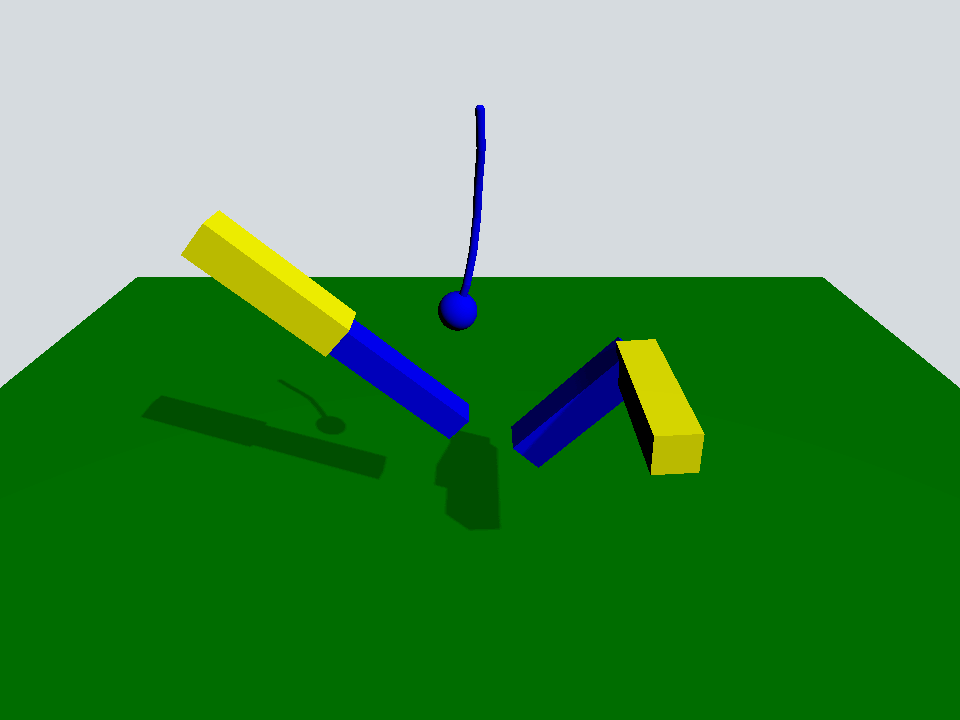
Dieses Beispiel veranschaulicht die Verwendung einiger der in Quick 3D Physics verfügbaren Gelenke.
Die Szene ist eine typische Szene mit einem „ PhysicsWorld “, einem „ View3D “ mit einem „ PerspectiveCamera “ und einem „ DirectionalLight “:
Window {
    width: 640
    height: 480
    visible: true
    title: qsTr("Qt Quick 3D Physics - Joints")

    PhysicsWorld {
        scene: viewport.scene
        running: true
    }

    View3D {
        id: viewport
        anchors.fill: parent

        environment: SceneEnvironment {
            clearColor: "#d6dbdf"
            backgroundMode: SceneEnvironment.Color
        }

        PerspectiveCamera {
            position: Qt.vector3d(0, 600, 700)
            eulerRotation: Qt.vector3d(-30, 0, 0)
            clipFar: 5000
            clipNear: 1
        }

        DirectionalLight {
            eulerRotation.x: -45
            eulerRotation.y: 45
            castsShadow: true
            brightness: 1
            shadowFactor: 50
            shadowMapQuality: Light.ShadowMapQualityHigh
        }

        Rope {
            eulerRotation: Qt.vector3d(0, 0, -90)
            position: Qt.vector3d(0, 500, 0)
        }

        Prismatic {
            id: prismatic
            position: Qt.vector3d(-250, 100, 0)
        }

        Revolute {
            id: revolute
            position: Qt.vector3d(200, 200, 100)
        }

        StaticRigidBody {
            position: Qt.vector3d(0, -100, 0)
            eulerRotation: Qt.vector3d(-90, 0, 0)
            collisionShapes: PlaneShape {}
            Model {
                source: "#Rectangle"
                scale: Qt.vector3d(20, 20, 1)
                materials: PrincipledMaterial {
                    baseColor: "green"
                }
                castsShadows: false
                receivesShadows: true
            }
        }

        FrameAnimation {
            id: animator
            running: true
            onTriggered: {
                prismatic.jointRotation.z += 1
                revolute.jointRotation.x += 0.95
            }
        }
    }
}
Es gibt ein „ StaticRigidBody “ mit einem „ PlaneShape “, das als Boden dient, sowie drei benutzerdefinierte QML-Objekte: „Rope“, „Prismatic“ und „Revolute“.
Rope {
    eulerRotation: Qt.vector3d(0, 0, -90)
    position: Qt.vector3d(0, 500, 0)
}

Prismatic {
    id: prismatic
    position: Qt.vector3d(-250, 100, 0)
}

Revolute {
    id: revolute
    position: Qt.vector3d(200, 200, 100)
}
Das „Rope“-Objekt besteht aus einer Reihe von Kapseln und einer Kugel, die über „ spherical joints “ für die Kapseln und über „ fixed joint “ für die Kugel miteinander verbunden sind.
Node {
    id: root

    SphericalJoint {
        bodyB: shape0
        positionA: root.position
        positionB: Qt.vector3d(-20, 0, 0)
    }

    SphericalJoint {
        bodyA: shape0
        bodyB: shape1
        positionA: Qt.vector3d(20, 0, 0)
        positionB: Qt.vector3d(-20, 0, 0)
    }

    SphericalJoint {
        bodyA: shape1
        bodyB: shape2
        positionA: Qt.vector3d(20, 0, 0)
        positionB: Qt.vector3d(-20, 0, 0)
    }

    SphericalJoint {
        bodyA: shape2
        bodyB: shape3
        positionA: Qt.vector3d(20, 0, 0)
        positionB: Qt.vector3d(-20, 0, 0)
    }

    SphericalJoint {
        bodyA: shape3
        bodyB: shape4
        positionA: Qt.vector3d(20, 0, 0)
        positionB: Qt.vector3d(-20, 0, 0)
    }

    SphericalJoint {
        bodyA: shape4
        bodyB: shape5
        positionA: Qt.vector3d(20, 0, 0)
        positionB: Qt.vector3d(-20, 0, 0)
    }

    FixedJoint {
        bodyA: shape5
        bodyB: sphere
        positionA: Qt.vector3d(20, 0, 0)
        positionB: Qt.vector3d(0, 0, 0)
    }

    DynamicRigidBody {
        id: shape0
        position: Qt.vector3d(0, 0, 0)
        collisionShapes: CapsuleShape {
            diameter: 10
            height: 40
        }
        Model {
            geometry: CapsuleGeometry {
                diameter: 10
                height: 40
            }
            materials: PrincipledMaterial {
                baseColor: "blue"
            }
        }
    }

    DynamicRigidBody {
        id: shape1
        position: Qt.vector3d(40, 0, 0)
        collisionShapes: CapsuleShape {
            diameter: 10
            height: 40
        }
        Model {
            geometry: CapsuleGeometry {
                diameter: 10
                height: 40
            }
            materials: PrincipledMaterial {
                baseColor: "blue"
            }
        }
    }

    DynamicRigidBody {
        id: shape2
        position: Qt.vector3d(80, 0, 0)
        collisionShapes: CapsuleShape {
            diameter: 10
            height: 40
        }
        Model {
            geometry: CapsuleGeometry {
                diameter: 10
                height: 40
            }
            materials: PrincipledMaterial {
                baseColor: "blue"
            }
        }
    }

    DynamicRigidBody {
        id: shape3
        position: Qt.vector3d(120, 0, 0)
        collisionShapes: CapsuleShape {
            diameter: 10
            height: 40
        }
        Model {
            geometry: CapsuleGeometry {
                diameter: 10
                height: 40
            }
            materials: PrincipledMaterial {
                baseColor: "blue"
            }
        }
    }

    DynamicRigidBody {
        id: shape4
        position: Qt.vector3d(160, 0, 0)
        collisionShapes: CapsuleShape {
            diameter: 10
            height: 40
        }
        Model {
            geometry: CapsuleGeometry {
                diameter: 10
                height: 40
            }
            materials: PrincipledMaterial {
                baseColor: "blue"
            }
        }
    }

    DynamicRigidBody {
        id: shape5
        position: Qt.vector3d(200, 0, 0)
        collisionShapes: CapsuleShape {
            diameter: 10
            height: 40
        }
        Model {
            geometry: CapsuleGeometry {
                diameter: 10
                height: 40
            }
            materials: PrincipledMaterial {
                baseColor: "blue"
            }
        }
    }

    DynamicRigidBody {
        id: sphere
        position: Qt.vector3d(240, 0, 0)
        scale: Qt.vector3d(0.5, 0.5, 0.5)
        collisionShapes: SphereShape {}
        Model {
            source: "#Sphere"
            materials: PrincipledMaterial {
                baseColor: "blue"
            }
        }
    }
}
Das „Prismatic“-Objekt besteht aus zwei Stäben, die über ein „ prismatic joint “ entlang ihrer gemeinsamen x-Achse miteinander verbunden sind. Durch dieses Gelenk kann sich der kleinere Stab frei entlang dieser x-Achse bewegen, bis er seine Begrenzungen „ upper “ und „ lower “ erreicht.
Node {
    id: root
    property vector3d jointRotation : Qt.vector3d(0, 0, 0)

    PrismaticJoint {
        bodyA: prismaticBoxA
        bodyB: prismaticBoxB
        lowerLimit: -200
        upperLimit: 0
        positionA: Qt.vector3d(100, 0, 0)
        positionB: Qt.vector3d(-100, 0, 0)
    }

    DynamicRigidBody {
        id: prismaticBoxA
        kinematicPosition: Qt.vector3d(0, 200, 0)
        kinematicEulerRotation: root.jointRotation
        isKinematic: true
        scale: Qt.vector3d(2, 0.5, 0.5)
        collisionShapes: BoxShape {}
        Model {
            source: "#Cube"
            materials: PrincipledMaterial {
                baseColor: "yellow"
            }
        }
    }

    DynamicRigidBody {
        id: prismaticBoxB
        position: Qt.vector3d(0, 0, 0)
        scale: Qt.vector3d(2, 0.4, 0.4)
        collisionShapes: BoxShape {}
        Model {
            source: "#Cube"
            materials: PrincipledMaterial {
                baseColor: "blue"
            }
        }
    }
}
Das Revolute-Objekt besteht aus zwei Stäben, die um 90 Grad gedreht und in einem „ revolute joint “ verbunden sind.
Node {
    id: root
    property vector3d jointRotation : Qt.vector3d(0, 90, 0)

    RevoluteJoint {
        bodyA: revoluteBoxA
        bodyB: revoluteBoxB
        positionA: Qt.vector3d(100, 0, 0)
        positionB: Qt.vector3d(100, 0, 0)
        orientationB: Quaternion.fromEulerAngles(0, 0, 90)
        angularLimitLower: -Math.PI / 4
        angularLimitUpper: Math.PI / 4
        enableAngularLimit: true
    }

    DynamicRigidBody {
        id: revoluteBoxA
        kinematicPosition: Qt.vector3d(0, 0, 0)
        kinematicEulerRotation: root.jointRotation
        isKinematic: true
        scale: Qt.vector3d(2, 0.5, 0.5)
        collisionShapes: BoxShape {}
        Model {
            source: "#Cube"
            materials: PrincipledMaterial {
                baseColor: "yellow"
            }
        }
    }

    DynamicRigidBody {
        id: revoluteBoxB
        position: Qt.vector3d(0, 100, -100)
        eulerRotation: Qt.vector3d(0, 90, -90)
        scale: Qt.vector3d(2, 0.5, 0.5)
        collisionShapes: BoxShape {}
        Model {
            source: "#Cube"
            materials: PrincipledMaterial {
                baseColor: "blue"
            }
        }
    }
}
Zurück zur Hauptszene: Dort befindet sich ein „ FrameAnimation “-Objekt, das die kinematischen Gelenke „ prismatic “ und „ revolute “ dreht.
FrameAnimation {
    id: animator
    running: true
    onTriggered: {
        prismatic.jointRotation.z += 1
        revolute.jointRotation.x += 0.95
    }
}
Anhand all dieser beweglichen Teile können wir sehen, wie die verschiedenen Gelenke in einer Physikszene zusammenwirken.
Dateien:
© 2026 The Qt Company Ltd. Documentation contributions included herein are the copyrights of their respective owners. The documentation provided herein is licensed under the terms of the GNU Free Documentation License version 1.3 as published by the Free Software Foundation. Qt and respective logos are trademarks of The Qt Company Ltd. in Finland and/or other countries worldwide. All other trademarks are property of their respective owners.
