
Frame QML Type
コントロールの論理グループを表す視覚的枠組み。詳細...
詳細説明
Frameは、コントロールの論理的なグループを1つのビジュアルフレーム内にまとめて配置するために使用されます。Frame自体は独自のレイアウト機能を提供せず、RowLayout やColumnLayout を作成するなどして、その内容の位置を指定する必要があります。
Frameの子として宣言されたアイテムは、自動的にそのFrameのcontentItem の子となります。動的に作成されたアイテムは、明示的にcontentItemの子として設定する必要があります。
Frame内で1つのアイテムのみが使用される場合、Frameは、その中に含まれるアイテムの暗黙的なサイズに合わせてサイズが調整されます。このため、レイアウトとの併用に特に適しています。
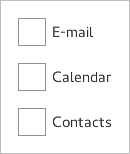
Frame {
    ColumnLayout {
        anchors.fill: parent
        CheckBox { text: qsTr("E-mail") }
        CheckBox { text: qsTr("Calendar") }
        CheckBox { text: qsTr("Contacts") }
    }
}「フレームおよびコンテナコントロールのカスタマイズ」も参照してください 。
© 2026 The Qt Company Ltd. Documentation contributions included herein are the copyrights of their respective owners. The documentation provided herein is licensed under the terms of the GNU Free Documentation License version 1.3 as published by the Free Software Foundation. Qt and respective logos are trademarks of The Qt Company Ltd. in Finland and/or other countries worldwide. All other trademarks are property of their respective owners.
