
Qt Quick 3D - HelloCube の例
Qt Quick 3Dで2Dオブジェクトと3Dオブジェクトを一緒にレンダリングする方法を示しています。
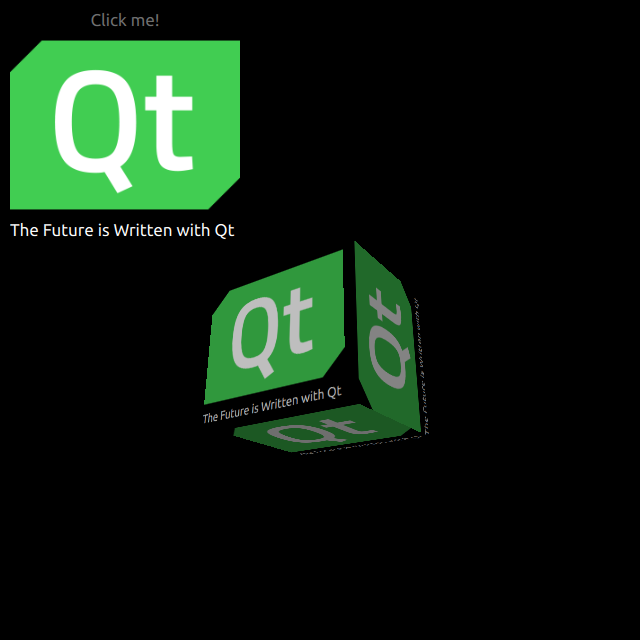
HelloCubeは、Qt Quick 3Dで3Dの立方体を2Dアイテムと共にレンダリングする方法を示しています。
2D アイテムの描画
シーン全体の設定はmain.qmlファイルで行います。
QtQuick3D モジュールの型を使用するには、そのモジュールをインポートする必要があります。
import QtQuick3DRectangle上にImageとTextを配置した、シンプルなQtQuick アイテムを定義します。
Image {
    anchors.fill: parent
    source: "qt_logo.png"
}
Text {
    anchors.bottom: parent.bottom
    anchors.left: parent.left
    color: "white"
    font.pixelSize: 17
    text: qsTr("The Future is Written with Qt")
}
この単純な矩形には、垂直方向に反転するための2つのアニメーションが設定されています。
transform: Rotation {
    id: rotation
    origin.x: qt_logo.width / 2
    origin.y: qt_logo.height / 2
    axis { x: 1; y: 0; z: 0 }
}

PropertyAnimation {
    id: flip1
    target: rotation
    property: "angle"
    duration: 600
    to: 180
    from: 0
}
PropertyAnimation {
    id: flip2
    target: rotation
    property: "angle"
    duration: 600
    to: 360
    from: 180
}
3Dキューブの描画
立方体の描画は非常に簡単です。Camera とLight を定義した後、組み込みのModel を使用して立方体を作成します。この例では、前述の2D Rectangleを、この立方体の表面上に拡散テクスチャ(Texture )としてレンダリングします。Rectangleでは、layer.enabled をtrue に設定します。
layer.enabled: trueこのプロパティを有効にすると、2Dアイテムはオフスクリーンサーフェスにレンダリングされ、それをキューブのテクスチャとして使用します。
id: cube
source: "#Cube"
materials: PrincipledMaterial {
    baseColorMap: Texture {
        sourceItem: qt_logo
    }
}
eulerRotation.y: 90© 2026 The Qt Company Ltd. Documentation contributions included herein are the copyrights of their respective owners. The documentation provided herein is licensed under the terms of the GNU Free Documentation License version 1.3 as published by the Free Software Foundation. Qt and respective logos are trademarks of The Qt Company Ltd. in Finland and/or other countries worldwide. All other trademarks are property of their respective owners.
