
Qt Quick 3D - レイヤーの例
QtQuick3D におけるレイヤーの使用方法を紹介します。
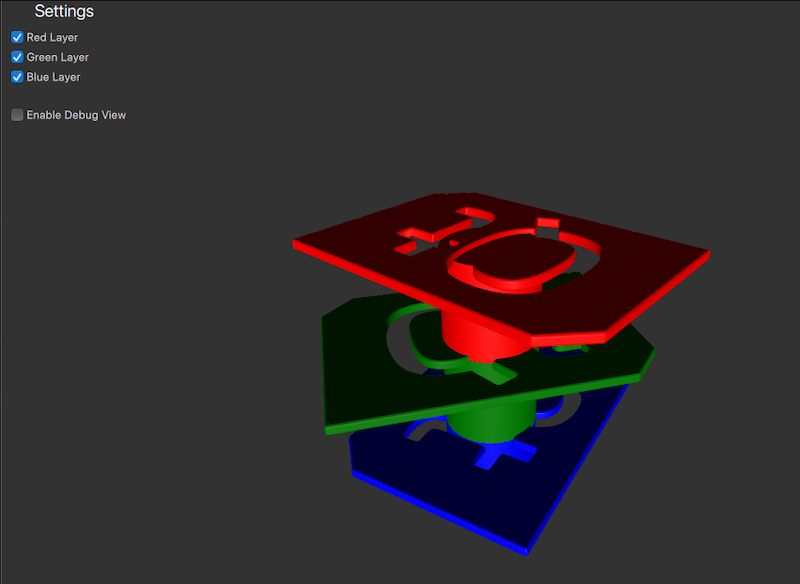
この例では、異なる色のロゴモデルがそれぞれ別のレイヤーに配置されています。設定パネルから、チェックボックスのオン/オフを切り替えることで、各レイヤーの表示/非表示を切り替えることができます。
シーンレイヤーの準備
レイヤー
便宜上、Layer の列挙型に、識別しやすい名前をエイリアスとして設定します。
readonly property int redModels: ContentLayer.Layer1
readonly property int greenModels: ContentLayer.Layer2
readonly property int blueModels: ContentLayer.Layer3
カメラ
レイヤーに基づいてカメラのビューをフィルタリングしたいので、カメラがレンダリングすべきレイヤーを設定する必要があります。これを行うには、カメラのlayers プロパティを1つ以上のレイヤーに設定します。これにより、カメラはlayers で指定されたレイヤーにあるオブジェクトのみをレンダリングするようになります。デフォルトでは、カメラはすべてのlayers にあるノードをレンダリングします。
アクティブなレイヤーを選択できるようにするため、cameraFilter プロパティを作成し、それをカメラのlayers プロパティにバインドします。
property int cameraFilter: ContentLayer.LayerAll

camera: PerspectiveCamera {
    layers: v3d.cameraFilter
    position: Qt.vector3d(0, 400, 500)
    eulerRotation.x: -30
    clipFar: 2000
}設定パネルのチェックボックスを切り替えると、cameraFilter プロパティが更新され、対応するレイヤーが含まれたり除外されたりします。これにより、カメラはcameraFilter で指定されたレイヤーにあるオブジェクトのみをレンダリングするようになります。
CheckBox {
    id: checkBoxRedLayer
    text: qsTr("Red Layer")
    checked: true
    onCheckedChanged: {
        v3d.cameraFilter = checked ? v3d.cameraFilter | v3d.redModels : v3d.cameraFilter & ~v3d.redModels;
    }
}
モデル
3つの異なる色のモデルを、それぞれのレイヤーに割り当てる必要があります。カメラと同様に、モデルのlayers プロパティを使用してレイヤーを割り当てることができます。赤いロゴモデルはredLayer に、緑色のモデルはgreenLayer に、青いモデルはblueLayer に割り当てます。
Node {
    position: Qt.vector3d(0, 200, 0)
    Model {
        source: "qtlogo.mesh"
        layers: v3d.redModels
        scale: Qt.vector3d(5000, 5000, 5000)
        materials:[ PrincipledMaterial {
            baseColor: "red"
            roughness: 0.5
        } ]

        NumberAnimation on eulerRotation.y {
            from: 0
            to: 360
            duration: 15000
            loops: Animation.Infinite
        }
    }

    Model {
        position: Qt.vector3d(0, -50, 0)
        source: "#Cylinder"
        materials:[ PrincipledMaterial {
            baseColor: "red"
            roughness: 0.5
        } ]
    }

    ParticleSystem3D {
        visible: particlesCheckbox.checked
        running: particlesCheckbox.checked
        layers: v3d.redModels
        SpriteParticle3D {
            id: redParticle
            color: "red"
            maxAmount: 200
            particleScale: 8
            fadeInDuration: 500
            fadeOutDuration: 500
        }
        ParticleEmitter3D {
            particle: redParticle
            position: Qt.vector3d(0, -50, 0)
            emitRate: 40
            lifeSpan: 2000
            velocity: VectorDirection3D {
                direction: Qt.vector3d(0, 120, 0)
                directionVariation: Qt.vector3d(40, 40, 40)
            }
        }
    }
}

Node {
    position: Qt.vector3d(0, 100, 0)
    Model {
        source: "qtlogo.mesh"
        layers: v3d.greenModels
        scale: Qt.vector3d(5000, 5000, 5000)
        materials:[ PrincipledMaterial {
            baseColor: "green"
            roughness: 0.5
        } ]

        NumberAnimation on eulerRotation.y {
            from: 0
            to: 360
            duration: 20000
            loops: Animation.Infinite
        }
    }
    Model {
        position: Qt.vector3d(0, -50, 0)
        source: "#Cylinder"
        materials:[ PrincipledMaterial {
            baseColor: "green"
            roughness: 0.5
        } ]
    }

    ParticleSystem3D {
        visible: particlesCheckbox.checked
        running: particlesCheckbox.checked
        layers: v3d.greenModels
        SpriteParticle3D {
            id: greenParticle
            color: "green"
            maxAmount: 200
            particleScale: 8
            fadeInDuration: 500
            fadeOutDuration: 500
        }
        ParticleEmitter3D {
            particle: greenParticle
            position: Qt.vector3d(0, -50, 0)
            emitRate: 40
            lifeSpan: 2000
            velocity: VectorDirection3D {
                direction: Qt.vector3d(0, 120, 0)
                directionVariation: Qt.vector3d(40, 40, 40)
            }
        }
    }
}
Node {
    Model {
        source: "qtlogo.mesh"
        layers: v3d.blueModels
        scale: Qt.vector3d(5000, 5000, 5000)
        materials:[ PrincipledMaterial {
            baseColor: "blue"
            roughness: 0.5
        } ]

        NumberAnimation on eulerRotation.y {
            from: 0
            to: 360
            duration: 12500
            loops: Animation.Infinite
        }
    }
    Model {
        position: Qt.vector3d(0, -50, 0)
        source: "#Cylinder"
        materials:[ PrincipledMaterial {
            baseColor: "blue"
            roughness: 0.5
        } ]
    }

    ParticleSystem3D {
        visible: particlesCheckbox.checked
        running: particlesCheckbox.checked
        layers: v3d.blueModels
        SpriteParticle3D {
            id: blueParticle
            color: "blue"
            maxAmount: 200
            particleScale: 8
            fadeInDuration: 500
            fadeOutDuration: 500
        }
        ParticleEmitter3D {
            particle: blueParticle
            position: Qt.vector3d(0, -50, 0)
            emitRate: 40
            lifeSpan: 2000
            velocity: VectorDirection3D {
                direction: Qt.vector3d(0, 120, 0)
                directionVariation: Qt.vector3d(40, 40, 40)
            }
        }
    }
}レイヤーの設定が完了すると、カメラはcameraFilter で指定されたレイヤーに含まれるモデルのみをレンダリングするようになります。ユーザーは、設定パネルのチェックボックスをオンまたはオフにすることで、各レイヤーの表示/非表示を切り替えることができます。
© 2026 The Qt Company Ltd. Documentation contributions included herein are the copyrights of their respective owners. The documentation provided herein is licensed under the terms of the GNU Free Documentation License version 1.3 as published by the Free Software Foundation. Qt and respective logos are trademarks of The Qt Company Ltd. in Finland and/or other countries worldwide. All other trademarks are property of their respective owners.
