
Frame QML Type
컨트롤의 논리적 그룹을 나타내는 시각적 프레임. 더 보기...
상세 설명
Frame은 시각적 프레임 내에서 컨트롤의 논리적 그룹을 함께 배치하는 데 사용됩니다. Frame 자체는 레이아웃을 제공하지 않으며, 예를 들어 콘텐츠 아이템( RowLayout )이나 콘텐츠 그룹( ColumnLayout)을 생성하는 등의 방법으로 내용을 배치해야 합니다.
프레임의 자식으로 선언된 항목은 자동으로 프레임의 콘텐츠 항목( contentItem)에 부모-자식 관계가 설정됩니다. 동적으로 생성된 항목은 명시적으로 콘텐츠 항목에 부모-자식 관계를 설정해야 합니다.
Frame 내에서 단 하나의 항목만 사용되는 경우, Frame은 포함된 항목의 암시적 크기에 맞게 크기가 조정됩니다. 이로 인해 레이아웃과 함께 사용하기에 특히 적합합니다.
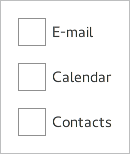
Frame {
    ColumnLayout {
        anchors.fill: parent
        CheckBox { text: qsTr("E-mail") }
        CheckBox { text: qsTr("Calendar") }
        CheckBox { text: qsTr("Contacts") }
    }
}© 2026 The Qt Company Ltd. Documentation contributions included herein are the copyrights of their respective owners. The documentation provided herein is licensed under the terms of the GNU Free Documentation License version 1.3 as published by the Free Software Foundation. Qt and respective logos are trademarks of The Qt Company Ltd. in Finland and/or other countries worldwide. All other trademarks are property of their respective owners.
