
Qt Quick 3D - HelloCube 예제
Qt Quick 3D 에서 2D 및 3D 객체를 함께 렌더링하는 방법을 보여줍니다.
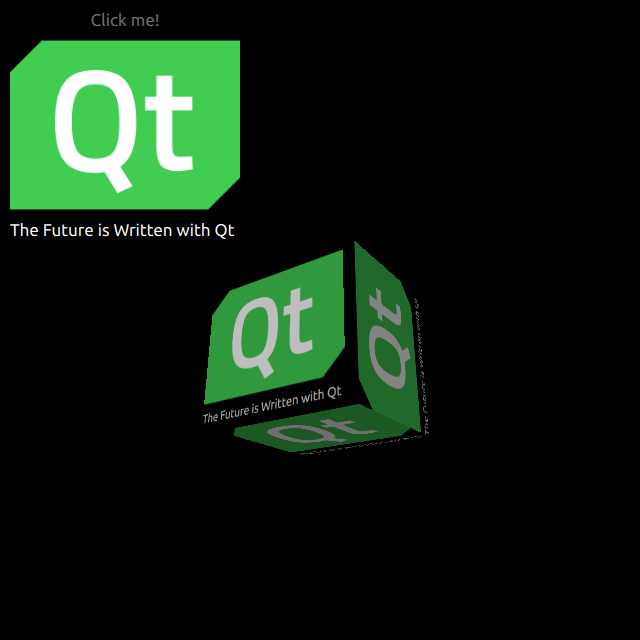
HelloCube는 Qt Quick 3D 에서 3D 큐브를 2D 요소와 함께 렌더링하는 방법을 보여줍니다.
2D 객체 그리기
전체 씬은 main.qml 파일에서 설정합니다.
QtQuick3D 모듈의 타입을 사용하려면 해당 모듈을 임포트해야 합니다:
import QtQuick3D직사각형 위에 이미지(Image)와 텍스트(Text)를 배치한 간단한 QtQuick 항목을 정의합니다.
Image {
    anchors.fill: parent
    source: "qt_logo.png"
}
Text {
    anchors.bottom: parent.bottom
    anchors.left: parent.left
    color: "white"
    font.pixelSize: 17
    text: qsTr("The Future is Written with Qt")
}
이 간단한 사각형에는 수직으로 뒤집히는 두 가지 애니메이션이 있습니다.
transform: Rotation {
    id: rotation
    origin.x: qt_logo.width / 2
    origin.y: qt_logo.height / 2
    axis { x: 1; y: 0; z: 0 }
}

PropertyAnimation {
    id: flip1
    target: rotation
    property: "angle"
    duration: 600
    to: 180
    from: 0
}
PropertyAnimation {
    id: flip2
    target: rotation
    property: "angle"
    duration: 600
    to: 360
    from: 180
}
3D 큐브 그리기
큐브를 그리는 것은 매우 간단합니다. Camera 과 Light 를 정의한 후, 내장된 Model 를 사용하여 큐브를 만듭니다. 이 예제에서는 이전의 2D Rectangle을 이 큐브 표면에 디퓨즈(diffuse) Texture 로 렌더링합니다. Rectangle에서 layer.enabled 를 true 로 설정합니다.
layer.enabled: true이 속성을 활성화하면 2D 항목이 오프스크린 표면에 렌더링되며, 이를 큐브의 텍스처로 사용합니다.
id: cube
source: "#Cube"
materials: PrincipledMaterial {
    baseColorMap: Texture {
        sourceItem: qt_logo
    }
}
eulerRotation.y: 90© 2026 The Qt Company Ltd. Documentation contributions included herein are the copyrights of their respective owners. The documentation provided herein is licensed under the terms of the GNU Free Documentation License version 1.3 as published by the Free Software Foundation. Qt and respective logos are trademarks of The Qt Company Ltd. in Finland and/or other countries worldwide. All other trademarks are property of their respective owners.
