
VxWorks 장치에서 C++ 애플리케이션 디버깅
참고: 모든 라이브러리 종속성을 SD 카드에저장하십시오 . 마운트된 NFS 디렉터리와 같은 다른 위치에서는 디버깅이 작동하지 않습니다.
Qt Creator 응용 프로그램 바이너리 및 기타 배포 가능한 파일만 SD 카드의 루트 디렉터리에 복사합니다. SD 카드의 디렉터리 구조는 보존하거나 생성하지 않습니다.
Qt 애플리케이션을 디버그하려면 VxWorks 소스 빌드(VSB) 구성에 다음 줄을 추가하십시오.
vxprj vsb config -s -add "_WRS_CONFIG_TCF_GDB_RSP=y"
장치에서 GDB 서버를 자동으로 시작하려면 VxWorks 이미지 프로젝트(VIP) 구성에 다음 줄을 추가하십시오:
"INCLUDE_DEBUG_AGENT"
"INCLUDE_DEBUG_AGENT_START"
"INCLUDE_STANDALONE_SYM_TBL"
자세한 내용은 Qt for VxWorks를 참조하십시오.
디버깅을 설정하려면:
- 프로젝트에 대한 VxWorks 키트를 활성화하십시오.
- Projects > Run Settings 로 이동합니다.
- Priority 와 Stack size 를 설정하십시오.
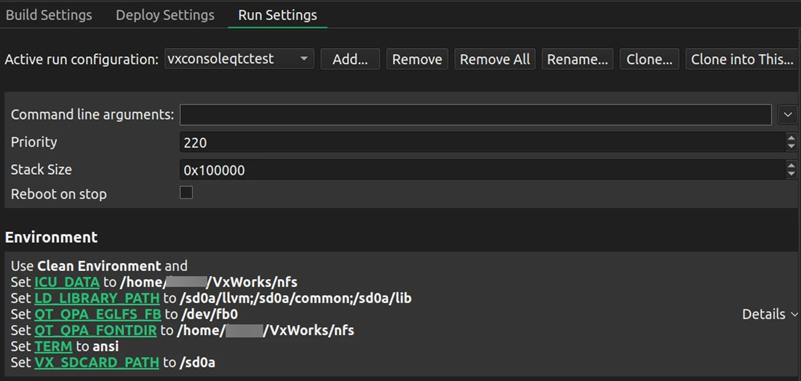
- Environment 에서
LD_LIBRARY_PATH변수를 SD 카드에 있는 라이브러리의 위치로 설정합니다. SD 카드의 경로가/sd0a가 아닌 경우,VX_SDCARD_PATH를 올바른 위치로 설정하십시오.
디버깅을 시작하려면 F5를 누르거나 Debug > Start Debugging > Start Debugging of Startup Project 로 이동하십시오.
‘프로젝트에 대한 키트 활성화’, ‘플러그인 활성화 및 비활성화’, ‘방법: VxWorks’, ‘디버깅’, ‘VxWorks용 개발’ 및 ‘VxWorks용Qt’도 참조하십시오 .
Copyright © The Qt Company Ltd. and other contributors. Documentation contributions included herein are the copyrights of their respective owners. The documentation provided herein is licensed under the terms of the GNU Free Documentation License version 1.3 as published by the Free Software Foundation. Qt and respective logos are trademarks of The Qt Company Ltd in Finland and/or other countries worldwide. All other trademarks are property of their respective owners.
