
覆盖项目的 CMake 设置
要覆盖当前项目的 CMake 设置:
- 转到“Projects ” > “Project Settings ” > “CMake ”。
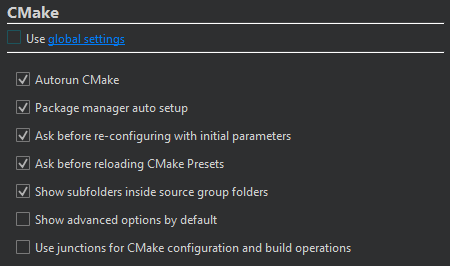
- 清除“Use global settings ”。
- 为该项目配置 CMake。
您的选择将覆盖在“Preferences ” > “CMake ” > “General ”中设置的值。
| 设置 | 值 | 阅读更多 |
|---|---|---|
| Autorun CMake | 当您在项目中编辑CMakeLists.txt 配置文件时,会运行 CMake 以刷新项目信息。此外,在构建项目时也会刷新项目信息。 | 查看 CMake 项目内容 |
| Clear old CMake output on a new run | 当您再次运行 CMake 时,将删除旧的输出结果。 | 查看 CMake 输出 |
| Package manager auto setup | 设置Conan或vcpkg包管理器,以便与 CMake 配合使用。 | 在包管理器中使用 CMake |
| Maintenance Tool dependency provider | 使用Qt Online Installer 安装缺失的 Qt 模块。 | 安装缺失的 Qt 软件包 |
| Ask before re-configuring with initial parameters | 当您选择“Re-configure with Initial Variables ”时,系统会先询问再执行操作。 | 使用初始变量重新配置 |
| Ask before reloading CMake presets | 当您进入“Build ”( )并选择“Reload CMake Presets ”( )时,系统会在执行前进行确认。 | CMake 预设 |
| Show subfolders inside source group folders | 在“Projects ”视图中隐藏子文件夹名称,并根据源代码组对文件进行排列。 | 在“项目”视图中隐藏子文件夹名称 |
| Show advanced options by default | 在“Initial Configuration ”和“Current Configuration ”中默认显示所有 CMake 变量。 | 查看高级变量 |
| Use junctions for CMake configuration and build operations | 在 Windows 上,使用连接点(junction points)进行 CMake 的配置、构建和安装操作。 | 在 Windows 上使用连接点 |
您可以将这些首选项设置为CMake 配置预设,或写入 CMakeLists.txt.shared 文件中进行设置。
另请参阅 《操作指南:使用 CMake 进行构建》、《CMake》以及《构建和运行项目》。
Copyright © The Qt Company Ltd. and other contributors. Documentation contributions included herein are the copyrights of their respective owners. The documentation provided herein is licensed under the terms of the GNU Free Documentation License version 1.3 as published by the Free Software Foundation. Qt and respective logos are trademarks of The Qt Company Ltd in Finland and/or other countries worldwide. All other trademarks are property of their respective owners.
