
C
Qt Quick Ultraliteチェスの例
Qt Quick のUltraliteで、C++のシングルトンオブジェクトを使用する方法を示します。
概要
これは、C++ オブジェクトをQt Quick Ultralite と統合する方法を示す簡単な例です。意図的にすべてのルールに準拠していない、簡略化されたチェスゲームを実装しています。 2人のプレイヤーが順番に手を指し、相手の駒を取り合うことができます。画面の右上には現在どのプレイヤーの番か、右下には前回の手から経過した時間が表示されます。
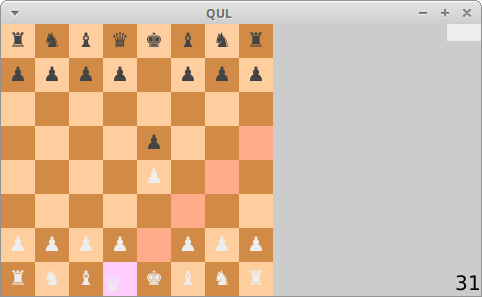
ゲームロジックはC++のシングルトンオブジェクトで実装されており、シングルトンからQMLコードに対していくつかのプロパティとメソッドを公開しています。QMLコードはマウスイベントをシングルトンと連携させ、盤面の現在の状態を表示します。
プロジェクト構造
CMakeプロジェクトファイル
QMLファイル内でC++シングルトンオブジェクトのプロパティやメソッドを使用する前に、qmlinterfacegenerator ツールにそれらをQMLに公開するよう指示する必要があります。これは、QmlProjectのInterfaceFiles.filesプロパティを使用して行われ、これによりヘッダーファイルに対してツールが実行されます。
...
        InterfaceFiles {
                files: ["chessmodel.h"]
        }
...
シングルトンオブジェクト
ChessModel クラスは、チェス盤の管理を担当します。このクラスはQul::Singleton を継承し、パブリックメソッド、シグナル、およびプロパティをQMLに公開しています。
    ...
    Qul::Property<bool> whiteTurn;
    Qul::Property<int> secondsSinceMove;
    Qul::Signal<void(int col, int row)> validMove;
    Qul::Signal<void()> invalidMove;
    ...
    /// Return the current column position of a specific piece
    /// (or -1 if it is not in the chess board).
    /// This function is public and can be called from the QML
    int col(int piece) { return position[piece].value().first; }

    /// Return the current row position of a specific piece
    /// (or -1 if it is not in the chess board).
    /// This function is public and can be called from the QML
    int row(int piece) { return position[piece].value().second; }

    /// Return true if it is allowed to drop the piece on thie case
    /// This function is public and can be called from the QML
    bool canDrop(int col, int row)
    {
        if (col < 0 || col > 7 || row < 0 || row > 7)
            return false;
        return squares[col][row].value().canDrop;
    }

    /// Set the current active piece
    /// (if piece is negative, there shall not be any active piece)
    /// This function is public and can be called from the QML
    void setActivePiece(int piece)
    ...
    void release(int piece, int col, int row)
    ...
アプリケーションの UI
chess.qml ファイルは、チェス盤と駒を定義します。このファイルでは、2つのRepeaters を使用して、Rectangle アイテムでチェス盤を構築し、その上に駒を配置します。
チェス盤を担当するリピーター
    ...
    // The chess board: simply 64 squares of different colors
    Repeater {
        model: 64

        Rectangle {
            property int row: Math.floor(index/8);
            property int col: index % 8;
            z: 0;
            x: col * squareSize
            y: (7 - row) * squareSize
            height: squareSize
            width: squareSize
            color: {
                var even = ((row + col) % 2) == 0;
                if (!ChessModel.canDrop(col, row))
                    return even ? "#d18b47" : "#ffce9e";
                if (row == hoverRow && col == hoverCol)
                    return even ? "#d18bff" : "#ffceff";
                return even ? "#ff8b47" : "#ffaa88";
            }
        }
    }
...マスの色は、canDrop() メソッドを使用してChessModel にバインドされています。これにより、特定の駒の可能な手がハイライト表示されます。駒に対するcanDrop() の戻り値が変更されるたびに、色のバインドが再評価されます。
チェスの駒を管理するリピーター
ChessModel を使用して各駒の位置を取得します。また、setActivePiece() およびrelease() メソッドを呼び出すことで、ユーザーの操作をモデルに通知します。
    ...
    // The chess pieces: There are 32 chess pieces, the first 16 are white, and the
    // last 16 are black.
    Repeater {
        model: 32
        Item {
            id: pieceText;
            visible: ChessModel.col(modelData) >= 0;
            x: squareSize * ChessModel.col(modelData);
            y: squareSize * (7 - ChessModel.row(modelData));
            // Note: with QUL, the item in a repeater might not get the same order relative to
            // the item, so we use the z order to ensure that pieces are on top
            z: 1
            height: squareSize
            width: squareSize

            Text {
                color: index < 16 ? "#eee" : "#444"
                text: {
                    var p = index % 16;
                    switch (p) {
                    case 0:
                        return "♚";
                    case 1:
                        return "♛";
                    case 2:
                    case 3:
                        return "♜";
                    case 4:
                    case 5:
                        return "♝";
                    case 6:
                    case 7:
                        return "♞";
                    }
                    return "♟";
                }
                x: (pieceTouch.pressed ? pieceTouch.mouseX - pieceTouch.pressedX : 0);
                y: (pieceTouch.pressed ? pieceTouch.mouseY - pieceTouch.pressedY : 0);
                height: squareSize
                width: squareSize
                horizontalAlignment: Text.AlignHCenter
                verticalAlignment: Text.AlignVCenter
            }
            MouseArea {
                id: pieceTouch;
                anchors.fill: pieceText;
                property real pressedX: 0
                property real pressedY: 0
                onPressed: {
                    pressedX = mouse.x
                    pressedY = mouse.y
                }
                onPressedChanged: {
                    if (pressed) {
                        ChessModel.setActivePiece(modelData);
                    } else {
                        ChessModel.release(modelData, hoverCol,  hoverRow);
                        ChessModel.setActivePiece(-1);
                    }
                }

                onMouseXChanged: hoverCol = (pieceText.x + pieceTouch.mouseX - pieceTouch.pressedX + squareSize / 2) / squareSize;
                onMouseYChanged: hoverRow = 7 - (pieceText.y + pieceTouch.mouseY - pieceTouch.pressedY  - squareSize / 3) / squareSize;
            }
        }
    }
...また、ChessModel のアクションをinvalidMove およびvalidMove シグナルにバインドします:
    ...
    ChessModel.onInvalidMove: invalidLabel.visible = true
    ChessModel.onValidMove: {
        invalidLabel.visible = false;
        console.log("valid move ", col, row);
    }
ファイル:
特定の Qt ライセンスの下で利用可能です。
詳細はこちら。
