
C
Qt Quick ウルトラライトシェイプの例
Qt Quick Ultraliteでのシェイプの使用方法を説明します。
概要
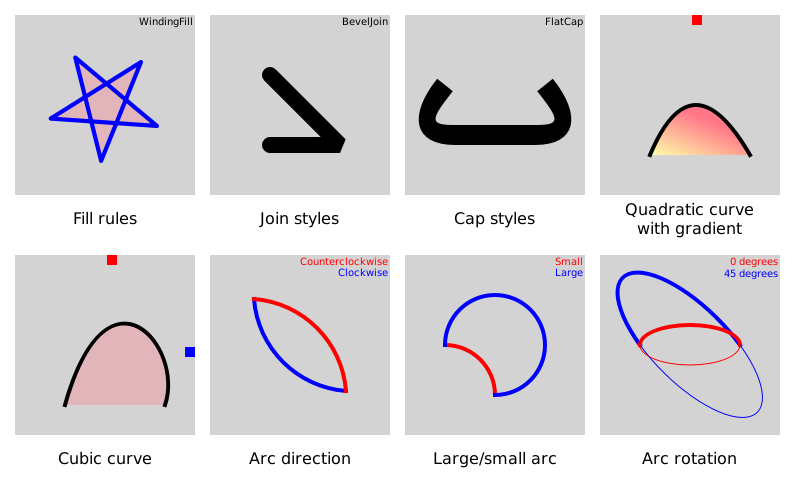
この例では、QML におけるShape およびShapePath API の使用方法を示します。
対象プラットフォーム
- Infineon TRAVEO T2G(「サポートされている機能」の表に記載されている注意事項あり)
- RH850 D1M1A
- MCIMX93-EVK
- MIMXRT1050
- MIMXRT1060
- MIMXRT1064
- MIMXRT1170
- STM32F769I
- STM32H750B
プロジェクト構造
shapes のサンプルは、CMakeLists.txt 、mcu_shapes.qmlproject 、shapes.qml 、ArcDirection.qml 、ArcRotation.qml 、CapStyles.qml 、CubicCurve.qml 、FillRules.qml 、JoinStyles.qml 、LargeSmallArc.qml 、QuadraticCurve.qml 、およびShapesEntry.qml の 11 つのファイルで構成されています。
CMakeプロジェクトファイル
CMakeプロジェクトファイルには、基本的なビルドスクリプトが含まれています。
# Copyright (C) 2025 The Qt Company Ltd.
# SPDX-License-Identifier: LicenseRef-Qt-Commercial
cmake_minimum_required (VERSION 3.21.1)

project(shapes VERSION 0.0.1 LANGUAGES C CXX ASM)
if (NOT TARGET Qul::Core)
    find_package(Qul)
endif()

if(QUL_PLATFORM MATCHES "^mimxrt1170-evkb")
    set(SHAPES_SELECTORS "mimxrt1170-evkb")
elseif(QUL_PLATFORM MATCHES "^tviic2d.*")
    set(SHAPES_SELECTORS "traveo-t2g")
endif()

qul_add_target(shapes
                QML_PROJECT mcu_shapes.qmlproject
                SELECTORS ${SHAPES_SELECTORS}
                GENERATE_ENTRYPOINT
                )
app_target_setup_os(shapes)
QmlProject ファイル
QmlProject ファイルには、必要な Qml ファイルとモジュールが含まれています
// Copyright (C) 2026 The Qt Company Ltd.
// SPDX-License-Identifier: LicenseRef-Qt-Commercial

import QmlProject 1.3

Project {
        mainFile: "shapes.qml"

        QmlFiles {
                files: [
                        "shapes.qml",
                        "ShapesEntry.qml",
                        "FillRules.qml",
                        "JoinStyles.qml",
                        "CapStyles.qml",
                        "QuadraticCurve.qml",
                        "CubicCurve.qml",
                        "ArcDirection.qml",
                        "LargeSmallArc.qml",
                        "ArcRotation.qml"
                ]
        }

        ModuleFiles {
                MCU.qulModules: ["Shapes"]
        }
}
ArcDirection.qml
ArcDirection.qml は、PathArc direction プロパティの例を示しています。
Shape {
    width: 100
    height: 100
    anchors.centerIn: parent

    scale: root.shapeScale

    ShapePath {
        fillColor: "transparent"
        strokeColor: index === 1 ? "red" : "blue"
        strokeWidth: 4

        startX: 4; startY: 4
        PathArc {
            id: arc
            x: 96; y: 96
            radiusX: 100; radiusY: 100
            direction: index === 1 ? PathArc.Clockwise : PathArc.Counterclockwise
        }
    }
}
ArcRotation.qml
ArcRotation.qml PathArc xAxisRotation プロパティを示しています。
Shape {
    width: 200
    height: 200
    anchors.centerIn: parent

    scale: root.shapeScale

    ShapePath {
        fillColor: "transparent"
        strokeColor: index === 1 ? "red" : "blue"
        strokeWidth: 4

        startX: 50; startY: 100
        PathArc {
            x: 150; y: 100
            radiusX: 50; radiusY: 20
            xAxisRotation: index === 1 ? 0 : 45
        }
    }
}
Shape {
    width: 200
    height: 200
    anchors.centerIn: parent

    scale: root.shapeScale

    ShapePath {
        fillColor: "transparent"
        strokeColor: index === 1 ? "red" : "blue"

        startX: 50; startY: 100
        PathArc {
            x: 150; y: 100
            radiusX: 50; radiusY: 20
            xAxisRotation: index === 1 ? 0 : 45
            direction: PathArc.Counterclockwise
        }
    }
}
CapStyles.qml
CapStyles.qml ShapePath capStyle プロパティを示しています。 プロパティを示しています。
Shape {
    anchors.centerIn: parent
    width: 200
    height: 100

    scale: root.shapeScale

    ShapePath {
        id: capTest

        strokeColor: "black"
        strokeWidth: 20
        fillColor: "transparent"

        property int capStyleIdx: 0
        capStyle: style(capTest.capStyleIdx)

        startX: 50; startY: 30
        PathSvg { path: "Q 10 80 60 80 L 140 80 Q 190 80 150 30" }
    }
}
CubicCurve.qml
CubicCurve.qml PathCubic 要素の動作を示しています。
Shape {
    id: shape
    anchors.fill: parent

    ShapePath {
        strokeWidth: 4 * root.shapeScale
        strokeColor: "black"
        fillColor: "#55ff7788"

        startX: 50 * root.shapeScale
        startY: 150 * root.shapeScale
        PathCubic {
            x: 150 * root.shapeScale
            y: 150 * root.shapeScale
            control1X: cp1.x; control1Y: cp1.y
            control2X: cp2.x; control2Y: cp2.y
        }
    }
}
FillRules.qml
FillRules.qml ShapePath fillRule プロパティの動作を示しています。
Shape {
    width: 100
    height: 100
    scale: 1.4 * root.shapeScale
    anchors.centerIn: parent
    ShapePath {
        id: star
        strokeColor: "blue"
        fillColor: "#55ff7788"
        strokeWidth: 3
        capStyle: ShapePath.RoundCap
        joinStyle: ShapePath.RoundJoin
        PathMove { x: 90; y: 50 }
        PathLine { x: 50 + 40 * Math.cos(0.8 * 1 * Math.PI); y: 50 + 40 * Math.sin(0.8 * 1 * Math.PI) }
        PathLine { x: 50 + 40 * Math.cos(0.8 * 2 * Math.PI); y: 50 + 40 * Math.sin(0.8 * 2 * Math.PI) }
        PathLine { x: 50 + 40 * Math.cos(0.8 * 3 * Math.PI); y: 50 + 40 * Math.sin(0.8 * 3 * Math.PI) }
        PathLine { x: 50 + 40 * Math.cos(0.8 * 4 * Math.PI); y: 50 + 40 * Math.sin(0.8 * 4 * Math.PI) }
        PathLine { x: 90; y: 50 }
    }
    NumberAnimation on rotation {
        from: 0
        to: 360
        duration: 5000
        loops: Animation.Infinite
    }
}
JoinStyles.qml
JoinStyles.qml ShapePath の プロパティを示しています。joinStyle
Shape {
    anchors.centerIn: parent
    width: 120
    height: 120

    scale: root.shapeScale

    ShapePath {
        id: joinTest

        strokeColor: "black"
        strokeWidth: 16
        fillColor: "transparent"
        capStyle: ShapePath.RoundCap

        property int joinStyleIdx: 0
        joinStyle: style(joinStyleIdx)

        startX: 30
        startY: 30
        PathLine { x: 100; y: 100 }
        PathLine { x: 30; y: 100 }
    }
}
LargeSmallArc.qml
LargeSmallArc.qml PathArc の プロパティを示しています。useLargeArc
Shape {
    width: 200
    height: 200
    anchors.centerIn: parent

    scale: root.shapeScale

    ShapePath {
        fillColor: "transparent"
        strokeColor: index === 0 ? "red" : "blue"
        strokeWidth: 4

        startX: 50; startY: 100
        PathArc {
            x: 100; y: 150
            radiusX: 50; radiusY: 50
            useLargeArc: index === 1
        }
    }
}
QuadraticCurve.qml
QuadraticCurve.qml PathQuad 要素が で埋められる様子を示しています。LinearGradient
Shape {
    id: shape
    width: parent.width
    height: 100
    anchors.verticalCenter: parent.verticalCenter

    ShapePath {
        strokeWidth: 4 * root.shapeScale
        strokeColor: "black"
        fillGradient: LinearGradient {
            x1: 50 * root.shapeScale
            y1: 100 * root.shapeScale
            x2: (50 + pathQuad.controlX) * root.shapeScale / 2
            y2: 50 * root.shapeScale

            GradientStop {
                position: 0
                color: "#ffffffaa"
            }

            GradientStop {
                position: 1
                color: "#ffff7788"
            }
        }

        startX: 50 * root.shapeScale
        startY: 100 * root.shapeScale
        closed: true
        PathQuad {
            id: pathQuad
            x: 150 * root.shapeScale
            y: 100 * root.shapeScale
            controlX: cp.x; controlY: cp.y
        }
    }
}
ファイル:
- shapes/+mimxrt1170-evkb/shapes.qml
- shapes/+traveo-t2g/shapes.qml
- shapes/ArcDirection.qml
- shapes/ArcRotation.qml
- shapes/CMakeLists.txt
- shapes/CapStyles.qml
- shapes/CubicCurve.qml
- shapes/FillRules.qml
- shapes/JoinStyles.qml
- shapes/LargeSmallArc.qml
- shapes/QuadraticCurve.qml
- shapes/ShapesEntry.qml
- shapes/mcu_shapes.qmlproject
- shapes/shapes.qml
特定のQtライセンスの下で利用可能です。
詳細はこちら。
