C
Qt Quick Ultraliteの翻訳例
Qt Quick のUltraliteアプリケーションで翻訳を実装する方法を示します。
概要
このtranslation のサンプルでは、「Qt Quick Ultraliteによる国際化(i18n)と地域化(l18n)」のトピックで説明されている手法を使用しています。アプリケーションにローカライズされたリソースを組み込む方法や、既存のQML APIを使用して実行時にUIの言語を変更する方法を示しています。
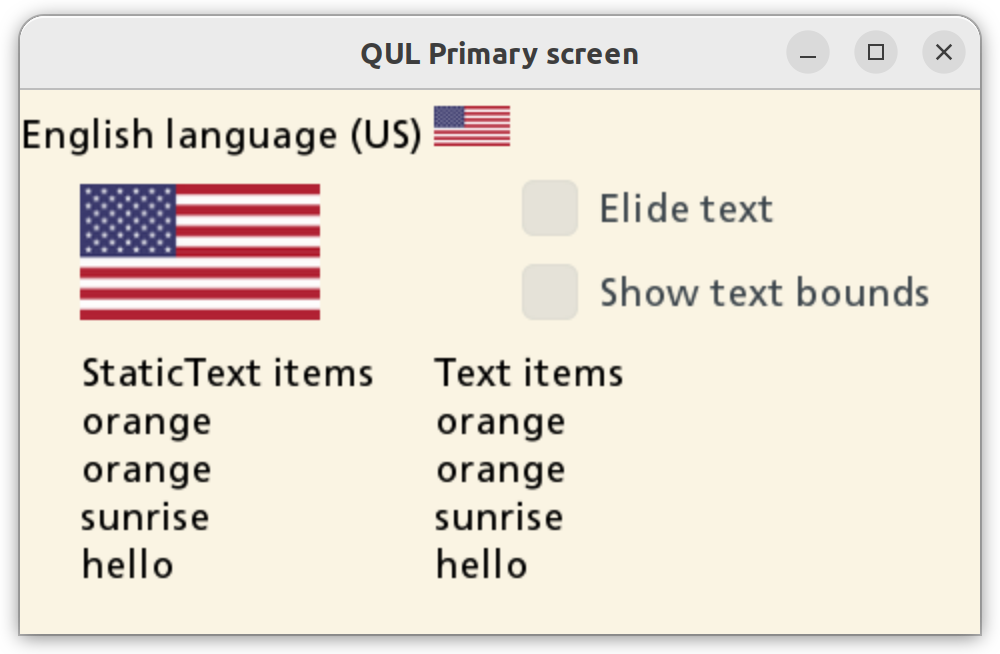
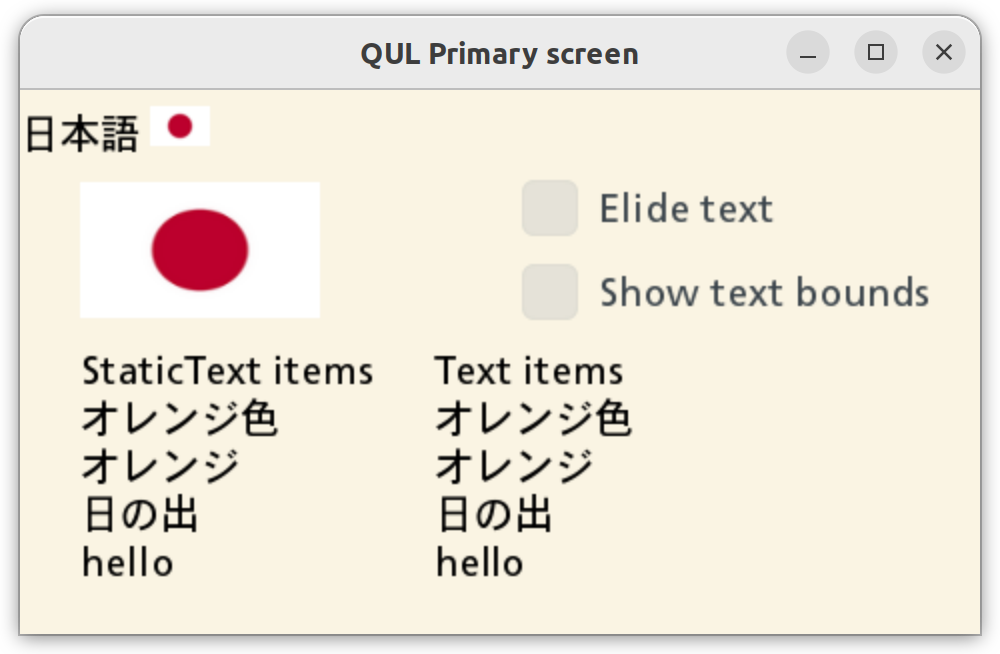
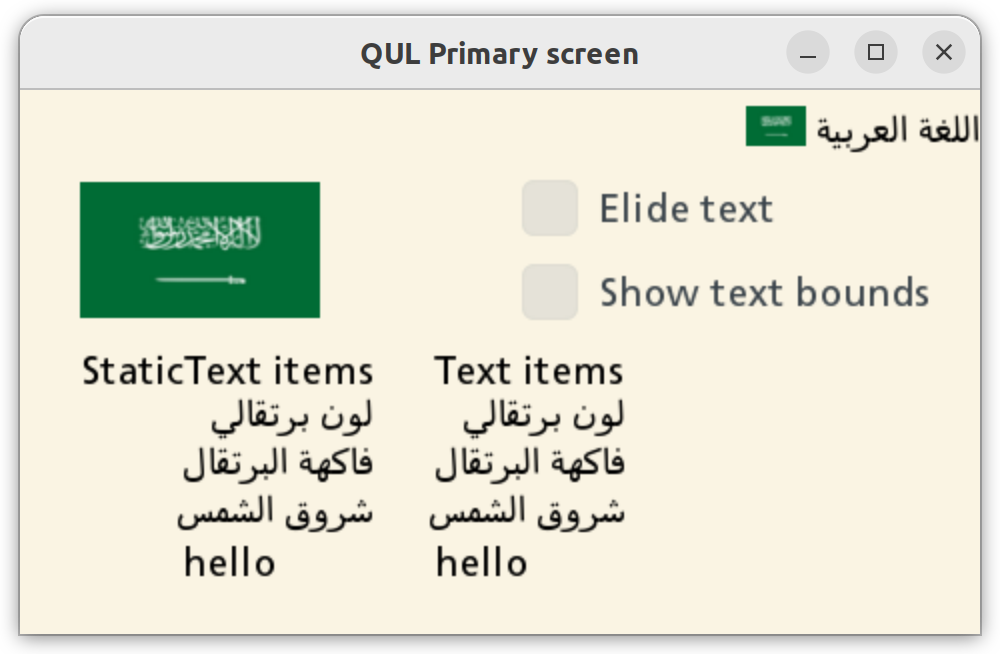
画面をタップすることで、利用可能な言語(英語、ノルウェー語、ラトビア語、日本語、アラビア語、タイ語)を切り替えることができます。アプリケーションの言語を変更すると、国旗の画像および「Text 」と「StaticText 」の項目が更新されます。静的フォントエンジンを使用して複雑な文字を正しく表示できるのは、StaticText のみです。
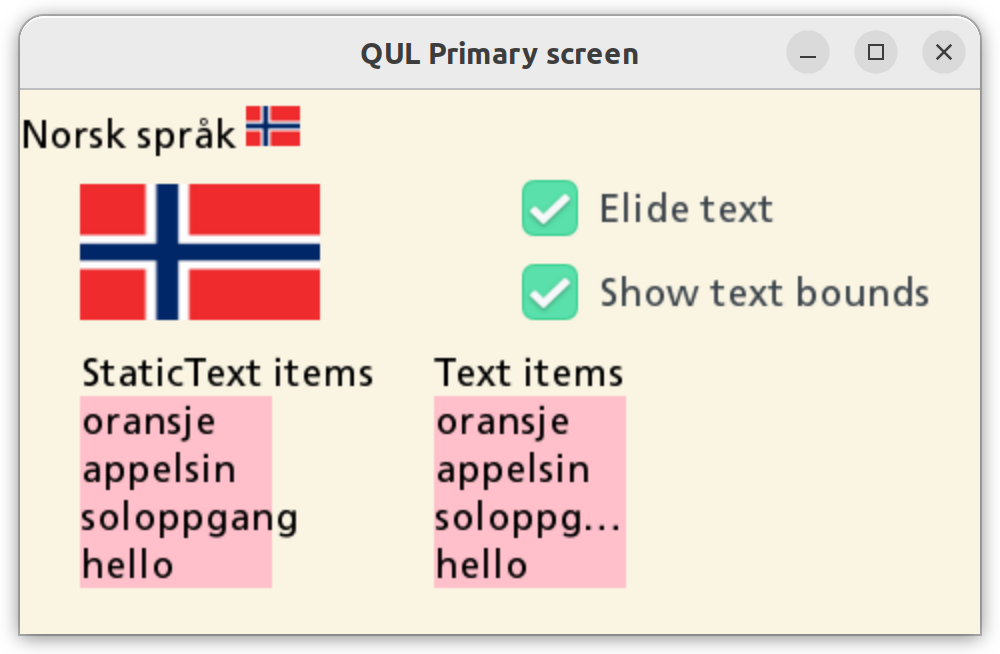
このアプリケーションでは、以下のオプションが用意されています:
- Elide text - 「テキスト」項目のテキストのみを省略します。「StaticText 」項目はテキストの省略に対応していないため、このオプションの影響を受けません。
- Show text background - テキスト項目にピンクの背景を追加し、テキストがどの境界で省略されるかを視覚化します。
対象プラットフォーム
プロジェクト構造
CMake プロジェクトファイル
この例のCMakeLists.txtでは、3 つの個別の CMake ターゲットが定義されています。
translation_all- すべての翻訳を含めてアプリケーションをビルドします。translation_lv- ラトビア語の翻訳のみを含めてアプリケーションをビルドします。translation_spark-すべての翻訳とMonotype Sparkフォントエンジンを含めてアプリケーションをビルドします。
QmlProject ファイル
アプリケーションで使用されるテキストには、Qt Quick Ultraliteに同梱されているデフォルトのフォントには含まれていないグリフが含まれているため、各ターゲットにおいてプロジェクトにカスタムフォントが追加されています。
    // Qul ships some default fonts. Since they don't contain glyphs for
    // all the characters that are needed for this application,
    // add some extra fonts.
    FontFiles {
        files: [
            "fonts/kosugi/Kosugi-Regular.ttf",
            "fonts/sarabun/Sarabun-Regular.ttf"
        ]
    }
translation_all
このアプリケーションのバリエーションには、利用可能なすべての翻訳が含まれています。
    TranslationFiles {
        files: [
            "translation.ar_SA.ts",
            "translation.ja_JP.ts",
            "translation.lv_LV.ts",
            "translation.nb_NO.ts",
            "translation.th_TH.ts"
        ]
    }

    // Qul ships some default fonts. Since they don't contain glyphs for
translation_lv
ここでは、ラトビア語のみが利用可能となっており、アプリケーションのデフォルト言語として設定されています。
    TranslationFiles {
        files: ["translation.lv_LV.ts"]
        MCU.omitSourceLanguage: true
    }
translation_spark
このアプリケーションのバリエーションは、Monotype Spark フォントレンダリングエンジンを使用している点を除き、translation_all とほぼ同じです。
...
        TranslationFiles {
                files: [
                "translation.ar_SA.ts",
                "translation.ja_JP.ts",
                "translation.lv_LV.ts",
                "translation.nb_NO.ts",
                "translation.th_TH.ts"
                ]
        }

        FontFiles {
                files: [
                        "fonts/monotype/TranslationsSampleFontmap.fmp"
                ]
        }

        MCU.Config {
                fontEngine: "Spark"
                defaultFontFamily: "arabic-style-font"
                fontCacheSize: 1 // Disable the cache
        }
...
アプリケーションの UI
translation.qmlファイルは、アプリケーションのユーザーインターフェースを定義します。
ローカライズ可能な文字列をマークするには、qStr() メソッドを使用します。
StaticText {
    width: root.textMaxWidth
    text: qsTr("orange", "color")
}
StaticText {
    width: root.textMaxWidth
    text: qsTr("orange", "fruit")
}
StaticText {
    width: root.textMaxWidth
    text: qsTr("sunrise")
}
StaticText {
    // This string is not translated in the .ts files and
    // will just fall back to the source string.
    width: root.textMaxWidth
    text: qsTr("hello")
}
Qt.uiLanguage プロパティは、翻訳作業を行う上で最も重要なポイントです。
アプリケーションが利用可能な言語のうち 1 つだけで構築されている場合、Qt.uiLanguage プロパティは空になります。
// Disable language switching when this is compiled with
// a single language.
Component.onCompleted: allowLangSwitch = (Qt.uiLanguage == "")
Qt.uiLanguage プロパティの値を変更すると、現在の UI の表示言語が変更されます。
MouseArea {
    anchors.fill: parent
    onClicked: {
        if (!root.allowLangSwitch)
            return

        var lang = Qt.uiLanguage
        switch (lang) {
            case "nb_NO": lang = "lv_LV"; break;
            case "lv_LV": lang = "ja_JP"; break;
            case "ja_JP": lang = "ar_SA"; break;
            case "ar_SA": lang = "th_TH"; break;
            case "th_TH": lang = ""; break;
            default: lang = "nb_NO"; break;
        }
        Qt.uiLanguage = lang
    }
}
注: 空の文字列を設定すると 、「デフォルト」言語(.ts ファイルの読み込みを解除)が使用され、qStr() で囲まれた元のテキストが使用されます。
翻訳固有の画像
Text.StyledText qsTr() では、書式付き文字列がサポートされています。このアプローチにより、翻訳者は、翻訳された文字列の語順に基づいて、テキスト内の画像の位置を柔軟に変更することができます。
StaticText {
    width: root.width
    topPadding: 8
    textFormat: Text.StyledText
    text: qsTr("English language (US) <img src=\"usa-flag-small-icon.png\" width=\"38\" height=\"20\">")
}
あるいは、Image アイテムを使用し、source プロパティにQt.uiLanguage をバインドすることもできます。
Image {
    readonly property bool horizontalScreen: root.width > root.height
    width: horizontalScreen ? root.width / 4 : root.width / 3
    height: horizontalScreen ? root.height / 4 : root.height / 8
    // If this application is build with, for example, only one translation
    // (see translation_lv.qmlproject), then only one of flag PNGs
    // is needed in the binary (registered with the resouce system).
    // By using a function here we prevent qmltocpp from trying to
    // resolve file paths to images at build-time. Instead
    // a code is generated that will try to resolve the path to
    // image at run-time.
    source: flagForLanguage()
}
翻訳ファイル(.ts)
アプリケーションが初めてビルドされると、.ts ファイルがプロジェクトのルートディレクトリに生成されます。
翻訳ファイルはプレーンな XML ファイルです:
<?xml version="1.0" encoding="utf-8"?>
<!DOCTYPE TS>
<TS version="2.1" language="nb_NO">
<context>
<name>translation</name>
<message>
<location filename="translation.qml" line="108"/>
<source>English language (US) <img src="usa-flag-small-icon.png" width="38" height="20"></source>
<oldsource>English language (US) <img src="usa-flag-small-icon.png"> width="38" height="20"</oldsource>
<translation>Norsk språk <img src="norway-flag-small-icon.png" width="27" height="20"></translation>
</message>
...任意のテキスト/XML エディタを使用して、<translation> ノードに適切な値を指定できます。 Qt Linguist GUI エディタも、翻訳ファイルを扱うのに最適です。
自動生成されたupdate_translations CMakeターゲットのビルドを実行して、ソースコードから新しい翻訳可能な文字列や変更された翻訳可能な文字列を用いて、.ts ファイルを作成または更新します。
.ts ファイルを編集した後、アプリケーションターゲットを再ビルドして翻訳を更新してください。
qStr() で囲まれた文字列が翻訳ファイルに見つからない場合、元の(ソースの)文字列が使用されます。
ファイル:
- translation/CMakeLists.txt
- translation/imports/fontconfigs/spark/FontConfiguration.qml
- translation/imports/fontconfigs/static/FontConfiguration.qml
- translation/translation.ar_SA.ts
- translation/translation.ja_JP.ts
- translation/translation.lv_LV.ts
- translation/translation.nb_NO.ts
- translation/translation.qml
- translation/translation.th_TH.ts
- translation/translation_all.qmlproject
- translation/translation_fontconfig_spark.qmlproject
- translation/translation_fontconfig_static.qmlproject
- translation/translation_lv.qmlproject
- translation/translation_spark.qmlproject
- translation/translation_spark_ra8d1.qmlproject
画像:
- translation/japan-flag-small-icon.png
- translation/japan-flag-small.png
- translation/latvia-flag-small-icon.png
- translation/latvia-flag-small.png
- translation/norway-flag-small-icon.png
- translation/norway-flag-small.png
- translation/saudi-arabia-flag-small-icon.png
- translation/saudi-arabia-flag-small.png
- translation/thai-flag-small-icon.png
- translation/thai-flag-small.png
- translation/usa-flag-small-icon.png
- translation/usa-flag-small.png
「 Qt Quick Ultralite による国際化とローカライズ」も参照してください 。
特定のQtライセンスの下で利用可能です。
詳細はこちら。