
Qt Quick 3D Physik – Beispiel „Kanone“
Veranschaulicht, wie physikalische Objekte erzeugt werden.
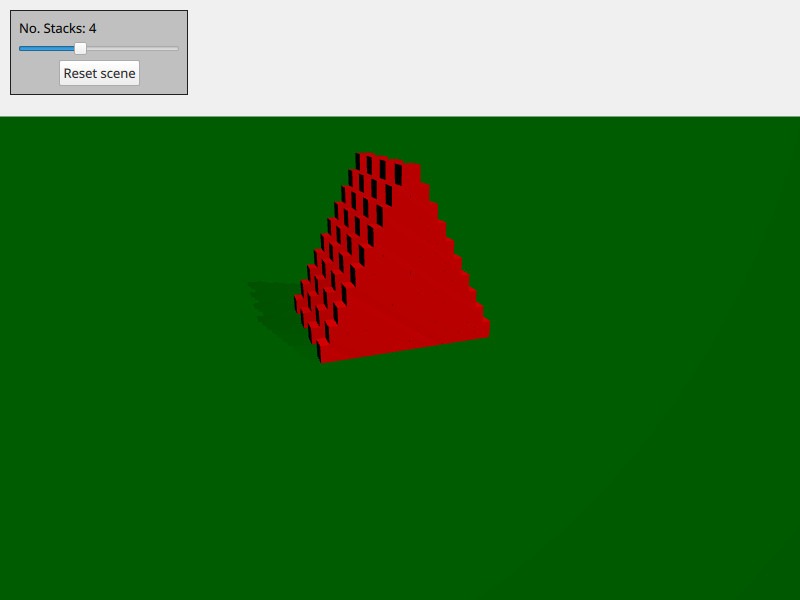
Dieses Beispiel zeigt, wie man physikalische Objekte nach Bedarf erstellt und löscht. Die Szene besteht aus mehreren Stapeln von Kisten. Sie können sich mit „ WASD “ und der Maus bewegen und durch Drücken von „ space “ einen Ball abschießen.
Die Szene ist mit den üblichen „ Qt Quick 3D “-Objekten wie Ansicht, Kamera und Licht eingerichtet:
PerspectiveCamera {
    id: camera
    position: Qt.vector3d(-4000, 5000, 10000)
    eulerRotation: Qt.vector3d(-20, -20, 0)
    clipFar: 200000
    clipNear: 100
}
DirectionalLight {
    eulerRotation: Qt.vector3d(-45, 45, 0)
    castsShadow: true
    brightness: 1
    shadowMapQuality: Light.ShadowMapQualityVeryHigh
    shadowMapFar: camera.clipFar
    shadowFactor: 50
    csmNumSplits: 2
    csmSplit1: 0.1
    csmSplit2: 0.3
    softShadowQuality: Light.PCF4
}
Außerdem fügen wir einen statischen Boden hinzu:
StaticRigidBody {
    eulerRotation: Qt.vector3d(-90, 0, 0)
    collisionShapes: PlaneShape {}
    Model {
        source: "#Rectangle"
        scale: Qt.vector3d(2000, 2000, 1)
        materials: PrincipledMaterial {
            baseColor: "green"
        }
        castsShadows: false
        receivesShadows: true
    }
}
Wir erstellen einen Knoten, den wir als Spawner für Objekte verwenden, und fügen ihn in unsere Ansicht ein:
Node {
    id: shapeSpawner
    property var instancesBoxes: []
    property var instancesSpheres: []
    property int stackCount: 0
    property var boxComponent: Qt.createComponent("Box.qml")
    property var sphereComponent: Qt.createComponent("Sphere.qml")

    function createStack(stackZ, numStacks) {
        let size = 10
        let extents = 400

        for (let i = 0; i < size; i++) {
            for (let j = 0; j < size - i; j++) {
                let x = j * 2 - size + i
                let y = i * 2 + 1
                let z = 5 * (stackZ - numStacks)
                let center = Qt.vector3d(x, y, z).times(0.5 * extents)
                let box = boxComponent.incubateObject(shapeSpawner, {
                                                          "position": center,
                                                          "xyzExtents": extents
                                                      })
                instancesBoxes.push(box)
            }
        }
    }

    function createBall(position, forward) {
        const diameter = 600
        const speed = 20000
        let settings = {
            "position": position,
            "sphereDiameter": diameter
        }
        let sphere = sphereComponent.createObject(shapeSpawner, settings)
        sphere.setLinearVelocity(forward.times(speed))
        instancesSpheres.push(sphere)

        if (sphere === null) {
            console.log("Error creating object")
        }
    }

    function reset() {
        // Only run method if previous stack has been created fully
        for (let i = 0; i < instancesBoxes.length; i++)
            if (!instancesBoxes[i].object)
                return

        instancesSpheres.forEach(sphere => {
                                     sphere.collisionShapes = []
                                     sphere.destroy()
                                 })
        instancesBoxes.forEach(box => {
                                   box.object.collisionShapes = []
                                   box.object.destroy()
                               })
        instancesSpheres = []
        instancesBoxes = []

        for (let stackI = 0; stackI < stackSlider.value; stackI++) {
            shapeSpawner.createStack(stackI, stackSlider.value)
        }
    }
}
Wir haben drei Methoden: „ createStack “ zum Erstellen eines Stacks, „ createBall “ zum Erstellen eines Balls mit Geschwindigkeit und „ reset “ zum Zurücksetzen der Szene. Die eigentlichen Box- und Sphere-Objekte, die generiert werden, sind in eigenen QML-Dateien gespeichert (box.qml und sphere.qml).
Dateien:
© 2026 The Qt Company Ltd. Documentation contributions included herein are the copyrights of their respective owners. The documentation provided herein is licensed under the terms of the GNU Free Documentation License version 1.3 as published by the Free Software Foundation. Qt and respective logos are trademarks of The Qt Company Ltd. in Finland and/or other countries worldwide. All other trademarks are property of their respective owners.
